
- 🧪 Build Your PostgreSQL RBAC Lab
- 🏦 Meet Our Credit Card Application — The RBAC Scenario
- 🔐 Understanding PostgreSQL Roles — LOGIN vs NOLOGIN
- 🧪 Hands-On — Create Our PostgreSQL Roles
- 🏦 Creating Our PostgreSQL Application Database
- 🗂️ Creating Our Application Schema
- 📋 Creating Our Application Tables
- 🔑 Configuring Database Access — CONNECT Privilege
- 🚪 Configuring Schema Access — USAGE vs CREATE
- 📋 Configuring Table Privileges — SELECT, INSERT, UPDATE, DELETE
- 🧪 Testing RBAC — Application vs Reporting Access
- 🔗 PostgreSQL Role Membership — INHERIT vs SET ROLE
- 🔐 PostgreSQL Object Ownership — Why GRANT ALL Is Not Ownership
- 🔍 Auditing PostgreSQL RBAC — Verify Effective Privileges
🧪 Build Your PostgreSQL RBAC Lab
Understanding PostgreSQL roles and privileges becomes much easier when you see them in action.
Instead of simply memorizing GRANT and REVOKE commands, we’ll build a small credit-card application environment and explore how PostgreSQL manages users, object ownership, and access permissions.
🎯 What will you learn?
Through this hands-on lab, we’ll explore:
- 🔐 Roles and Users — Understand
LOGIN,NOLOGIN, and why PostgreSQL treats users and groups as roles. - 🏦 Object Ownership — Discover how a
NOLOGINrole can own databases, schemas, and tables. - 🔑 Privileges and Access Control — Learn how database, schema, and table permissions work together.
- 🔗 Role Membership — Understand
INHERIT,SET ROLE, and how privileges flow between roles. - 🛡️ Least-Privilege Security — Build separate read-only and read-write access for application and reporting users.
- ⚙️ Default Privileges — Automatically configure access for future database objects.
🖥️ Lab prerequisites
You’ll need:
- PostgreSQL 16 or later. Our examples use PostgreSQL 16.
- Access to a PostgreSQL administrator account for initial configuration.
- A SQL client such as
psql. - A dedicated sandbox environment where you can safely create roles, databases, and tables.
🚀 Don’t have a PostgreSQL sandbox yet?
No problem! I’ve documented the complete PostgreSQL sandbox setup separately so we can keep this article focused on RBAC.
👉 Build Your PostgreSQL Sandbox — Step-by-Step Guide
If you already have PostgreSQL running, you can skip the installation guide and follow the exercises directly.
💡 A note for Oracle DBAs
If you’re coming from Oracle, some PostgreSQL concepts may initially look familiar but behave differently—particularly the relationship between users, roles, schemas, and object ownership.
We’ll highlight these differences wherever they matter, using practical examples rather than lengthy theory.
✅ Ready?
With our sandbox prepared, let’s build a simple production-inspired credit-card application and implement PostgreSQL RBAC step by step.
🏦 Meet Our Credit Card Application — The RBAC Scenario
Imagine we’re managing a PostgreSQL database for a credit-card application.
The application stores customer information and credit-card account details. Different users and services need different levels of access, just like in a real production environment.
Our challenge is simple: How do we ensure everyone gets exactly the access they need—nothing more?
🎯 Real-World Access Requirements
- 💳 Application Service: Needs to read, insert, update, and delete customer and account records.
- 📊 Reporting User: Needs read-only access to generate reports without modifying application data.
- 🔐 Object Owner: Owns application tables and schemas but should not be used as a normal application login.
- 🛡️ Security: Application and reporting users must not be able to create, alter, or drop application tables.
🗂️ Our PostgreSQL Lab Architecture
We’ll use a small, easy-to-follow environment throughout this guide.
| Component | Name | Purpose |
|---|---|---|
| Database | carddb | Credit-card application database |
| Schema | app | Contains application objects |
| Table | customers | Customer information |
| Table | accounts | Credit-card account details |
| Ownership role | app_owner | Owns application objects |
| Read-only role | app_ro | Holds SELECT privileges |
| Read-write role | app_rw | Holds INSERT, UPDATE, DELETE privileges |
| Application login | app_user | Connects on behalf of the application |
| Reporting login | report_user | Connects for reporting |
🔑 Two Types of Roles in Our Design
PostgreSQL doesn’t maintain separate user and group object types. Both are implemented as roles.
We’ll use two categories:
- 👤 LOGIN roles:
app_userandreport_user— identities that can authenticate to PostgreSQL. - 🔒 NOLOGIN roles:
app_owner,app_ro, andapp_rw— roles that hold ownership or access privileges without directly authenticating.
💡 Why this separation?
Instead of granting table privileges to each application user individually, we assign permissions to reusable NOLOGIN roles and grant those roles to the appropriate LOGIN identities.
This makes access management simpler, more consistent, and easier to audit.
🛡️ Our Security Goal
By the end of this lab:
app_usercan read and modify application data but cannot perform application DDL.report_usercan read application data but cannot modify it.app_ownerconsistently owns the database objects.- Privileges are managed through role membership rather than scattered direct grants.
We’ll build this model step by step and verify it using PostgreSQL’s system catalogs and privilege-checking functions.
🔗 Visualizing Our RBAC Architecture
                  app_owner [NOLOGIN]
                         │
                   Owns objects
                         │
                ┌────────┴────────┐
                ▼                 ▼
           app.customers      app.accounts


report_user [LOGIN]                app_user [LOGIN]
        │                                │
        ▼                                ▼
   app_ro [NOLOGIN]                app_rw [NOLOGIN]
      SELECT                    INSERT, UPDATE, DELETE
        ▲                                │
        └──────── Inherits RO ───────────┘
🔐 Understanding PostgreSQL Roles — LOGIN vs NOLOGIN
In PostgreSQL, users and groups are not separate database objects. Both are implemented using a single concept called a ROLE.
What makes them different is whether the role is allowed to log in.
👤 LOGIN Role — Who Connects?
A role with the LOGIN attribute can authenticate and establish a PostgreSQL session, provided it also satisfies authentication rules and has database CONNECT privileges.
For example, our application and reporting identities will be:
app_user— connects on behalf of the credit-card application.report_user— connects to generate reports.
🔒 NOLOGIN Role — Who Owns or Holds Privileges?
A NOLOGIN role cannot authenticate directly, but it can still own database objects, receive privileges, and be granted to other roles.
In our lab:
app_owner— owns the application schema and tables.app_ro— holds read-only privileges.app_rw— holds read-write privileges.
💡 Why separate LOGIN and NOLOGIN roles?
Instead of granting privileges individually to every application user, we grant them to reusable access roles.
For example:
GRANT app_ro TO report_user;
GRANT app_rw TO app_user;
The login roles can then use the privileges inherited through their memberships, subject to the membership’s INHERIT setting.
This gives us a clean separation between authentication, authorization, and ownership.
🆚 Oracle DBA Perspective
In Oracle, a schema is closely associated with a database user. In PostgreSQL, schemas are independent objects, and a NOLOGIN role can own schemas and tables.
For example, app_owner can own all our application objects without ever being used as an application login.
This is one of the most useful PostgreSQL security concepts for Oracle DBAs to understand.
✅ Key Takeaway
- LOGIN determines whether a role can authenticate.
- NOLOGIN prevents direct authentication, not ownership or privilege grants.
- Role membership allows privileges to be shared without granting everything directly to individual login accounts.
- Object ownership is separate from the ability to connect.
🧪 Hands-On — Create Our PostgreSQL Roles
💡 “Oracle DBA Tip” :
Coming from Oracle CDB/PDB? PostgreSQL roles are created at the cluster level, regardless of which database you’re connected to. You don’t need to recreate application roles in each database.
Now let’s create the roles we’ve just discussed.
Step 1 — Connect as the PostgreSQL administrator
From your sandbox terminal: (as postgres user)
psql -p 5432 -d postgresStep 2 — Create the three NOLOGIN roles
CREATE ROLE app_owner NOLOGIN;
CREATE ROLE app_ro NOLOGIN;
CREATE ROLE app_rw NOLOGIN;Step 3 — Create the two LOGIN roles
For the sandbox, we’ll use example passwords. These are lab credentials, not production recommendations.
CREATE ROLE app_user
    LOGIN PASSWORD 'AppLab123!';

CREATE ROLE report_user
LOGIN PASSWORD 'ReportLab123!';Step 4 — Verify all five roles
SELECT
    rolname AS role_name,
    CASE
        WHEN rolcanlogin THEN 'LOGIN'
        ELSE 'NOLOGIN'
    END AS role_type,
    rolsuper AS superuser,
    rolcreatedb AS create_db,
    rolcreaterole AS create_role,
    rolinherit AS inherit,
    rolreplication AS replication,
    rolbypassrls AS bypass_rls,
    rolconnlimit AS connection_limit
FROM pg_catalog.pg_roles
WHERE rolname !~ '^pg_'
  AND oid <> 10
ORDER BY rolname;Expected output:
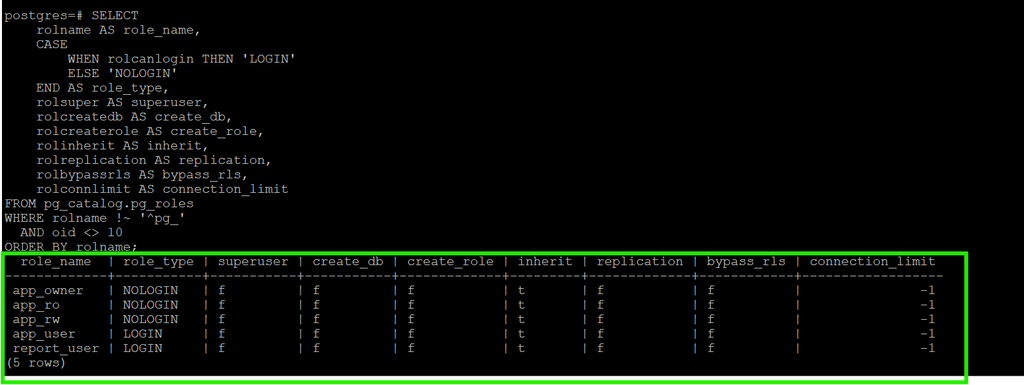
🔎 What have we achieved?
- ✅ Created separate identities for application and reporting connections.
- ✅ Created reusable roles for ownership and privileges.
- ✅ Avoided giving application users superuser or role-administration privileges.
- ✅ Established the foundation for a least-privilege RBAC model.
💡 Production Tip
Application logins should not normally own application tables. Keeping ownership in a separate NOLOGIN role makes deployments, privilege management, and security auditing more consistent.
🏦 Creating Our PostgreSQL Application Database
Now that we’ve created our PostgreSQL roles, let’s create a dedicated database for our credit-card application.
🎯 Why a Separate Application Database?
In a production environment, applications typically use dedicated databases to keep their objects and access controls logically separated.
For our lab:
- 🏦 Database:
carddb— Stores our credit-card application data. - 🔐 Database Owner:
app_owner— ANOLOGINrole responsible for ownership. - 👤 Application Login:
app_user— Will connect to the database and perform application operations. - 📊 Reporting Login:
report_user— Will connect with read-only privileges.
🔐 Create the Database with a NOLOGIN Owner
Create our application database:
CREATE DATABASE carddb
OWNER app_owner;Expected result:
postgres=# CREATE DATABASE carddb
    OWNER app_owner;
CREATE DATABASE
postgres=#
💡 Interesting PostgreSQL Behavior
Notice that app_owner was created with the NOLOGIN attribute.
Yet PostgreSQL allows it to own an entire database!
This demonstrates an important concept:
A PostgreSQL role does not need LOGIN privileges to own databases, schemas, tables, or other database objects.
🔍 Verify Database Ownership
Instead of writing a query that checks only our carddb database, let’s use a reusable PostgreSQL catalog query suitable for any environment.
SELECT
    d.datname AS database_name,
    pg_get_userbyid(d.datdba) AS database_owner,
    pg_encoding_to_char(d.encoding) AS encoding,
    d.datallowconn AS allows_connections,
    d.datconnlimit AS connection_limit
FROM pg_catalog.pg_database d
WHERE NOT d.datistemplate
ORDER BY d.datname;This query helps DBAs identify:
- ✅ All non-template databases in the PostgreSQL cluster.
- 👤 The owner of each database.
- 🔤 Database encoding.
- 🔌 Whether connections are allowed.
- 📊 Configured connection limits.
Example output:
 database_name | database_owner | encoding | allows_connections | connection_limit
---------------+----------------+----------+--------------------+-----------------
 carddb        | app_owner      | UTF8     | t                  | -1
 postgres      | postgres       | UTF8     | t                  | -1
A connection limit of -1 means no database-specific connection limit is configured; other PostgreSQL connection limits still apply.
🆚 Oracle DBA Perspective
If you’re coming from Oracle CDB/PDB architecture, remember:
- PostgreSQL roles are cluster-wide.
- Databases belong to a PostgreSQL cluster.
- Schemas exist inside individual databases.
- A
NOLOGINrole can own a database without being used for authentication.
Unlike Oracle, a PostgreSQL schema is not automatically created simply because a role exists.
We’ll configure access in separate layers:
- 🔑 Database CONNECT — Allows a role to establish a connection to the database.
- 🚪 Schema USAGE — Allows a role to resolve and reference objects within a schema.
- 📋 Table Privileges — Determine whether the role can SELECT, INSERT, UPDATE, or DELETE data.
PostgreSQL grants some database privileges to PUBLIC by default, so we’ll also review and restrict those permissions when configuring our security model.
✅ Key Takeaway
We’ve created a dedicated application database owned by a NOLOGIN role.
This establishes a clean separation between database ownership and application authentication, forming the foundation of our PostgreSQL RBAC design.
🗂️ Creating Our Application Schema
A PostgreSQL schema organizes database objects such as tables, views, and functions.
We’ll create the app schema inside carddb, owned by our NOLOGIN role app_owner.
🔐 Connect to the Application Database
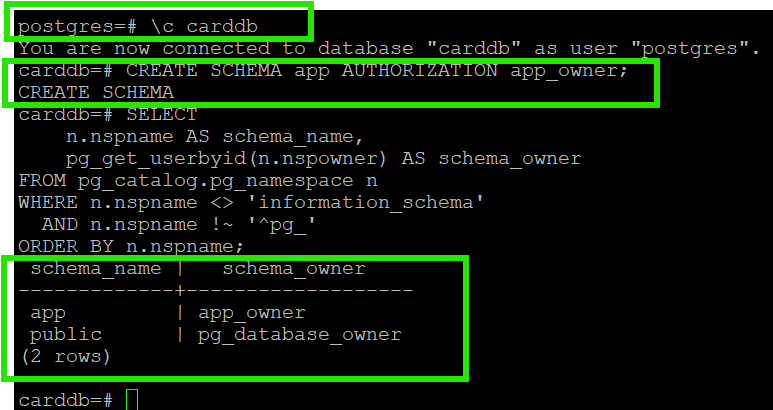
\c carddb🛠️ Create the Schema
CREATE SCHEMA app AUTHORIZATION app_owner;🔍 Verify Schema Ownership
Use this reusable query to list user-defined schemas and their owners:
SELECT
    n.nspname AS schema_name,
    pg_get_userbyid(n.nspowner) AS schema_owner
FROM pg_catalog.pg_namespace n
WHERE n.nspname <> 'information_schema'
  AND n.nspname !~ '^pg_'
ORDER BY n.nspname;Expected Result
💡 Oracle DBA Tip
Unlike Oracle, PostgreSQL schemas are independent objects. Creating a role does not automatically create a schema with the same name.
✅ Key Takeaway
- 🏦
carddb— Our application database. - 📁
app— Our application schema. - 🔐
app_owner— Owns the schema but cannot log in directly.
📋 Creating Our Application Tables
We’ll create two tables inside the app schema:
- 👤 customers — Stores customer information.
- 💳 accounts — Stores credit-card account details.
Both tables will be owned by app_owner.
🔐 Switch to the Object Owner
Connect to carddb as postgres, then switch roles:
SET ROLE app_owner;

SELECT current_user, session_user;Expected:
current_user | session_user
-------------+-------------
app_owner | postgres💡 SET ROLE lets us create objects as app_owner, even though it is a NOLOGIN role.
🛠️ Create the Customers Table
CREATE TABLE app.customers (
customer_id integer PRIMARY KEY,
customer_name varchar(100) NOT NULL,
email varchar(150),
status varchar(20) DEFAULT 'ACTIVE'
);🛠️ Create the Accounts Table
CREATE TABLE app.accounts (
account_id integer PRIMARY KEY,
customer_id integer REFERENCES app.customers(customer_id),
account_number varchar(20) NOT NULL,
credit_limit numeric(12,2),
balance numeric(12,2) DEFAULT 0
);📝 Insert Sample Data
INSERT INTO app.customers
(customer_id, customer_name, email)
VALUES
(1, 'Alice Johnson', 'alice@example.com'),
(2, 'Bob Smith', 'bob@example.com');
INSERT INTO app.accounts
(account_id, customer_id, account_number, credit_limit, balance)
VALUES
(101, 1, 'CC-10001', 5000, 1200),
(102, 2, 'CC-10002', 8000, 2500);🔍 Verify Table Ownership
Use this reusable query to list application tables and their owners:
SELECT
n.nspname AS schema_name,
c.relname AS table_name,
pg_get_userbyid(c.relowner) AS table_owner
FROM pg_catalog.pg_class c
JOIN pg_catalog.pg_namespace n
ON n.oid = c.relnamespace
WHERE c.relkind IN ('r', 'p')
AND n.nspname <> 'information_schema'
AND n.nspname !~ '^pg_'
ORDER BY n.nspname, c.relname;Expected Result
schema_name | table_name | table_owner
------------+------------+------------
app | accounts | app_owner
app | customers | app_owner🔄 Return to the Administrator Role
RESET ROLE;✅ Key Takeaway
- Both tables belong to
app_owner, notpostgres. - The application and reporting users do not own these tables.
- Object ownership and table privileges are separate concepts.
🔑 Configuring Database Access — CONNECT Privilege
Creating a LOGIN role doesn’t automatically mean it should access every database. We’ll control access to carddb using PostgreSQL RBAC.
🛡️ Restrict Default PUBLIC Access
By default, PostgreSQL grants CONNECT and TEMPORARY privileges to PUBLIC (all roles).
REVOKE CONNECT, TEMPORARY
ON DATABASE carddb FROM PUBLIC;🔐 This prevents ordinary roles from connecting or creating temporary tables unless they have another applicable privilege grant.
🔗 Configure Role Membership
Instead of granting privileges directly to users, we’ll use reusable NOLOGIN roles.
GRANT app_ro TO app_rw;
GRANT app_rw TO app_user;
GRANT app_ro TO report_user;Our RBAC hierarchy:
report_user [LOGIN] app_user [LOGIN]
| |
v v
app_ro [NOLOGIN] <------- app_rw [NOLOGIN]
SELECT Read + Write- 📊
report_userinherits privileges fromapp_ro. - 💳
app_userinherits privileges fromapp_rw, which also inheritsapp_ro.
🔐 Grant Database CONNECT
GRANT CONNECT ON DATABASE carddb
TO app_ro, app_rw;Both application and reporting logins now inherit database CONNECT through their assigned roles.
🔍 Verify Database LOGIN and CONNECT Privileges
Use this reusable query to identify which PostgreSQL roles can log in and which have CONNECT privileges on each database.
- 👤 can_login = t — Role is allowed to authenticate.
- 🔑 can_connect = t — Role has effective CONNECT privilege on the database.
- ✅ Both = t — Role can potentially establish a database connection, subject to authentication and connection rules.
- 🔒 NOLOGIN roles may hold CONNECT privileges but cannot establish sessions directly.
💡 Key Takeaway: LOGIN controls authentication eligibility, while CONNECT controls database access. Both are required for a normal login session.
SELECT
d.datname AS database_name,
r.rolname AS role_name,
r.rolcanlogin AS can_login,
has_database_privilege(
r.oid, d.oid, 'CONNECT'
) AS can_connect
FROM pg_catalog.pg_database d
CROSS JOIN pg_catalog.pg_roles r
WHERE NOT d.datistemplate
AND r.rolname !~ '^pg_'
AND r.oid <> 10
ORDER BY d.datname, r.rolname;🆚 Oracle DBA Tip
PostgreSQL database CONNECT is conceptually similar to Oracle’s CREATE SESSION privilege, although PostgreSQL evaluates it separately for each database.
✅ Key Takeaway
We’ve restricted default database access and granted CONNECT through our RBAC roles. Next, we’ll control which schemas and tables these roles can access.
🚪 Configuring Schema Access — USAGE vs CREATE
Connecting to a PostgreSQL database does not automatically grant access to its schemas.
PostgreSQL provides two main schema privileges:
- 🔑 USAGE — Allows referencing objects within a schema, subject to object-level privileges.
- 🛠️ CREATE — Allows creating objects within that schema.
🔐 Grant Schema USAGE
Our application and reporting users need access to the app schema, but they should not create objects.
Run as postgres:
GRANT USAGE ON SCHEMA app TO app_ro, app_rw;Through role membership:
- 📊
report_userinheritsUSAGEfromapp_ro. - 💳
app_userinheritsUSAGEfromapp_rw. - 🔒 Neither receives schema
CREATE.
🔍 Verify Schema Privileges
Use this reusable query to audit schema privileges for non-system roles:
SELECT
n.nspname AS schema_name,
r.rolname AS role_name,
has_schema_privilege(r.oid, n.oid, 'USAGE') AS usage_in_schema,
has_schema_privilege(r.oid, n.oid, 'CREATE') AS create_in_schema
FROM pg_catalog.pg_namespace n
CROSS JOIN pg_catalog.pg_roles r
WHERE n.nspname <> 'information_schema'
AND n.nspname !~ '^pg_'
AND r.rolname !~ '^pg_'
AND r.oid <> 10
ORDER BY n.nspname, r.rolname;💡 Important: Schema USAGE does not automatically grant SELECT, INSERT, UPDATE, or DELETE on tables.
🔍 Understanding the Results
- 🔑 usage_in_schema = t — Role has
USAGEon the schema and can reference its objects, subject to object-level privileges. - 🛠️ create_in_schema = t — Role can create objects inside the schema.
- ❌ f — The corresponding privilege is not available.
🆚 Oracle DBA Tip
Unlike Oracle, PostgreSQL separates schema access from table privileges. A role may have SELECT on a table but still be unable to query it without schema USAGE.
✅ Key Takeaway
- 🏦 Database
CONNECT— Enter the database. - 🚪 Schema
USAGE— Reference objects inside the schema. - 📋 Table privileges — Determine what operations are permitted.
We’ll configure table privileges next.
📋 Configuring Table Privileges — SELECT, INSERT, UPDATE, DELETE
We’ve granted database CONNECT and schema USAGE. Now let’s control what each role can do with application data.
🎯 Our Access Requirements
- 📊
app_ro— Read customer and account information (SELECT). - 💳
app_rw— Insert, update, and delete application records (INSERT,UPDATE,DELETE). - 🔗
app_rwalsoinheritsSELECTthrough its membership inapp_ro. - 🔐
app_owner— Retains ownership and control of the tables.
🛠️ Grant Table Privileges
Connect to carddb as postgres, then execute:
GRANT SELECT
ON ALL TABLES IN SCHEMA app
TO app_ro;
GRANT INSERT, UPDATE, DELETE
ON ALL TABLES IN SCHEMA app
TO app_rw;💡 ON ALL TABLES IN SCHEMA applies to existing tables. Future tables require ALTER DEFAULT PRIVILEGES, which we’ll cover later.
🔍 Verify Effective Table Privileges
Use this reusable query to audit table privileges across user-defined schemas and non-system roles:
SELECT
n.nspname AS schema_name,
c.relname AS table_name,
r.rolname AS role_name,
has_table_privilege(r.oid, c.oid, 'SELECT') AS can_select,
has_table_privilege(r.oid, c.oid, 'INSERT') AS can_insert,
has_table_privilege(r.oid, c.oid, 'UPDATE') AS can_update,
has_table_privilege(r.oid, c.oid, 'DELETE') AS can_delete
FROM pg_catalog.pg_class c
JOIN pg_catalog.pg_namespace n
ON n.oid = c.relnamespace
CROSS JOIN pg_catalog.pg_roles r
WHERE c.relkind IN ('r', 'p')
AND n.nspname <> 'information_schema'
AND n.nspname !~ '^pg_'
AND r.rolname !~ '^pg_'
AND r.oid <> 10
ORDER BY n.nspname, c.relname, r.rolname;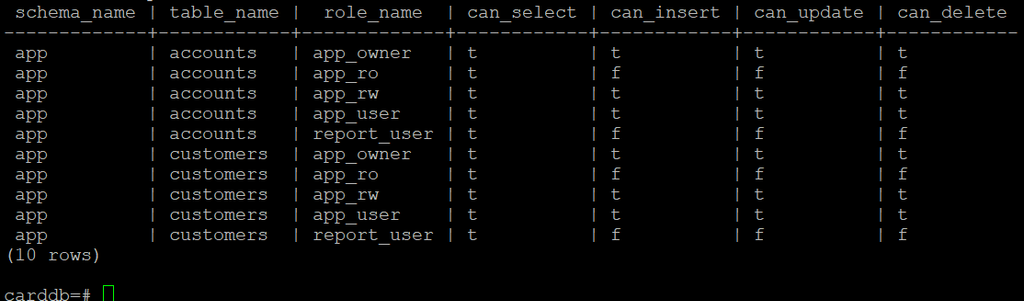
💡 Understanding the Results
- 🔑
can_select— Permission to read table data. - ➕
can_insert— Permission to insert rows. - ✏️
can_update— Permission to modify rows. - 🗑️
can_delete— Permission to delete rows. - ✅
tmeans the privilege is available;fmeans it isn’t.
The query reports effective privileges, including those inherited through role membership.
🛡️ Production Takeaway
Application and reporting users receive access through reusable NOLOGIN roles. They can work with application data without owning the tables or receiving schema CREATE privileges.
🔄 What About Future Tables? — Default Privileges
Our earlier GRANT ON ALL TABLES applies only to existing tables. New tables need their own privilege configuration.
PostgreSQL provides ALTER DEFAULT PRIVILEGES to automate this.
🛠️ Configure Privileges for Future Tables
Run as postgres, connected to carddb:
ALTER DEFAULT PRIVILEGES
FOR ROLE app_owner
IN SCHEMA app
GRANT SELECT ON TABLES TO app_ro;
ALTER DEFAULT PRIVILEGES
FOR ROLE app_owner
IN SCHEMA app
GRANT INSERT, UPDATE, DELETE ON TABLES TO app_rw;🔑 These rules apply to future tables created by app_owner in the app schema.
🔍 Verify Default Privileges
\ddpOr use this reusable catalog query:
SELECT
pg_get_userbyid(d.defaclrole) AS creator_role,
COALESCE(n.nspname, '<all schemas>') AS schema_name,
d.defaclobjtype AS object_type,
d.defaclacl AS default_acl
FROM pg_catalog.pg_default_acl d
LEFT JOIN pg_catalog.pg_namespace n
ON n.oid = d.defaclnamespace
ORDER BY creator_role, schema_name, object_type;
🔍 Understanding the Default Privilege Output
PostgreSQL displays privileges using abbreviated ACL codes:
- 🔑 r — SELECT (Read)
- ➕ a — INSERT (Add rows)
- ✏️ w — UPDATE (Modify rows)
- 🗑️ d — DELETE (Remove rows)
In our output:
app_ro=r/app_owner—app_roreceives SELECT.app_rw=awd/app_owner—app_rwreceives INSERT, UPDATE, and DELETE./app_owner— Indicates the role that granted the privileges.
💡 Key Takeaway: Future tables created by app_owner in the app schema will automatically receive these grants.
🧪 Testing RBAC — Application vs Reporting Access
We’ve configured database, schema, and table privileges. Let’s verify them by connecting as our application and reporting users.
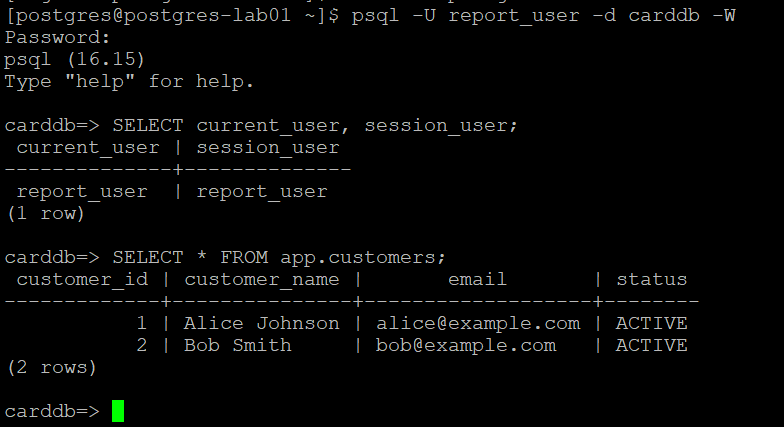
📊 Test 1 — Reporting User (Read-Only)
Connect from your terminal:
psql -U report_user -d carddb -WEnter the lab password: ReportLab123!
Verify the connected identity:
SELECT current_user, session_user;Read customer information:
SELECT * FROM app.customers;✅ Expected: The query succeeds and displays customer records.
🔒 Verify Read-Only Access
Try modifying a customer record:
UPDATE app.customers
SET status = 'INACTIVE'
WHERE customer_id = 1;❌ Expected:
ERROR: permission denied for table customersexit from the psql prompt
\q💳 Test 2 — Application User (Read-Write)
Connect in another terminal:
psql -U app_user -d carddb -WEnter the lab password: AppLab123!
Verify the connected identity:
SELECT current_user, session_user;Update customer information:
UPDATE app.customers
SET status = 'INACTIVE'
WHERE customer_id = 1;✅ Expected: UPDATE 1
Verify the change:
SELECT customer_id, customer_name, status
FROM app.customers
WHERE customer_id = 1;--exit
\q🔍 What Have We Proven?
- 📊
report_usercan read data but cannot modify it. - 💳
app_usercan read and modify application data. - 🔗 Both receive privileges through inherited NOLOGIN roles.
- 🔐 Neither login owns the application tables.
💡 Production Takeaway: PostgreSQL RBAC separates login identities from access privileges, making permissions easier to manage and audit.
🔗 PostgreSQL Role Membership — INHERIT vs SET ROLE
We’ve seen how app_user and report_user receive privileges without direct table grants. This works through role membership.
PostgreSQL 16 provides three important membership options:
- 🔑 INHERIT — Use another role’s privileges automatically.
- 🔄 SET — Allow switching to another role using
SET ROLE. - 🛡️ ADMIN — Allow granting or revoking membership in that role.
🔍 Verify Role Memberships
psql -p 5432 -d carddbUse this reusable PostgreSQL 16+ query:
SELECT
member.rolname AS member_role,
granted.rolname AS granted_role,
m.inherit_option,
m.set_option,
m.admin_option
FROM pg_catalog.pg_auth_members m
JOIN pg_catalog.pg_roles member
ON member.oid = m.member
JOIN pg_catalog.pg_roles granted
ON granted.oid = m.roleid
WHERE member.rolname !~ '^pg_'
AND granted.rolname !~ '^pg_'
ORDER BY member_role, granted_role;
🔐 Understanding the Membership Options
| INHERIT | SET | Behavior |
|---|---|---|
| TRUE | TRUE | Automatically inherit privileges and allow SET ROLE |
| TRUE | FALSE | Automatically inherit privileges; cannot SET ROLE through this membership |
| FALSE | TRUE | Privileges require explicit SET ROLE |
| FALSE | FALSE | Neither automatic inheritance nor SET ROLE through this membership |
💡 Example from Our Application
app_user [LOGIN]
│ INHERIT TRUE
▼
app_rw [NOLOGIN]
│ INHERIT TRUE
▼
app_ro [NOLOGIN]
Because inheritance is enabled, app_user automatically receives both read and write privileges without executing SET ROLE.
🔄 What Happens with SET ROLE?
SET ROLE app_rw;
SELECT current_user, session_user;
RESET ROLE;--exit
\qcurrent_userbecomesapp_rwduring the role switch.session_userremains the original authenticated login.RESET ROLErestores the previous default role context.
🆚 Oracle DBA Tip
PostgreSQL 16 introduced per-membership INHERIT and SET options. Before PostgreSQL 16, automatic inheritance primarily depended on the member role’s INHERIT attribute; the separate membership-level SET option did not exist.
✅ Key Takeaway: INHERIT controls automatic privilege availability; SET controls explicit role switching. They serve different purposes.
🔐 PostgreSQL Object Ownership — Why GRANT ALL Is Not Ownership
In PostgreSQL, having privileges on an object does not make you its owner.
- 🔑 GRANT — Controls operations such as SELECT, INSERT, UPDATE, and DELETE.
- 👑 Ownership — Controls owner-only operations such as ALTER and DROP.
- 🔄 SET ROLE — Allows authorized users to switch to an ownership role.
🔍 Verify Table Ownership
Connect to carddb as postgres:
psql -p 5432 -d carddbUse this reusable query to identify table owners:
SELECT
n.nspname AS schema_name,
c.relname AS table_name,
pg_get_userbyid(c.relowner) AS table_owner
FROM pg_catalog.pg_class c
JOIN pg_catalog.pg_namespace n
ON n.oid = c.relnamespace
WHERE c.relkind IN ('r', 'p')
AND n.nspname <> 'information_schema'
AND n.nspname !~ '^pg_'
ORDER BY n.nspname, c.relname;Our customers and accounts tables should be owned by app_owner.
schema_name | table_name | table_owner
-------------+------------+-------------
app | accounts | app_owner
app | customers | app_owner
(2 rows)
--exit
\q🧪 Test Ownership Restrictions as app_user
Connect as the application user:
psql -U app_user -d carddb -W🔑 Lab Password: AppLab123!
Verify the session and table privileges:
SELECT
current_user,
pg_get_userbyid(c.relowner) AS table_owner,
has_table_privilege(
current_user, c.oid, 'SELECT'
) AS can_select,
has_table_privilege(
current_user, c.oid, 'UPDATE'
) AS can_update
FROM pg_catalog.pg_class c
JOIN pg_catalog.pg_namespace n
ON n.oid = c.relnamespace
WHERE n.nspname = 'app'
AND c.relname = 'customers';Expected:
current_user | table_owner | can_select | can_update
-------------+-------------+------------+-----------
app_user | app_owner | t | t
Now attempt to modify the table structure:
ALTER TABLE app.customers
ADD COLUMN remarks text;❌ Expected:
ERROR: must be owner of table customers💡 Why did it fail?
app_user has DML privileges through app_rw, but the table belongs to app_owner. Table privileges do not include ownership authority.
🔑 Does GRANT ALL Make app_user the Owner?
Let’s prove it.
Connect as postgres in another session and execute:
psql -p 5432 -d carddbGRANT ALL PRIVILEGES
ON TABLE app.customers
TO app_user;Now retry as app_user:
ALTER TABLE app.customers
ADD COLUMN remarks text;❌ Expected:
ERROR: must be owner of table customersEven GRANT ALL cannot transfer ownership or authorize owner-only DDL.
🔄 Restore Least Privilege
As postgres, remove the temporary direct grant:
REVOKE ALL PRIVILEGES
ON TABLE app.customers
FROM app_user;app_user retains its normal DML privileges through inherited role memberships.
👑 How Can the Owner Modify the Table?
As postgres, activate our dedicated ownership role:
SET ROLE app_owner;

SELECT current_user, session_user;
Expected:
current_user | session_user
-------------+-------------
app_owner | postgresNow execute:
ALTER TABLE app.customers
ADD COLUMN remarks text;✅ Expected:
ALTER TABLEReturn to the administrator role:
RESET ROLE;🛡️ Production Best Practices
- 🔒 Use a dedicated
NOLOGINrole for object ownership. - 👤 Keep application logins separate from object owners.
- 🔑 Grant only required DML privileges through access roles.
- 🚫 Avoid granting unnecessary privileges directly to application users.
- 🔄 Use a controlled deployment identity with
SET ROLEfor schema changes.
🆚 Oracle DBA Tip
Oracle closely associates schemas with database users. PostgreSQL allows a NOLOGIN role to own schemas and tables while separate LOGIN roles access the data through privileges.
✅ Key Takeaway: GRANT ALL grants all applicable object privileges—not ownership. Only the owner, a role with effective ownership authority, or a sufficiently privileged administrator can perform owner-only operations.
🔍 Auditing PostgreSQL RBAC — Verify Effective Privileges
Configuring privileges is only half the job. A DBA must also verify who can actually access what.
PostgreSQL provides system catalogs and built-in functions to audit effective privileges.
👤 1. Audit Roles and Memberships
Use pg_auth_members to identify role relationships, including inheritance and role-switching permissions.
SELECT
member.rolname AS member_role,
granted.rolname AS granted_role,
m.inherit_option,
m.set_option,
m.admin_option
FROM pg_catalog.pg_auth_members m
JOIN pg_catalog.pg_roles member
ON member.oid = m.member
JOIN pg_catalog.pg_roles granted
ON granted.oid = m.roleid
WHERE member.rolname !~ '^pg_'
AND granted.rolname !~ '^pg_'
ORDER BY member_role, granted_role;🔑 2. Audit Database CONNECT Privileges
SELECT
    d.datname AS database_name,
    r.rolname AS role_name,
    r.rolcanlogin AS can_login,
    has_database_privilege(
        r.oid, d.oid, 'CONNECT'
    ) AS can_connect
FROM pg_catalog.pg_database d
CROSS JOIN pg_catalog.pg_roles r
WHERE NOT d.datistemplate
  AND r.rolname !~ '^pg_'
  AND r.oid <> 10
ORDER BY d.datname, r.rolname;
🚪 3. Audit Schema Privileges
SELECT
n.nspname AS schema_name,
r.rolname AS role_name,
has_schema_privilege(
r.oid, n.oid, 'USAGE'
) AS usage_in_schema,
has_schema_privilege(
r.oid, n.oid, 'CREATE'
) AS create_in_schema
FROM pg_catalog.pg_namespace n
CROSS JOIN pg_catalog.pg_roles r
WHERE n.nspname <> 'information_schema'
AND n.nspname !~ '^pg_'
AND r.rolname !~ '^pg_'
AND r.oid <> 10
ORDER BY n.nspname, r.rolname;📋 4. Audit Effective Table Privileges
SELECT
    n.nspname AS schema_name,
    c.relname AS table_name,
    r.rolname AS role_name,
    has_table_privilege(r.oid, c.oid, 'SELECT') AS can_select,
    has_table_privilege(r.oid, c.oid, 'INSERT') AS can_insert,
    has_table_privilege(r.oid, c.oid, 'UPDATE') AS can_update,
    has_table_privilege(r.oid, c.oid, 'DELETE') AS can_delete
FROM pg_catalog.pg_class c
JOIN pg_catalog.pg_namespace n
    ON n.oid = c.relnamespace
CROSS JOIN pg_catalog.pg_roles r
WHERE c.relkind IN ('r', 'p')
  AND n.nspname <> 'information_schema'
  AND n.nspname !~ '^pg_'
  AND r.rolname !~ '^pg_'
  AND r.oid <> 10
ORDER BY n.nspname, c.relname, r.rolname;
💡 Understanding Effective Privileges
- ✅
t— The role has the privilege. - ❌
f— The role does not have the privilege. - 🔗 Results include applicable inherited role privileges and grants through
PUBLIC. - 🔐 Schema access and table privileges are evaluated separately.
🛡️ Production Tip: These queries are reusable across PostgreSQL environments. They help identify unexpected access, missing grants, and privilege inheritance issues.
⚠️ Note: Role membership options shown above require PostgreSQL 16+. Run database-specific object audits while connected to the database you want to inspect.
👑 5. Audit Object Ownership
Identify who owns application tables, views, and sequences. Unexpected ownership by application login accounts deserves investigation.
SELECT
    n.nspname AS schema_name,
    c.relname AS object_name,
    CASE c.relkind
        WHEN 'r' THEN 'TABLE'
        WHEN 'p' THEN 'PARTITIONED TABLE'
        WHEN 'v' THEN 'VIEW'
        WHEN 'm' THEN 'MATERIALIZED VIEW'
        WHEN 'S' THEN 'SEQUENCE'
        WHEN 'f' THEN 'FOREIGN TABLE'
    END AS object_type,
    pg_get_userbyid(c.relowner) AS object_owner
FROM pg_catalog.pg_class c
JOIN pg_catalog.pg_namespace n
    ON n.oid = c.relnamespace
WHERE c.relkind IN ('r', 'p', 'v', 'm', 'S', 'f')
  AND n.nspname <> 'information_schema'
  AND n.nspname !~ '^pg_'
ORDER BY n.nspname, object_type, object_name;💡 Why useful? Helps detect objects accidentally created under application logins instead of the intended ownership role.
🌐 6. Audit Privileges Granted to PUBLIC
This is especially important because PUBLIC represents every PostgreSQL role.
The following query identifies explicit PUBLIC privileges on databases and schemas:
SELECT
    'DATABASE' AS object_type,
    d.datname AS object_name,
    a.privilege_type
FROM pg_catalog.pg_database d
CROSS JOIN LATERAL aclexplode(
    COALESCE(d.datacl, acldefault('d', d.datdba))
) a
WHERE a.grantee = 0

UNION ALL

SELECT
    'SCHEMA',
    n.nspname,
    a.privilege_type
FROM pg_catalog.pg_namespace n
CROSS JOIN LATERAL aclexplode(
    COALESCE(n.nspacl, acldefault('n', n.nspowner))
) a
WHERE a.grantee = 0
  AND n.nspname <> 'information_schema'
  AND n.nspname !~ '^pg_'

ORDER BY object_type, object_name, privilege_type;💡 Why useful? Reveals database CONNECT/TEMPORARY and schema USAGE/CREATE privileges available to all roles.
📌 Note: The query uses PostgreSQL’s built-in default ACLs when the stored ACL is NULL. It covers database and schema privileges; table and function PUBLIC grants require separate checks.
🔄 7. Audit Default Privileges
Identify automatic grants that PostgreSQL will apply when roles create future objects.
SELECT
    pg_get_userbyid(d.defaclrole) AS creator_role,
    COALESCE(n.nspname, '<all schemas>') AS schema_name,
    CASE d.defaclobjtype
        WHEN 'r' THEN 'TABLE'
        WHEN 'S' THEN 'SEQUENCE'
        WHEN 'f' THEN 'FUNCTION'
        WHEN 'T' THEN 'TYPE'
        WHEN 'n' THEN 'SCHEMA'
        ELSE d.defaclobjtype::text
    END AS object_type,
    d.defaclacl AS default_acl
FROM pg_catalog.pg_default_acl d
LEFT JOIN pg_catalog.pg_namespace n
    ON n.oid = d.defaclnamespace
ORDER BY creator_role, schema_name, object_type;💡 Why useful? Helps explain why newly created tables receive different privileges from existing tables.
⚠️ Important: An empty result does not mean there are no default privileges. PostgreSQL still applies built-in defaults, including PUBLIC EXECUTE on newly created functions unless overridden.
🚨 8. Identify Roles with Elevated Administrative Attributes
This query highlights roles that possess powerful cluster-level attributes.
SELECT
    rolname AS role_name,
    rolsuper AS superuser,
    rolcreatedb AS create_database,
    rolcreaterole AS create_role,
    rolreplication AS replication,
    rolbypassrls AS bypass_rls
FROM pg_catalog.pg_roles
WHERE rolname !~ '^pg_'
  AND (
      rolsuper
      OR rolcreatedb
      OR rolcreaterole
      OR rolreplication
      OR rolbypassrls
  )
ORDER BY rolname;💡 Why useful? Identifies accounts with elevated privileges that may require additional review.
⚠️ Note: This checks role attributes, not powerful privileges obtained through membership in predefined roles such as pg_read_all_data or pg_write_all_data.
🔍 9. Audit Direct Grants vs Effective Privileges
A PostgreSQL user may access a table even without receiving a direct GRANT. Access can come through inherited roles or PUBLIC.
This audit helps identify who received the privilege directly and who can actually use it.
🔑 Check Direct Table Grants
Use this reusable query to inspect explicit table ACL entries:
SELECT
    n.nspname AS schema_name,
    c.relname AS table_name,
    COALESCE(g.rolname, 'PUBLIC') AS grantee,
    a.privilege_type,
    a.is_grantable
FROM pg_catalog.pg_class c
JOIN pg_catalog.pg_namespace n
    ON n.oid = c.relnamespace
CROSS JOIN LATERAL pg_catalog.aclexplode(
    COALESCE(c.relacl, pg_catalog.acldefault('r', c.relowner))
) a
LEFT JOIN pg_catalog.pg_roles g
    ON g.oid = a.grantee
WHERE c.relkind IN ('r', 'p')
  AND n.nspname <> 'information_schema'
  AND n.nspname !~ '^pg_'
ORDER BY n.nspname, c.relname, grantee, a.privilege_type;
💡 Understanding the Output
- 👤 grantee — Role receiving the privilege, or
PUBLIC. - 🔑 privilege_type — SELECT, INSERT, UPDATE, DELETE, etc.
- 🛡️ is_grantable — Whether the privilege can be granted onward.
- 🔐 Owner entries — Included when PostgreSQL’s built-in default ACL is used.
🔗 Compare with Effective Privileges
Our earlier table audit uses:
has_table_privilege(role_oid, table_oid, 'SELECT')It evaluates applicable direct grants, inherited memberships, and PUBLIC privileges.
For example:
| Role | Direct SELECT grant | Effective SELECT |
|---|---|---|
app_ro | ✅ Yes | ✅ Yes |
app_rw | ❌ No | ✅ Yes — inherited from app_ro |
app_user | ❌ No | ✅ Yes — through nested membership |
report_user | ❌ No | ✅ Yes — inherited from app_ro |
⚠️ Important: Effective table privileges do not automatically establish schema USAGE. Both must be checked when diagnosing actual query access.
✅ Key Takeaway: Direct ACLs show where privileges were granted. Effective privilege functions show which roles can use them.