
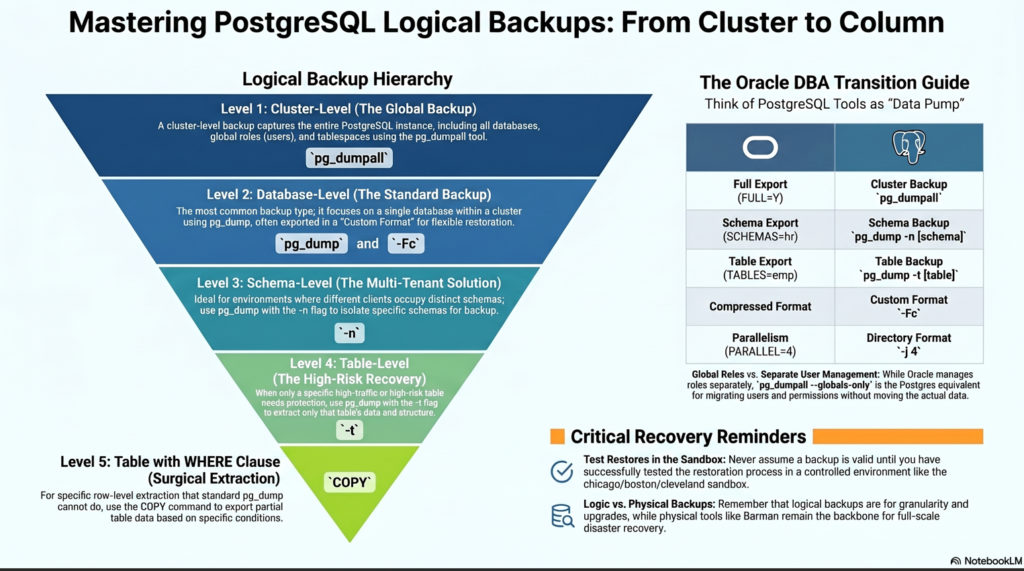
I created this page for Oracle DBAs looking for a clear translation of their skills into the Postgres world, but it’s also built for anyone brand new to PostgreSQL
Please follow steps for preparing Sandbox in case you need one.
Note: In this lab tutorials ,
Source database name is onboarding cluster running in port 5432.
Destination database name is onboarding_sandbox cluster running in port 5433.
Disclaimer: This guide is provided for educational purposes only and is not intended for production use. These steps were documented and tested in a controlled sandbox environment. Please exercise caution before applying any changes to a production system; the author assumes no responsibility for discrepancies or issues. Use at your own risk.
Chapter 1 : Preparation Phase
1.1 Import a dummy database to the source
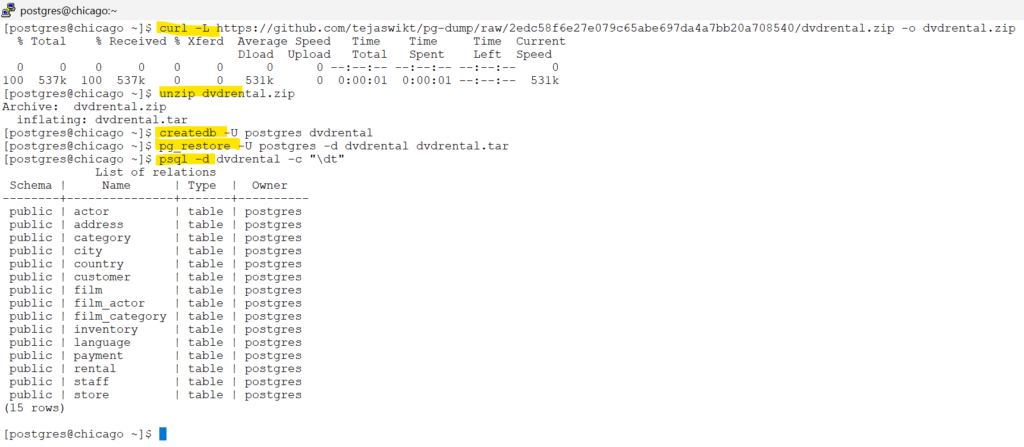
As postgres user : Download the sample database (dvdrental.zip) and unzip it
# Step 1: download the dvdrental.zip file
curl -L https://github.com/tejaswikt/pg-dump/raw/2edc58f6e27e079c65abe697da4a7bb20a708540/dvdrental.zip -o dvdrental.zip

# Step 2: unzip the file
unzip dvdrental.zip

# Step 3: create the database in psql prompt
createdb -U postgres dvdrental

# Step 4: restore the dvdrental database from the tar file.
 pg_restore -U postgres -d dvdrental dvdrental.tar

 # Step 5: display the tables in the dvdrental database
psql -d dvdrental -c "\dt"screenshot
1.2 Create a sandbox database for testing scenarios
1.2: create a sandbox database for testing scenarios
# Step 1: create the directory as postgres user
mkdir -p /var/lib/pgsql/onboarding_sandbox/log
chown postgres:postgres /var/lib/pgsql/onboarding_sandbox

# Step 2:  Initialize the cluster
initdb -D /var/lib/pgsql/onboarding_sandbox

# Step 3: edit the port to 5433 , since 5432 is already occupied by our other database onboarding
vi /var/lib/pgsql/onboarding_sandbox/postgresql.conf
edit the port
port = 5433

# Step 4:  start the database
pg_ctl -D /var/lib/pgsql/onboarding_sandbox -l /var/lib/pgsql/onboarding_sandbox/log/logfile start

# Step 5: check if the database is started and accepting connections
pg_ctl -D /var/lib/pgsql/onboarding_sandbox status
pg_isready -p 5433Chapter 2 : The Cluster level backup / restore
2.1 pg_dumpall - backup the whole cluster
The Postgres Equivalent to expdp full=y
If you are looking for the PostgreSQL version of a full Oracle Data Pump export, pg_dumpall is your primary tool. It is designed to extract a PostgreSQL database cluster into a script file.The Postgres Equivalent to expdp full=y
What it handles:
- Full Cluster Scope: It backs up every database within the instance.
- Global Objects: Unlike individual database dumps, it includes cluster-wide metadata such as roles (users) and tablespaces.
- Consistency: It ensures a consistent snapshot of the entire cluster.
Critical Differences for Oracle DBAs:
No Parallelism: A major point to remember is that pg_dumpall does not support parallel threads. It runs as a single process, which is a departure from the parallel export options you might be used to in Oracle.
Output Format: While Oracle uses binary dump files, pg_dumpall generates a SQL text file (plain text) by default.
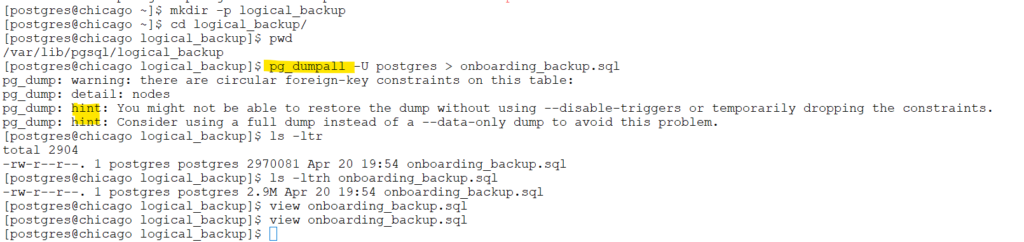
mkdir -p logical_backup
cd logical_backup/
pg_dumpall -U postgres > onboarding_backup.sqlscreenshot
| Feature | Oracle (expdp full=y) | Postgres (pg_dumpall) |
| Scope | Entire Database | Entire Cluster (All DBs + Globals) |
| Format Options | Binary (.dmp) | Plain Text SQL only |
| Parallelism | Supported (PARALLEL=n) | Single-threaded only |
| Metadata Only | Supported (CONTENT=METADATA_ONLY) | Supported (-s or –schema-only) |
| Compression | Built-in (Optional) | Requires piping to gzip |
# to take backup in compressed (gzip) format
pg_dumpall -U postgres | gzip > onboarding_backup.sql.gz2.2 psql : restore this sql file to another cluster (onboarding_sandbox)
Restoration:
Similar to impdp in oracle, we have psql utility in postgresql to import the sql file generated from pg_dumpall.
# Import the database to target postgres database .
# short format: psql -p 5433 -U postgres -f onboarding_backup.sql postgres
#psql --port=<> --username=postgres --file=<path_of_the_file> postgres 2>&1 | tee <log_file_to_write>


psql --port=5433 --username=postgres --file=/var/lib/pgsql/logical_backup/onboarding_backup.sql postgres 2>&1 | tee restore_sandbox.logscreenshot
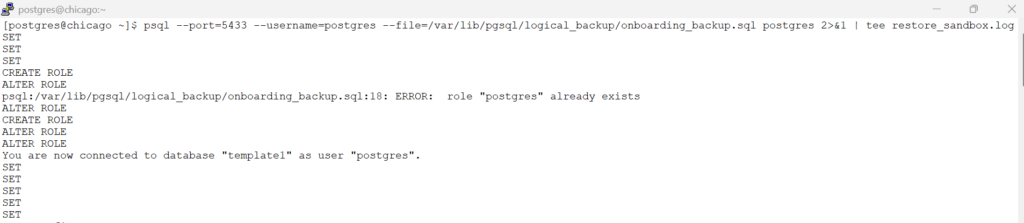
Verify if the import is sucessfull – by checking the restore_sandbox.log generated during the import.
Lets double check – by connecting to port 5433 – our sandbox database cluster
# port 5433 is where our sandbox database is running.
psql -p 5433 -d dvdrental -c "\dt"| Feature | Oracle impdp | Postgres psql (with pg_dumpall) |
| Input File | Binary (.dmp) | SQL Text (.sql) |
| Primary Job | Data/Metadata Import | Executing SQL Scripts |
| Logging | LOGFILE=… | 2>&1 | tee … |
| Stop on Error | Configurable (skip, etc.) | Continues by default (unless -v ON_ERROR_STOP=1) |
| Parallelism | PARALLEL=n | None (it is single-threaded) |
# If backup taken from pg_dumpall is in gzip format, then use below command to import
gunzip -c onboarding_backup.sql.gz | psql -p 5433 -U postgres postgres 2>&1 | tee restore_compressed.logChapter 3 : The Specific Database Backup / Restore
official link: pg_dump, pg_restore
3.1 - Custom format backup / restore (--format=custom)
If backups are taken in plain sql format, then psql should be used to restore the backup.
If Backups are taken in archive file formats, then pg_restore utility should be used for restoration.
In this tutorials, we follow the archive file formats.
Below command helps to take backup to single dump file where parallelism is not possible when custom format(c) – is chosen.
# Backup the entire dvdrental database with custom format
nohup pg_dump --username=postgres --port=5432 --dbname=dvdrental --format=custom --verbose --file=dvdrental.bkp 2>&1 | tee backup.log &After the backup is taken, we will use pg_restore to restore (import) the backup.
In our lab setup, we are importing to another cluster onboarding_sandbox which is running in port 5433.
In this section, we have 2 options to restore and we will try both the options.
Option #1 : We drop the database and recreate the empty database , then user –dbname = dvdrental to import the data. (target cluster – onboarding_sandbox running in port 5433)
# drop the database
psql -p 5433 -U postgres -c "DROP DATABASE dvdrental;"
# create the empty database
psql -p 5433 -U postgres -c "CREATE DATABASE dvdrental;"
# import the database by specifying the target database name
nohup pg_restore --username=postgres --port=5433 --dbname=dvdrental --verbose dvdrental.bkp 2>&1 | tee restore.log &screenshot

Option #2 : Here we do not manually cleanup but use the additional options to restore such as –clean and –create.
Note:
1) after the above import of database , we have not cleaned up, but still below command works.
2) if you do not specify –clean –create in below command, all the data of dvdrental will be imported to default schema of postgresql. So be careful in the command execution
Check the below screenshot for more details
“Before starting the refresh on port 5433 (onboarding_sandbox), ensure all active sessions are disconnected. If users or applications are still connected to the target database, the --clean and --create flags will be unable to drop the database due to active locks. This will cause the entire restore process to fail immediately.”
# Cleanup the sessions if any connected in target cluster with port 5433
psql -p 5433 -U postgres -d postgres -c "SELECT pg_terminate_backend(pid) FROM pg_stat_activity WHERE datname = 'dvdrental' AND pid <> pg_backend_pid();"nohup pg_restore --username=postgres --port=5433 --dbname=postgres --clean --create --verbose dvdrental.bkp 2>&1 | tee restore_advanced.log &screenshot

Conclusion :
“While the Custom format (-Fc) is a favorite for its single-file convenience, it comes with a performance catch: it doesn’t support parallel worker threads during the backup phase. Because the data is forced into a single-threaded stream to one file, it can become a significant bottleneck when you’re trying to back up massive databases.”
| Feature | Oracle impdp Equivalent | Postgres Option #1 (Manual) | Postgres Option #2 (Automated Flags) |
| Preparation | DROP USER … CASCADE; | Manual: DROP & CREATE DATABASE | Automated: No prep needed. |
| Command Logic | Standard Import | pg_restore –dbname=dvdrental | pg_restore –dbname=postgres –clean –create |
| Target Database | Determined by remap_schema or SID | The actual target (dvdrental) | The maintenance hub (postgres) |
| Flexibility | High (using TABLE_EXISTS_ACTION) | Low (Must have empty DB first) | High (Nukes and paves automatically) |
| “Data Soup” Risk | Low (Target schema is explicit) | Low (Fails if DB isn’t there) | HIGH (If flags are missing, data lands in postgres) |
3.2 - Directory format backup / restore (--format=directory)
“The second major option for backing up a specific database is the Directory format (-Fd). If speed is your priority, this is your go-to method. Unlike the Custom format, which is limited to a single thread during the backup phase, the Directory format allows for true parallelism using the --jobs flag. This is the PostgreSQL equivalent of the PARALLEL parameter in Oracle’s expdp. By matching your job count to the available CPUs on your server, you can significantly slash your backup window.”
# create an empty directory to place the backup files
mkdir -p /var/lib/pgsql/onboarding_backup
# initiate the backup in nohup mode from source database (5432)
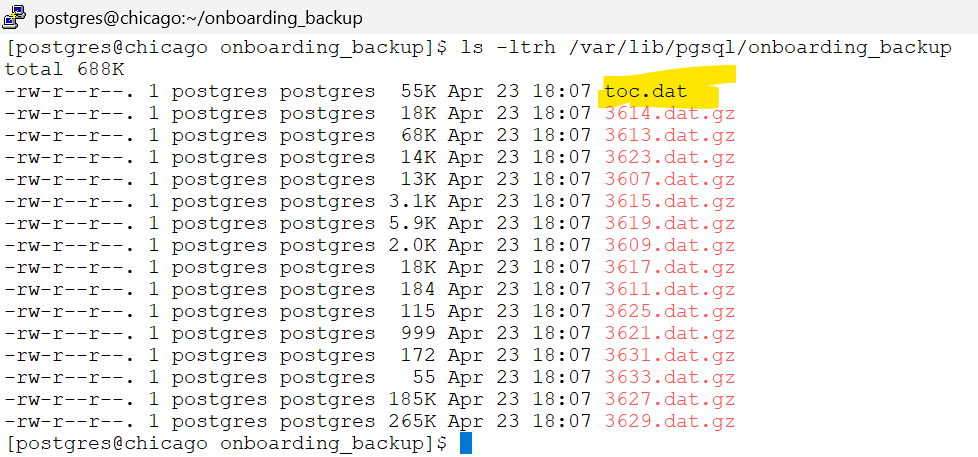
nohup pg_dump --username=postgres --port=5432 --dbname=dvdrental --format=d --jobs=4 --verbose --file=/var/lib/pgsql/onboarding_backup 2>&1 | tee /var/lib/pgsql/backup_dir.log &screenshot

“Before starting the refresh on port 5433 (onboarding_sandbox), ensure all active sessions are disconnected. If users or applications are still connected to the target database, the --clean and --create flags will be unable to drop the database due to active locks. This will cause the entire restore process to fail immediately.”
# Cleanup the sessions if any connected in target cluster with port 5433
psql -p 5433 -U postgres -d postgres -c "SELECT pg_terminate_backend(pid) FROM pg_stat_activity WHERE datname = 'dvdrental' AND pid <> pg_backend_pid();"After Killing of session connected to dvdrental database in target cluster on port 5433. lets initiate restore.
# restore to target cluster running on port 5433
nohup pg_restore --username=postgres --port=5433 --dbname=postgres --format=d --jobs=4 --clean --create --verbose /var/lib/pgsql/onboarding_backup 2>&1 | tee /var/lib/pgsql/restore_dir.log &screenshot

Chapter 4 : The Schema Backup / Restore
4.1 Prepare a Schema
# Step 1:create a schema
psql --port=5432 --dbname=dvdrental -c "CREATE SCHEMA media_content;"# Step 2: create a table
psql --port=5432 --dbname=dvdrental -c "CREATE TABLE media_content.employees (emp_id SERIAL PRIMARY KEY, first_name VARCHAR(50), last_name VARCHAR(50), photo BYTEA, hire_date DATE DEFAULT CURRENT_DATE);"# Step 3: insert records with BYTEA Code
psql --port=5432 --dbname=dvdrental -c \
"INSERT INTO media_content.employees (first_name, last_name, photo) VALUES ('JAMES', 'BOND', decode('89504E470D0A1A0A0000000D49484452', 'hex')), ('JOHN', 'RAMBO', decode('47494638396101000100800000FF0000', 'hex'));"# Step 4: check the table records
psql --port=5432 --dbname=dvdrental -c \
"SELECT emp_id, first_name, photo
FROM media_content.employees;"screenshot

4.2 Happy Flow:The Self-Contained Schema Migration"
# take the row count of the tables in the schema(media_content) at source from dvdrental database
psql --port=5432 \
--dbname=dvdrental -c \
"SELECT schemaname, relname AS table_name, n_live_tup AS estimated_row_count FROM pg_stat_user_tables WHERE schemaname = 'media_content';"# Create the directory
mkdir -p /var/lib/pgsql/backups
# Run backup with logging
# 2. Run pg_dump, but put the log in the base folder
pg_dump --port=5432 \
--dbname=dvdrental \
--format=d \
--jobs=4 \
--schema=media_content \
--file=/var/lib/pgsql/backups/media_schema_backup \
--verbose 2>&1 | tee /var/lib/pgsql/backups/media_schema.logAfter the Backup is taken on port 5432, lets try to import to cluster 5433.
Here the schema doesnt exist on 5433.
# Run restore - Log is outside the source directory
pg_restore --port=5433 \
           --dbname=dvdrental \
           --format=d \
           --jobs=4 \
           --clean \
           --if-exists \
--verbose /var/lib/pgsql/backups/media_schema_backup 2>&1 | tee /var/lib/pgsql/backups/media_schema_restore.logVerify the schema after import on port 5433 to check for the row count comparison with source.
# Verify if schema import is completed by checking the row counts of the tables when compared to source at the time of pg_dump
psql --port=5433 \
--dbname=dvdrental -c \
"SELECT schemaname, relname AS table_name, n_live_tup AS estimated_row_count FROM pg_stat_user_tables WHERE schemaname = 'media_content';"4.3 Unhappy Flow: "Solving Restore Failures: Managing Cross-Schema Dependencies"
Simulate an unhappy flow:
We are going to create a brand-new table in the public schema on your source (5432) and then make our media_content schema depend on it.
# Step A: Create a "Global" table in the public schema of port 5432
psql --port=5432 \
--dbname=dvdrental -c \
"CREATE TABLE public.lookup_departments (dept_id INT PRIMARY KEY, dept_name TEXT);"

psql --port=5432 \
--dbname=dvdrental -c \
"INSERT INTO public.lookup_departments VALUES (1, 'Legal'), (2, 'HR'), (3, 'Media');"# Step B: Create a View in media_content that depends on it.
psql --port=5432 \
--dbname=dvdrental -c \
"CREATE VIEW media_content.emp_dept_view_1 AS SELECT e.first_name, d.dept_name FROM media_content.employees e JOIN public.lookup_department d ON (e.emp_id = d.dept_id);"# Step C: Create a dump of the schema
pg_dump --port=5432 \
--dbname=dvdrental \
--format=d \
--jobs=4 \
--schema=media_content \
--file=/var/lib/pgsql/backups/unhappy_bridge \
--verbose 2>&1 | tee /var/lib/pgsql/backups/media_schema_backup_dependency.log# Step D: clear the old lab(Target: 5433)
# clear the old lab
psql --port=5433 \
--dbname=dvdrental -c \
"DROP SCHEMA IF EXISTS media_content CASCADE;"# Step E: Initiate a restore on port 5433.(The Failure)
# Now, try the restore
pg_restore --port=5433 \
--dbname=dvdrental \
--format=d \
--clean \
--if-exists \
--verbose /var/lib/pgsql/backups/unhappy_bridge 2>&1 | tee /var/lib/pgsql/backups/unhappy_restore.logscreenshot_with_error
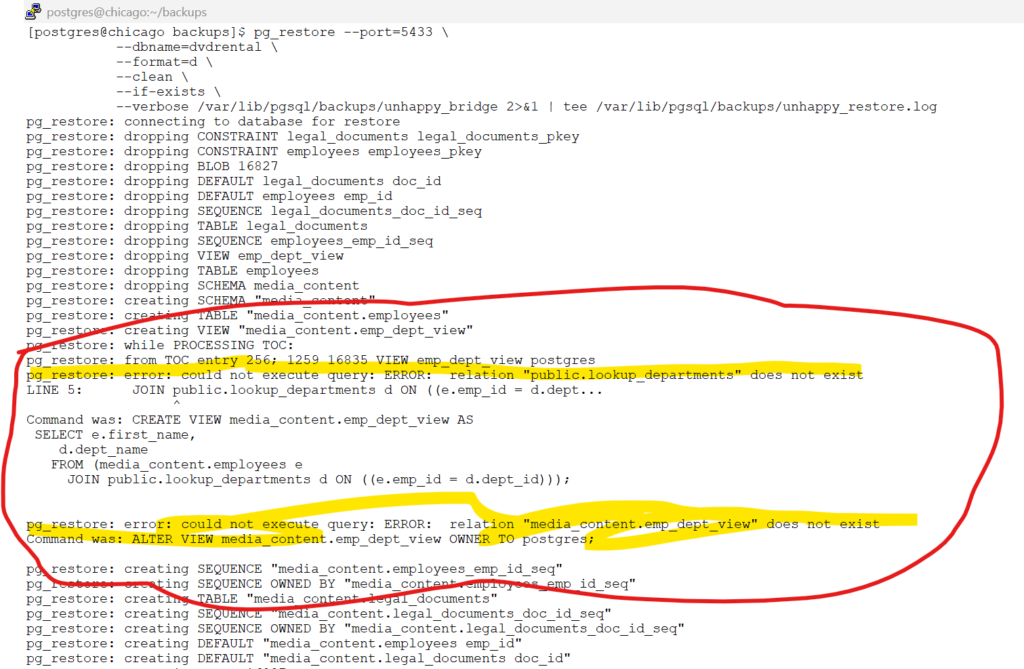
Noticed the error message:
pg_restore: error: could not execute query: ERROR: relation “public.lookup_departments” does not exist
pg_restore: error: could not execute query: ERROR: relation “media_content.emp_dept_view” does not exist
How to “Detect” these strings
 # On port 5432 , check for dependencies on media_content schema.
 psql --port=5432 \
 --dbname=dvdrental -c \
"SELECT DISTINCT n.nspname AS view_schema, v.relname AS view_name, ref_n.nspname AS referenced_schema, ref.relname AS referenced_object FROM pg_rewrite rw JOIN pg_class v ON rw.ev_class = v.oid JOIN pg_namespace n ON v.relnamespace = n.oid JOIN pg_depend d ON d.objid = rw.oid JOIN pg_class ref ON d.refobjid = ref.oid JOIN pg_namespace ref_n ON ref.relnamespace = ref_n.oid WHERE n.nspname = 'media_content' AND ref_n.nspname <> 'media_content' AND d.classid = 'pg_rewrite'::regclass AND ref.relkind IN ('r', 'v', 'm');"In the destination, if dependent objects existed the pg_restore would have been succeeded.
Since the table public.lookup_departments – is missing , the pg_restore failed.
Please run below command on port 5433, to re-check for the dependency tables in public schema.
# On port 5433, Check if the same dependicies already exist.
psql --port=5433 \
--dbname=dvdrental -c \
"SELECT DISTINCT n.nspname AS view_schema, v.relname AS view_name, ref_n.nspname AS referenced_schema, ref.relname AS referenced_object FROM pg_rewrite rw JOIN pg_class v ON rw.ev_class = v.oid JOIN pg_namespace n ON v.relnamespace = n.oid JOIN pg_depend d ON d.objid = rw.oid JOIN pg_class ref ON d.refobjid = ref.oid JOIN pg_namespace ref_n ON ref.relnamespace = ref_n.oid WHERE n.nspname = 'media_content' AND ref_n.nspname <> 'media_content' AND d.classid = 'pg_rewrite'::regclass AND ref.relkind IN ('r', 'v', 'm');"Don’t let your backup leave data behind! Because the -t flag overrides the -n (schema) flag in pg_dump, you must use wildcards to capture your entire working schema while targeting specific external dependencies.
# Package everything needed for a successful restore
pg_dump --port=5432 \
        --dbname=dvdrental \
        --format=d \
        --jobs=4 \
        --table="media_content.*" \
        --table="public.lookup_departments" \
        --file=/var/lib/pgsql/backups/media_complete_migration \
--verbose 2>&1 | tee /var/lib/pgsql/backups/media_migration.logUse below command to restore all the objects of media_content and the other dependency of the public.lookup_departments
# Execute the restore on the target server (Port 5433)
pg_restore --port=5433 \
           --dbname=dvdrental \
           --format=d \
           --jobs=4 \
           --clean \
           --if-exists \
           --verbose \
           /var/lib/pgsql/backups/media_complete_migration \
2>&1 | tee /var/lib/pgsql/backups/restore_final.logChapter 5 : The Specific table Backup / Restore
5.1 Table Backup / restore
5.1 Table Backup / restore The Happy Flow: Table Backup
# Create a table in cluster 5432 under dvdrental database
psql --port=5432 \
--dbname=dvdrental -c\
"CREATE TABLE public.blog_test (
    id INT PRIMARY KEY,
    content TEXT,
    created_at TIMESTAMP DEFAULT now()
);"

# Create an index for the table blog_test
psql --port=5432 \
--dbname=dvdrental -c\
"CREATE INDEX idx_blog_content ON public.blog_test(content);"

# insert a record in the table blog_test
psql --port=5432 \
--dbname=dvdrental -c\
"INSERT INTO public.blog_test VALUES (1, 'Hello DevOps World');"
# Backup the table from cluster 5432 -
pg_dump --port=5432 \
        --dbname=dvdrental \
        --format=d \
        --jobs=4 \
        --table="public.blog_test" \
        --file=/var/lib/pgsql/backups/blog_test_backup \
--verbose 2>&1 | tee /var/lib/pgsql/backups/blog_test_dump.log# Restore the table on cluster port 5433.
pg_restore --port=5433 \
--dbname=dvdrental \
--format=d \
--clean \
--if-exists \
--verbose \
/var/lib/pgsql/backups/blog_test_backup \
2>&1 | tee /var/lib/pgsql/backups/blog_test_restore.log# Check for Index and cosntraints
psql --port=5433 \
--dbname=dvdrental \
--command="\d+ public.blog_test"This complets the happy flow for a table backup and restore.
5.2 Table - with WHERE Clause -Backup / restore
5.2 Table - with WHERE Clause -Backup / restoreFiltering, compressing, and chunking data on-the-fly to simulate Oracle’s FILESIZE behavior/code
In below example:
we are Copying records from rental table of public schema in dvdrental database of port 5432.
with WHERE Clause of rental_date >= ‘2005-05-01’ AND rental_date < ‘2005-06-01’
redirecting to a CSV file and immediately compressing – by limiting the size to 10KB .
The below command produces multiple gzipped files max size of 10KB.
# Export May 2005 data, compress it, and slice into 10K chunks for easier transport
psql -p 5432 -d dvdrental -c "\copy (SELECT * FROM public.rental WHERE rental_date >= '2005-05-01' AND rental_date < '2005-06-01') TO STDOUT WITH CSV" \
| gzip \
| split -b 10K -d - --additional-suffix=.csv.gz /var/lib/pgsql/backups/rental_may_zipped_Calculate the record counts at source – we will use to compare post importing in destination
# Verify the exact row count we expect to migrate
psql -p 5432 -d dvdrental -c "SELECT count(*) FROM rental WHERE rental_date >= '2005-05-01' AND rental_date < '2005-06-01';"Lets clean up the sandbox – where the data is already present in our labs
# in our labs, lets delete records in 5433
psql -p 5433 -d dvdrental -c "DELETE FROM public.rental WHERE rental_date >= '2005-05-01' AND rental_date < '2005-06-01';"Import the data to 5433 cluster now – from the zip file
# import the data to 5433
cat /var/lib/pgsql/backups/rental_may_zipped_*.csv.gz \
| zcat \
| psql -p 5433 -d dvdrental -c "\copy public.rental FROM STDIN WITH CSV"Verify the record counts
# reverify the count in 5433 cluster to match that of source
psql -p 5433 -d dvdrental -c "SELECT count(*) FROM rental WHERE rental_date >= '2005-05-01' AND rental_date < '2005-06-01';"# analyze the data post import
psql -p 5433 -d dvdrental -c "ANALYZE public.rental;"This table simplifies the transition for Oracle DBAs by mapping the parameters they know to the Linux/Postgres tools we just used.
| Feature | Oracle expdp | PostgreSQL (The Simple Way) | Benefit |
| Filtered Data | QUERY=”WHERE…” | \copy (SELECT … WHERE …) | Only moves the specific data “slice” needed. |
| File Splitting | FILESIZE=20K | split -b 20K | Keeps files small for storage and network transfer. |
| Compression | COMPRESSION=ALL | ` | gzip` |
| Data Format | Binary .dmp | Compressed .csv.gz | High compatibility and easy to verify. |
| Logging | LOGFILE=exp.log | `2>&1 | tee exp.log` |
The Data Flow: Step-by-Step
| Step | Action | Tool | Why? |
| 1. Extract | Filtered Query | psql \copy | Grabs only the “May 2005” data. |
| 2. Shrink | On-the-fly Zip | gzip | Compresses the stream before it hits the disk. |
| 3. Slice | Divide Stream | split | Cuts the compressed stream into chunks. |
Chapter 6 : The Roles and Grants in Backup/Restore
6.1 Creation of Roles in 5432 cluster
6.1 Creation of Roles in 5432 cluster Create the Roles in our Source database – 5432
Phase 1: Global Role Creation
These commands create the residents of your cluster. Since roles are global, these can be run against the default postgres database.
# 1. Create the Group Role (No login capability)
psql --port=5432 --username=postgres -c "CREATE ROLE rental_admin_group NOLOGIN;"

# 2. Create the Login User with a password
psql --port=5432 --username=postgres -c "CREATE ROLE dvd_manager WITH LOGIN PASSWORD 'manager_pass_2026';"

# 3. Establish Group Membership (dvd_manager inherits group rights)
psql --port=5432 --username=postgres -c "GRANT rental_admin_group TO dvd_manager;"

# 4. Create a Table-Specific Login User
psql --port=5432 --username=postgres -c "CREATE ROLE actor_viewer LOGIN PASSWORD 'security_first';"Phase 2: Database-Specific Grants
# 5. Grant Connection access to the database
psql --port=5432 --username=postgres --dbname=dvdrental -c "GRANT CONNECT ON DATABASE dvdrental TO rental_admin_group;"
psql --port=5432 --username=postgres --dbname=dvdrental -c "GRANT CONNECT ON DATABASE dvdrental TO actor_viewer;"

# 6. Grant Usage on the Public Schema
psql --port=5432 --username=postgres --dbname=dvdrental -c "GRANT USAGE ON SCHEMA public TO rental_admin_group;"
psql --port=5432 --username=postgres --dbname=dvdrental -c "GRANT USAGE ON SCHEMA public TO actor_viewer;"

# 7. Grant Select on all existing tables to the group

psql --port=5432 --username=postgres --dbname=dvdrental -c "GRANT SELECT ON ALL TABLES IN SCHEMA public TO rental_admin_group;"

# 8. Set Default Privileges for future tables
psql --port=5432 --username=postgres --dbname=dvdrental -c "ALTER DEFAULT PRIVILEGES IN SCHEMA public GRANT SELECT ON TABLES TO rental_admin_group;"

# 9. Grant Specific access to a single table
psql --port=5432 --username=postgres --dbname=dvdrental -c "GRANT SELECT ON TABLE public.actor TO actor_viewer;"6.2 Restore Database along with creation of Roles
6.2 Restore Database along with creation of RolesCreate the Roles and copy the Dumps
Check for the roles that our database dvdrental needs to have before we import it in 5433 cluster by executing below command on 5432.
# Check for the Roles which needs to be considered at the destination during import
psql --port=5432 --username=postgres --dbname=dvdrental -c "
WITH RECURSIVE role_migration_tree AS (
    SELECT oid, rolname, (rolname)::text COLLATE \"C\" as link_name
    FROM pg_roles
    WHERE oid IN (
        SELECT nspowner FROM pg_namespace
        WHERE nspname NOT IN ('pg_catalog', 'information_schema')
        UNION
        SELECT relowner FROM pg_class c
        JOIN pg_namespace n ON n.oid = c.relnamespace
        WHERE n.nspname NOT IN ('pg_catalog', 'information_schema')
        UNION
        SELECT r.oid FROM pg_roles r
        JOIN information_schema.role_table_grants g ON r.rolname = g.grantee
        WHERE g.table_schema NOT IN ('pg_catalog', 'information_schema')
    )
    UNION
    SELECT m.oid, m.rolname, (m.rolname)::text COLLATE \"C\"
    FROM pg_roles m
    JOIN pg_auth_members am ON m.oid = am.member
    JOIN role_migration_tree rmt ON am.roleid = rmt.oid
)
SELECT DISTINCT rolname AS \"Roles_to_Migrate\"
FROM role_migration_tree
WHERE rolname != 'postgres'
AND rolname NOT LIKE 'pg_%'
ORDER BY 1;"# 1. Export all cluster-level global objects (Roles and Groups)
pg_dumpall -p 5432 --username=postgres --globals-only --file=/tmp/all_globals.sql# 2. Extract selected roles and their permissions into a new SQL file
# This captures CREATE ROLE, ALTER ROLE (passwords), and membership GRANTS
egrep "ROLE (actor_viewer|dvd_manager|rental_admin_group)|GRANT (actor_viewer|rental_admin_group)" /tmp/all_globals.sql > /tmp/dvdrental_roles.sql# 3. Export the complete 'dvdrental' database
pg_dump --username=postgres \
--port=5432 \
--dbname=dvdrental \
--format=d \
--jobs=4 \
--file=/var/lib/pgsql/dvdrental_backup/dump \
--verbose 2>&1 | tee /var/lib/pgsql/dvdrental_backup/backup_dir.logNow we need to import the roles on our destination 5433 , created in step 2 before we actually import the data for dvdrental database.
# 4. Import the Global Identities (The Roles) - On destination 5433.
psql --username=postgres \
     --port=5433 \
     --file=/tmp/dvdrental_roles.sql \
--echo-all 2>&1 | tee /var/lib/pgsql/roles_restore.logAfter the roles are imported , its time to import the actual data to dvdrental .
# Restore the Database on 5433.
pg_restore --username=postgres \
           --port=5433 \
           --dbname=postgres \
           --format=d \
           --jobs=4 \
           --create \
           --clean \
           --verbose \
/var/lib/pgsql/dumps 2>&1 | tee /var/lib/pgsql/dvdrental_restore.logDid you notice , the import / restore happened succesfully.
Now lets revisit what will happen if we do not create the roles in 5433 cluster.
Lets try to drop them – as we are playing it in our sandbox 🙂
Let us initiate Chaos .
6.3 Initiate Chaos
6.3 Initiate ChaosStep 1: The Clean Slate (Deleting the Success)
Before you can show the blunder, you must remove the database and the roles. We drop the database first because roles cannot be deleted if they still hold permissions or own objects within a database.
# 1. Drop the database to clear all object dependencies
psql --username=postgres \
     --port=5433 \
     --command="DROP DATABASE dvdrental;"

# 2. Delete the roles (The "Residents" are evicted)
psql --username=postgres \
     --port=5433 \
--command="DROP ROLE actor_viewer; DROP ROLE dvd_manager; DROP ROLE rental_admin_group;"Step 2: The “Blunder” (Restore Without Roles)
Now, attempt to restore the database dump without running your roles SQL script first. This is where the magic (or the nightmare) happens.
# Attempting a restore into a cluster that doesn't know our roles
pg_restore --username=postgres \
           --port=5433 \
           --dbname=postgres \
           --format=d \
           --create \
           --verbose \
/var/lib/pgsql/dumps 2>&1 | tee /var/lib/pgsql/the_blunder.logDid you noticed the errors
The data might be there, but the owners are missing, and the permissions are broken. It perfectly illustrates why the Global Identities (Roles) must always precede the Local Data (Restore).
Comparison with Oracle
Core Command Mapping
| Feature | Oracle Data Pump | PostgreSQL Utility |
| Export Utility | expdp | pg_dump |
| Import Utility | impdp | pg_restore |
| Connection | Server-side (Directory Objects) | Client-side (Port/Host/User) |
| Default Logic | Schema/Table focused | Database focused |
Backup Formats and Parallelism
| Feature | Oracle expdp | Postgres Custom (-Fc) | Postgres Directory (-Fd) |
| Structure | Set of .dmp files | Single .bkp binary file | A folder of “shredded” files |
| Parallel Backup | Yes (PARALLEL=N) | No (Single-threaded) | Yes (–jobs=N) |
| Parallel Restore | Yes (PARALLEL=N) | Yes (–jobs=N) | Yes (–jobs=N) |
| Portability | High | Very High (One file) | Moderate (Must move folder) |
| Best Use Case | All scenarios | Small to Medium DBs | Large DBs / Performance |
The "Refresh" Logic: Handling Existing Data
| Action | Oracle impdp | PostgreSQL pg_restore |
| Overwrite Tables | TABLE_EXISTS_ACTION=REPLACE | –clean |
| Recreate DB/User | Manual DROP USER … CASCADE | –clean –create |
| Session Conflict | ORA-01940 (If dropping user) | Connection Lock (If dropping DB) |
| The “Hammer” | ALTER SYSTEM KILL SESSION | pg_terminate_backend(pid) |
Common Flag Equivalents
| Goal | Oracle Parameter | PostgreSQL Flag |
| Metadata Only | CONTENT=METADATA_ONLY | -s (Schema only) |
| Data Only | CONTENT=DATA_ONLY | -a (Data only) |
| Exclude Tables | EXCLUDE=TABLE:”=’XYZ'” | -T table_name |
| Include Table | TABLES=actor | -t actor |
| Remap Schema | REMAP_SCHEMA=A:B | Manual (SET SCHEMA) |
| Ignore Owners | N/A | –no-owner |
Note -Explanation for --large-objects in schema/table - backup/restore
When it comes to Large Objects (LOs), PostgreSQL handles them differently than any other data type.
Here is the simple, step-by-step breakdown of why surgical moves are a nightmare and how to actually fix it.
1. The “Ticket” System (Storage)
Large Objects are not stored in your table. Your table only stores a ticket number (called an OID).
- The Table: Only has the OID (e.g.,
16428). - The Warehouse: The actual data (images, PDFs, blobs) is stored in a global system table called
pg_largeobject.
2. The “Blind” Export (Why it’s all or nothing)
Even if you try to backup just one table or one schema, using the --large-objects flag tells pg_dump: “Go to the Warehouse and grab the boxes.”
- The Problem: The Warehouse (
pg_largeobject) doesn’t have a record of which box belongs to which schema. - The Result:
pg_dumpplays it safe. It exports every single Large Object in the entire database, even if they belong to other tables or other schemas you didn’t ask for.
3. The Import Overload
When you take that file to your Target Database, you aren’t just importing your one table. You are bringing that entire “Warehouse” dump with you.
- PostgreSQL will try to insert every Large Object from the source into the target’s
pg_largeobjecttable.
4. The OID Collision (The Identity Crisis)
OIDs are just numbers. If your Source Database has a file labeled #5001 and your Target Database already has a different file labeled #5001:
- The Collision: The import will either fail (if there’s a unique constraint) or overwrite the target’s existing data with the source’s data.
- The Mess: Now Schema X in your target database is pointing to an OID that contains a file from Schema A in your source. It’s a data cross-contamination nightmare.
The Solution: The “Staging Database” Workaround
If you absolutely must move a table/schema with Large Objects surgically, don’t go directly to the target. Use the Staging Method:
Step 1: The Clean Room
Create a brand new, empty “Staging Database” on your target cluster.
SQL
CREATE DATABASE staging_restore;Step 2: The Full Dump/Restore
Import your source schema (including the --large-objects) into this empty staging database. Since the database is empty, there are zero OID collisions.
Step 3: The Scripted Export (The Surgical Precision)
Instead of using pg_dump, you write a small script in the staging database that uses the lo_export function to save each Large Object to a file on the disk, named after its ID.
Bash
# Example logic:
psql -d staging_restore -c "SELECT lo_export(oid_column, '/tmp/file_' || oid_column) FROM my_table;"
Step 4: The Target Import
Move those files to the target server, use lo_import to bring them into the real target database (which generates new, safe OIDs), and update your table to point to these new IDs.