
This page is designed for anyone who wants a practical and beginner-friendly path into PostgreSQL VACUUM Deep Dive — Practical Demos, Bloat Analysis & Real Production Lessons.
— whether you are coming from an Oracle background or starting fresh with PostgreSQL.
You can spin up a PostgreSQL Sandbox database cluster in just 10 minutes and follow along with the hands-on labs to learn vacuum step by step.
Note: This tutorial series is fully hands-on and focused on learning by doing.
Disclaimer: This guide is provided for educational purposes only and is not intended for production use. These steps were documented and tested in a controlled sandbox environment. Please exercise caution before applying any changes to a production system; the author assumes no responsibility for discrepancies or issues. Use at your own risk.
Chapter 1 : Designing a Modular PostgreSQL Logging Architecture
Designing a Modular PostgreSQL Logging Architecture
Instead of managing one giant config file or using ALTER SYSTEM, we use a conf.d/ directory for better administration:
- Organized Sections: Separate files for Extensions, Logging, and Auditing make it easy to find and update specific settings.
- Clear Source of Truth: We avoid
ALTER SYSTEMbecause it writes to a file (postgresql.auto.conf) that overrides our manual changes and causes confusion. - Easy Maintenance: You can swap or update individual modules (like an audit policy) without touching the core database configuration.
- Faster Troubleshooting: If a setting is wrong, you only have to check a small, 10-line file rather than a 500-line document.
# check the config file name
psql --port=5432 --username=postgres -c "SHOW config_file;"In the Below section, we backup the original file , create a directory , append the main conf file to include the directory path , and verify the update of the config file.
# Update the config file to include directories
# 1. Copy the postgresql.conf
cp /var/lib/pgsql/onboarding/postgresql.conf /var/lib/pgsql/onboarding/postgresql.conf.bak_$(date +%Y%m%d)

# 2. Create the Configuration Directory
mkdir -p /var/lib/pgsql/onboarding/conf.d

# 3. Append the include_dir Statement
echo "include_dir = '/var/lib/pgsql/onboarding/conf.d'" >> /var/lib/pgsql/onboarding/postgresql.conf

# 4. Verify the Change
tail -n 1 /var/lib/pgsql/onboarding/postgresql.conf# Add README.txt file for reading / how to use - purpose.
cat >> /var/lib/pgsql/onboarding/conf.d/README.txt <<'EOF'
Add new parameters to the appropriate file based on their purpose.
Avoid using ALTER SYSTEM to keep configuration management clean and centralized.
PostgreSQL Modular Configuration Directory
------------------------------------------
00-extensions.conf : Used for PostgreSQL extension-related parameters.
01-autovacuum.conf : Used for autovacuum thresholds, scaling factors, and cost delays.
02-logging.conf : Used for logging settings such as CSV logging, rotation.
03-connection.conf : Used for connection settings, authentication limits, and network timeouts.
04-resources.conf : Used for memory allocations, buffers, and worker processes.
05-wal.conf : Used for Write-Ahead Log (WAL), checkpoints, and archiving settings.
06-replication.conf : Used for streaming replication, slots, and standby behaviors.
07-query-tuning.conf : Used for planner constants, cost settings, and optimizer behaviors.
08-auditing.conf : Used for audit-related configuration parameters.
09-client-defaults.conf : Used for locale settings, timezones, and default client behaviors.
EOF# create the shell config files
touch /var/lib/pgsql/onboarding/conf.d/{00-extensions,01-autovacuum,02-logging,03-connection,04-resources,05-wal,06-replication,07-query-tuning,08-auditing,09-client-defaults}.conf
Chapter 2 : Preparing the PostgreSQL Bloat Lab
In this section, we will set up a small PostgreSQL lab environment that we will use throughout the VACUUM demos. We will create the database, schema, and KYC table, add a few indexes, and load 10,000 sample records to simulate real-world table growth and bloat behavior.
# Drop the database if it already exists
psql --port=5432 --username=postgres -d postgres -c "
DROP DATABASE IF EXISTS creditcards;
"# Create the database: creditcards
psql --port=5432 --username=postgres -d postgres -c "
CREATE DATABASE creditcards;
"# Create the schema: consumer
psql --port=5432 --username=postgres -d creditcards -c "
DROP SCHEMA IF EXISTS consumer CASCADE;
CREATE SCHEMA consumer;
"# Create the KYC table with realistic banking/customer onboarding columns
psql --port=5432 --username=postgres -d creditcards -c "
DROP TABLE IF EXISTS consumer.kyc;
CREATE TABLE consumer.kyc
(
kyc_id BIGSERIAL PRIMARY KEY,
customer_id BIGINT NOT NULL,
full_name TEXT NOT NULL,
email_address TEXT NOT NULL,
phone_number VARCHAR(20),
pan_number VARCHAR(20),
aadhaar_number VARCHAR(20),
annual_income NUMERIC(12,2),
kyc_status VARCHAR(20),
risk_category VARCHAR(20),
last_reviewed_date DATE,
remarks TEXT,
kyc_payload TEXT,
created_at TIMESTAMP DEFAULT CURRENT_TIMESTAMP,
updated_at TIMESTAMP DEFAULT CURRENT_TIMESTAMP
);
"# Create indexes that will make lookup and bloat behavior easier to observe
psql --port=5432 --username=postgres -d creditcards -c "
CREATE INDEX idx_kyc_customer_id
ON consumer.kyc(customer_id);
CREATE INDEX idx_kyc_email_address
ON consumer.kyc(email_address);
CREATE INDEX idx_kyc_kyc_status
ON consumer.kyc(kyc_status);
"# Verify the table structure and indexes
psql --port=5432 --username=postgres -d creditcards -c '\d+ consumer.kyc'Below insert statement will run for 3- 5 mins and creates a table of size 500 + MB.
# Load 20,000 wide records so the table grows close to 500 MB
psql --port=5432 --username=postgres -d creditcards -c "
INSERT INTO consumer.kyc
(
    customer_id,
    full_name,
    email_address,
    phone_number,
    pan_number,
    aadhaar_number,
    annual_income,
    kyc_status,
    risk_category,
    last_reviewed_date,
    remarks,
    kyc_payload,
    created_at,
    updated_at
)
SELECT
    gs AS customer_id,
    'Customer ' || gs AS full_name,
    'customer' || gs || '@example.com' AS email_address,
    '+91' || LPAD((1000000000 + gs)::TEXT, 10, '0') AS phone_number,
    'PAN' || LPAD(gs::TEXT, 10, '0') AS pan_number,
    'AAD' || LPAD(gs::TEXT, 12, '0') AS aadhaar_number,
    (250000 + (gs * 137) % 5000000)::NUMERIC(12,2) AS annual_income,
    CASE
        WHEN gs % 4 = 0 THEN 'VERIFIED'
        WHEN gs % 4 = 1 THEN 'PENDING'
        WHEN gs % 4 = 2 THEN 'REVIEW'
        ELSE 'REJECTED'
    END AS kyc_status,
    CASE
        WHEN gs % 5 = 0 THEN 'HIGH'
        WHEN gs % 5 IN (1,2) THEN 'MEDIUM'
        ELSE 'LOW'
    END AS risk_category,
    CURRENT_DATE - ((gs % 365)) AS last_reviewed_date,
    'Sample KYC record ' || gs AS remarks,
    (
        SELECT string_agg(md5(gs::TEXT || '-' || s::TEXT), '')
        FROM generate_series(1, 800) AS s
    ) AS kyc_payload,
    NOW() - ((gs % 90) || ' days')::interval AS created_at,
    NOW() - ((gs % 30) || ' days')::interval AS updated_at
FROM generate_series(1, 20000) AS gs;
"# Check the total row count before deletion
psql --port=5432 --username=postgres -d creditcards -c "
SELECT COUNT(*) AS total_rows
FROM consumer.kyc;
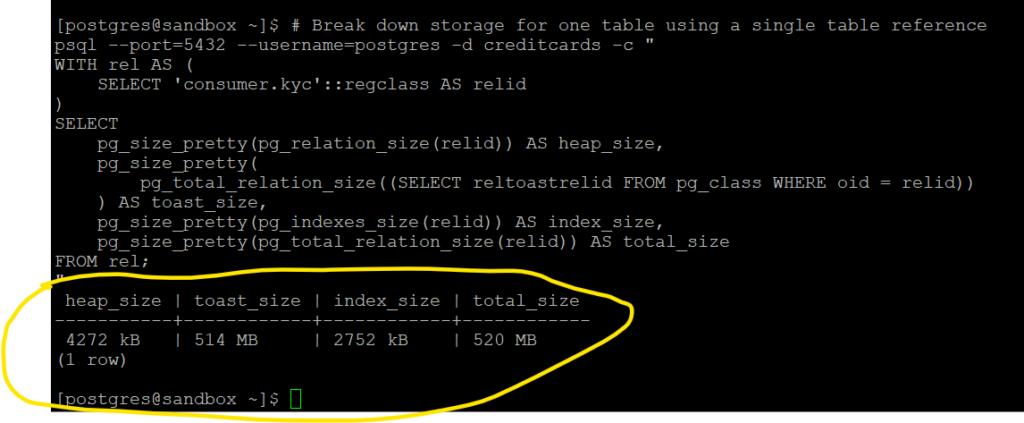
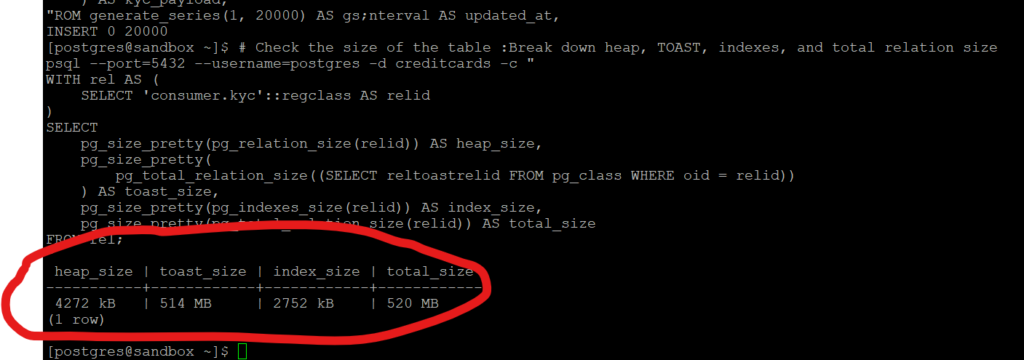
"# Check the size of the table :Break down heap, TOAST, indexes, and total relation size
psql --port=5432 --username=postgres -d creditcards -c "
WITH rel AS (
SELECT 'consumer.kyc'::regclass AS relid
)
SELECT
pg_size_pretty(pg_relation_size(relid)) AS heap_size,
pg_size_pretty(
pg_total_relation_size((SELECT reltoastrelid FROM pg_class WHERE oid = relid))
) AS toast_size,
pg_size_pretty(pg_indexes_size(relid)) AS index_size,
pg_size_pretty(pg_total_relation_size(relid)) AS total_size
FROM rel;
"
Chapter 3 : Understanding PostgreSQL Bloat Before Learning VACUUM
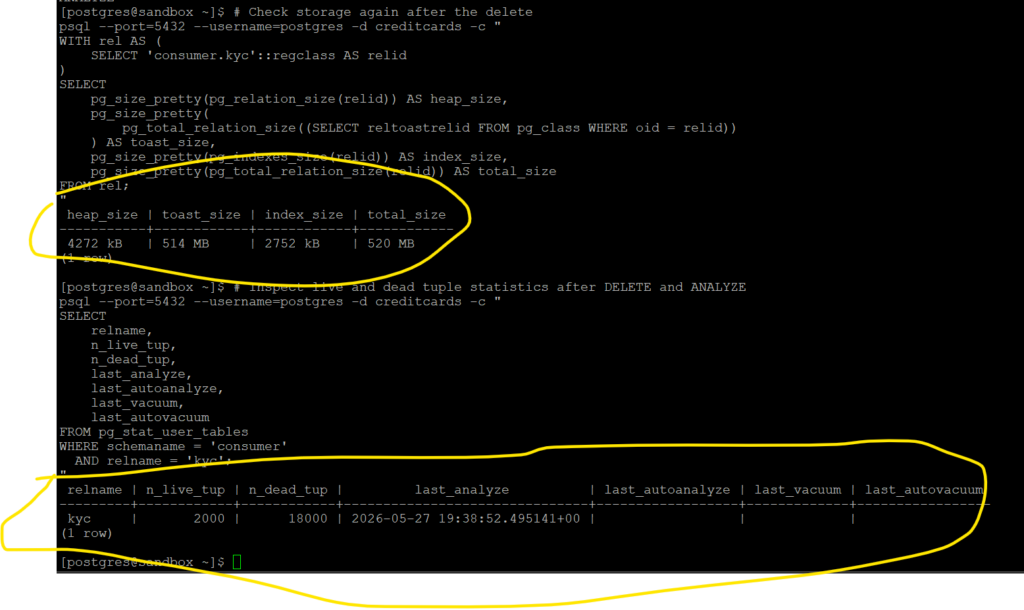
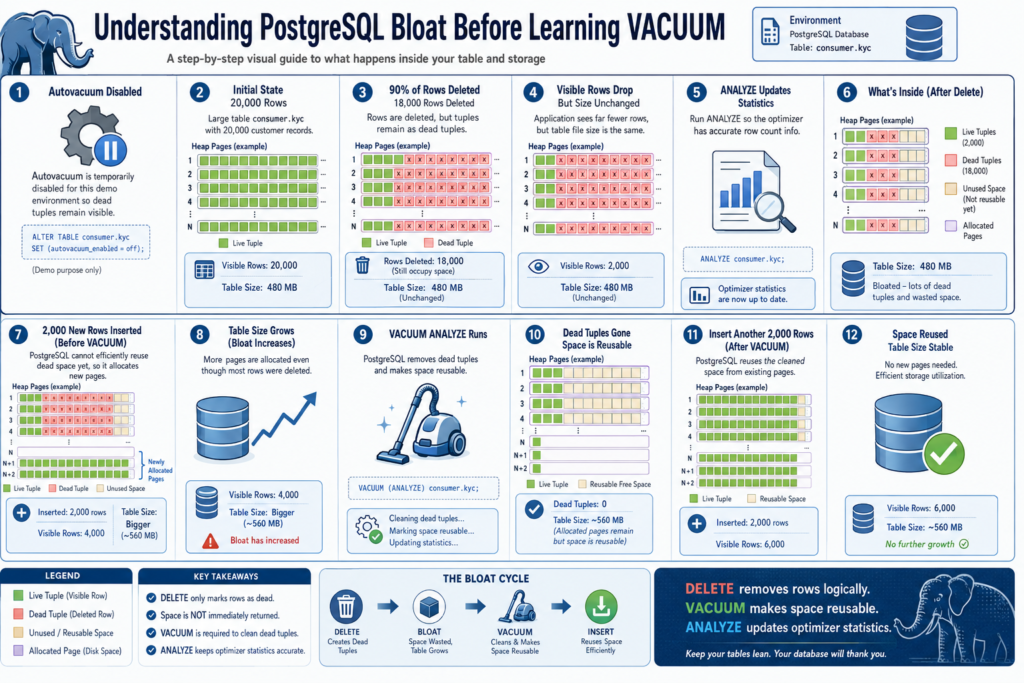
In this section, we will simulate a common PostgreSQL behavior where deleting data does not immediately reduce table size. By inserting and deleting records while continuously checking relation size and table statistics, we will observe how dead tuples accumulate internally and why PostgreSQL eventually requires VACUUM maintenance.
Please read official documentation : sql-vacuum
For this demo, autovacuum is temporarily disabled on the table so that dead tuples remain visible long enough to observe PostgreSQL bloat behavior manually. In real production environments, autovacuum should normally remain enabled.
# Disable autovacuum temporarily so dead tuples remain visible during the demo
psql --port=5432 --username=postgres -d creditcards -c "
ALTER TABLE consumer.kyc
SET (autovacuum_enabled = false);
"# Delete 90% of the records to create dead tuples and bloat
psql --port=5432 --username=postgres -d creditcards -c "
DELETE FROM consumer.kyc
WHERE customer_id <= 18000;
"# Verify how many rows are still visible after the delete
psql --port=5432 --username=postgres -d creditcards -c "
SELECT COUNT(*) AS remaining_rows
FROM consumer.kyc;
"# Update optimizer statistics after the mass delete operation
psql --port=5432 --username=postgres -d creditcards -c "
ANALYZE consumer.kyc;
"# Check storage again after the delete
psql --port=5432 --username=postgres -d creditcards -c "
WITH rel AS (
SELECT 'consumer.kyc'::regclass AS relid
)
SELECT
pg_size_pretty(pg_relation_size(relid)) AS heap_size,
pg_size_pretty(
pg_total_relation_size((SELECT reltoastrelid FROM pg_class WHERE oid = relid))
) AS toast_size,
pg_size_pretty(pg_indexes_size(relid)) AS index_size,
pg_size_pretty(pg_total_relation_size(relid)) AS total_size
FROM rel;
"# Inspect live and dead tuple statistics after DELETE and ANALYZE
psql --port=5432 --username=postgres -d creditcards -c "
SELECT
relname,
n_live_tup,
n_dead_tup,
last_analyze,
last_autoanalyze,
last_vacuum,
last_autovacuum
FROM pg_stat_user_tables
WHERE schemaname = 'consumer'
AND relname = 'kyc';
"
# Insert 2,000 new rows to simulate fresh workload after mass deletion
psql --port=5432 --username=postgres -d creditcards -c "
INSERT INTO consumer.kyc
(
    customer_id,
    full_name,
    email_address,
    phone_number,
    pan_number,
    aadhaar_number,
    annual_income,
    kyc_status,
    risk_category,
    last_reviewed_date,
    remarks,
    kyc_payload,
    created_at,
    updated_at
)
SELECT
    gs AS customer_id,
    'Customer ' || gs AS full_name,
    'customer' || gs || '@example.com' AS email_address,
    '+91' || LPAD((1000000000 + gs)::TEXT, 10, '0') AS phone_number,
    'PAN' || LPAD(gs::TEXT, 10, '0') AS pan_number,
    'AAD' || LPAD(gs::TEXT, 12, '0') AS aadhaar_number,
    (250000 + (gs * 137) % 5000000)::NUMERIC(12,2) AS annual_income,
    CASE
        WHEN gs % 4 = 0 THEN 'VERIFIED'
        WHEN gs % 4 = 1 THEN 'PENDING'
        WHEN gs % 4 = 2 THEN 'REVIEW'
        ELSE 'REJECTED'
    END AS kyc_status,
    CASE
        WHEN gs % 5 = 0 THEN 'HIGH'
        WHEN gs % 5 IN (1,2) THEN 'MEDIUM'
        ELSE 'LOW'
    END AS risk_category,
    CURRENT_DATE - ((gs % 365)) AS last_reviewed_date,
    'Post-delete insert record ' || gs AS remarks,
    (
        SELECT string_agg(md5(gs::TEXT || '-' || s::TEXT), '')
        FROM generate_series(1, 800) AS s
    ) AS kyc_payload,
    NOW() - ((gs % 90) || ' days')::interval AS created_at,
    NOW() - ((gs % 30) || ' days')::interval AS updated_at
FROM generate_series(20001, 22000) AS gs;
"# Check storage again after inserting 2k records
psql --port=5432 --username=postgres -d creditcards -c "
WITH rel AS (
SELECT 'consumer.kyc'::regclass AS relid
)
SELECT
pg_size_pretty(pg_relation_size(relid)) AS heap_size,
pg_size_pretty(
pg_total_relation_size((SELECT reltoastrelid FROM pg_class WHERE oid = relid))
) AS toast_size,
pg_size_pretty(pg_indexes_size(relid)) AS index_size,
pg_size_pretty(pg_total_relation_size(relid)) AS total_size
FROM rel;
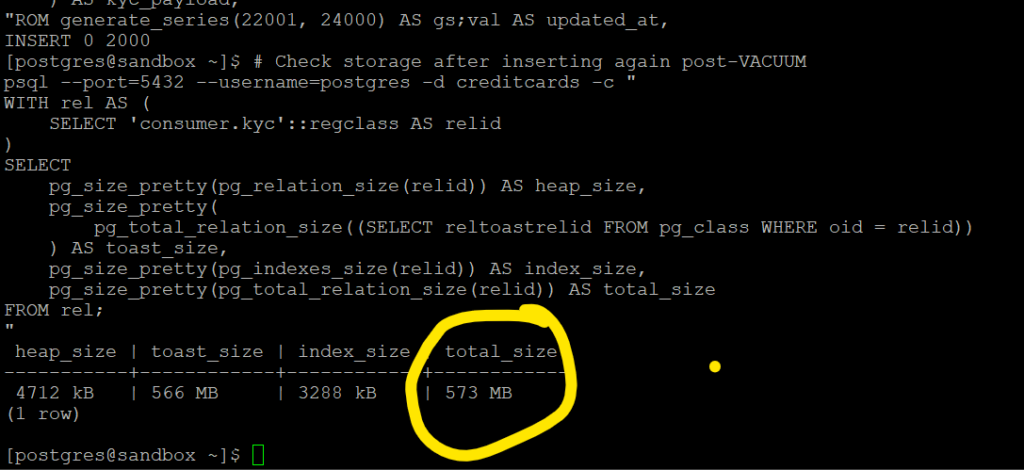
"Even after deleting 90% of the records, PostgreSQL did not immediately reduce the table size. As new rows were inserted again, the table continued to grow because the previously occupied space had not yet been fully reclaimed for reuse.
If you notice the total size is now 573 MB after 2k records are inserted.
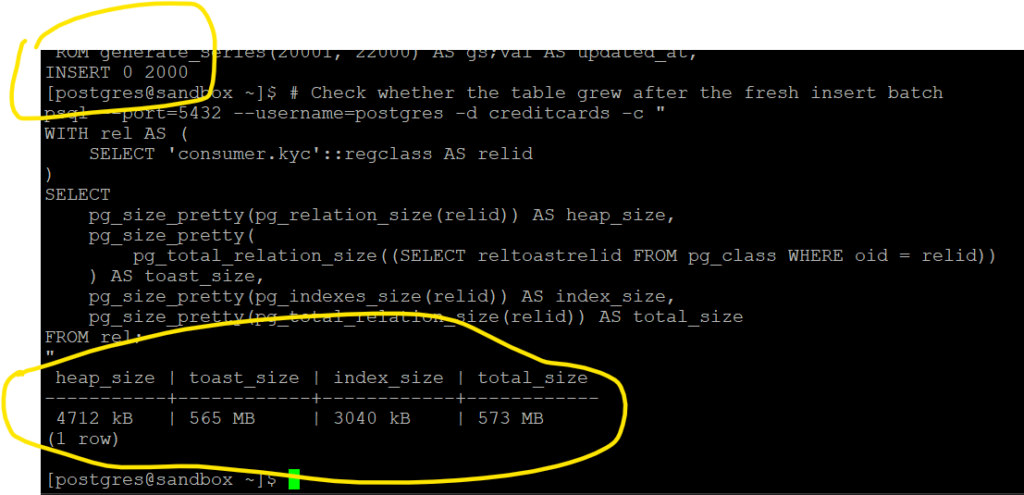
At this point, we can clearly see why VACUUM and ANALYZE are important in PostgreSQL. Deleting rows alone does not automatically reclaim storage or update optimizer statistics. VACUUM helps make the dead space reusable, while ANALYZE updates table statistics used by the query planner.
# Execute Vacuum and Update optimizer statistics by Analyze.
psql --port=5432 --username=postgres -d creditcards -c "
VACUUM ANALYZE consumer.kyc;
"
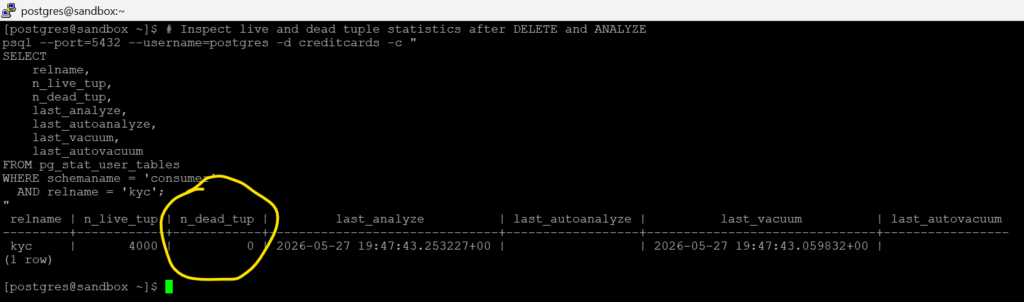
# Inspect live and dead tuple statistics after VACUUM and ANALYZE
psql --port=5432 --username=postgres -d creditcards -c "
SELECT
    relname,
    n_live_tup,
    n_dead_tup,
    last_analyze,
    last_autoanalyze,
    last_vacuum,
    last_autovacuum
FROM pg_stat_user_tables
WHERE schemaname = 'consumer'
  AND relname = 'kyc';
"Notice that the dead tuple count has now dropped to zero after running the VACUUM ANALYZE operation.
# Insert another 2,000 rows after VACUUM to observe reuse of free space
psql --port=5432 --username=postgres -d creditcards -c "
INSERT INTO consumer.kyc
(
    customer_id,
    full_name,
    email_address,
    phone_number,
    pan_number,
    aadhaar_number,
    annual_income,
    kyc_status,
    risk_category,
    last_reviewed_date,
    remarks,
    kyc_payload,
    created_at,
    updated_at
)
SELECT
    gs AS customer_id,
    'Customer ' || gs AS full_name,
    'customer' || gs || '@example.com' AS email_address,
    '+91' || LPAD((1000000000 + gs)::TEXT, 10, '0') AS phone_number,
    'PAN' || LPAD(gs::TEXT, 10, '0') AS pan_number,
    'AAD' || LPAD(gs::TEXT, 12, '0') AS aadhaar_number,
    (250000 + (gs * 137) % 5000000)::NUMERIC(12,2) AS annual_income,
    CASE
        WHEN gs % 4 = 0 THEN 'VERIFIED'
        WHEN gs % 4 = 1 THEN 'PENDING'
        WHEN gs % 4 = 2 THEN 'REVIEW'
        ELSE 'REJECTED'
    END AS kyc_status,
    CASE
        WHEN gs % 5 = 0 THEN 'HIGH'
        WHEN gs % 5 IN (1,2) THEN 'MEDIUM'
        ELSE 'LOW'
    END AS risk_category,
    CURRENT_DATE - ((gs % 365)) AS last_reviewed_date,
    'After vacuum insert record ' || gs AS remarks,
    (
        SELECT string_agg(md5(gs::TEXT || '-' || s::TEXT), '')
        FROM generate_series(1, 800) AS s
    ) AS kyc_payload,
    NOW() - ((gs % 90) || ' days')::interval AS created_at,
    NOW() - ((gs % 30) || ' days')::interval AS updated_at
FROM generate_series(22001, 24000) AS gs;
"# Check storage after inserting again post-VACUUM
psql --port=5432 --username=postgres -d creditcards -c "
WITH rel AS (
SELECT 'consumer.kyc'::regclass AS relid
)
SELECT
pg_size_pretty(pg_relation_size(relid)) AS heap_size,
pg_size_pretty(
pg_total_relation_size((SELECT reltoastrelid FROM pg_class WHERE oid = relid))
) AS toast_size,
pg_size_pretty(pg_indexes_size(relid)) AS index_size,
pg_size_pretty(pg_total_relation_size(relid)) AS total_size
FROM rel;
"
After running VACUUM ANALYZE, PostgreSQL was able to reuse the previously cleaned space internally. As a result, inserting another 2,000 records did not significantly increase the table size.
Chapter 4 : Understanding VACUUM Internals
Before learning autovacuum tuning or freeze management, we must understand what a VACUUM worker actually does internally.
In this chapter, we will intentionally create dead tuples and observe how PostgreSQL:
- scans heap pages
- identifies dead tuples
- cleans indexes
- updates visibility information
- tracks free space
- reuses pages
- handles long-running transactions
# TRUNCATE removes all rows immediately.
psql --port=5432 --username=postgres -d creditcards -c "
TRUNCATE TABLE consumer.kyc RESTART IDENTITY;
"# Load 20,000 wide records so the table grows close to 500 MB
psql --port=5432 --username=postgres -d creditcards -c "
INSERT INTO consumer.kyc
(
customer_id,
full_name,
email_address,
phone_number,
pan_number,
aadhaar_number,
annual_income,
kyc_status,
risk_category,
last_reviewed_date,
remarks,
kyc_payload,
created_at,
updated_at
)
SELECT
gs AS customer_id,
'Customer ' || gs AS full_name,
'customer' || gs || '@example.com' AS email_address,
'+91' || LPAD((1000000000 + gs)::TEXT, 10, '0') AS phone_number,
'PAN' || LPAD(gs::TEXT, 10, '0') AS pan_number,
'AAD' || LPAD(gs::TEXT, 12, '0') AS aadhaar_number,
(250000 + (gs * 137) % 5000000)::NUMERIC(12,2) AS annual_income,
CASE
WHEN gs % 4 = 0 THEN 'VERIFIED'
WHEN gs % 4 = 1 THEN 'PENDING'
WHEN gs % 4 = 2 THEN 'REVIEW'
ELSE 'REJECTED'
END AS kyc_status,
CASE
WHEN gs % 5 = 0 THEN 'HIGH'
WHEN gs % 5 IN (1,2) THEN 'MEDIUM'
ELSE 'LOW'
END AS risk_category,
CURRENT_DATE - ((gs % 365)) AS last_reviewed_date,
'Sample KYC record ' || gs AS remarks,
(
SELECT string_agg(md5(gs::TEXT || '-' || s::TEXT), '')
FROM generate_series(1, 800) AS s
) AS kyc_payload,
NOW() - ((gs % 90) || ' days')::interval AS created_at,
NOW() - ((gs % 30) || ' days')::interval AS updated_at
FROM generate_series(1, 20000) AS gs;
"# Check the size of the table :Break down heap, TOAST, indexes, and total relation size
psql --port=5432 --username=postgres -d creditcards -c "
WITH rel AS (
SELECT 'consumer.kyc'::regclass AS relid
)
SELECT
pg_size_pretty(pg_relation_size(relid)) AS heap_size,
pg_size_pretty(
pg_total_relation_size((SELECT reltoastrelid FROM pg_class WHERE oid = relid))
) AS toast_size,
pg_size_pretty(pg_indexes_size(relid)) AS index_size,
pg_size_pretty(pg_total_relation_size(relid)) AS total_size
FROM rel;
"
#  Generate dead tuples using UPDATE

psql --port=5432 --username=postgres -d creditcards -c "
UPDATE consumer.kyc
SET
    remarks = remarks || ' - REVIEWED',
    updated_at = clock_timestamp();
"# Check dead tuples after UPDATE
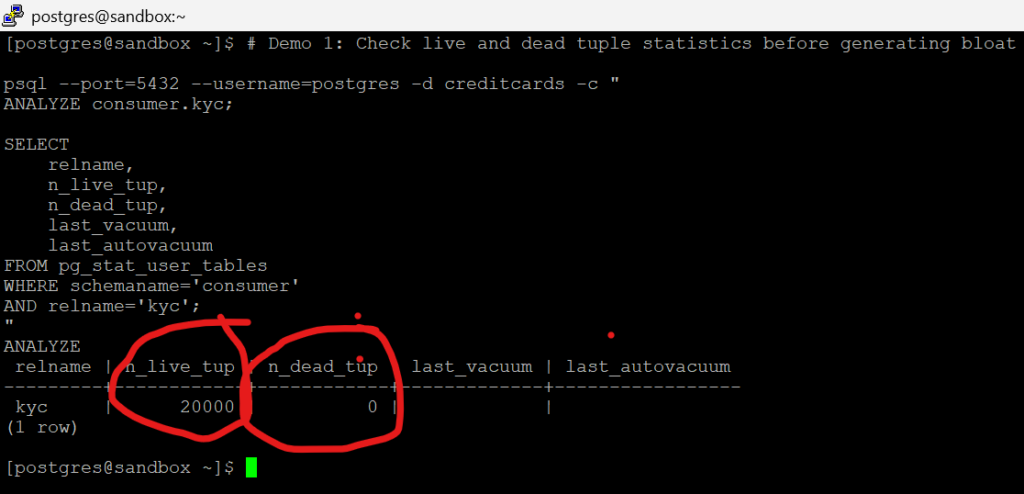
psql --port=5432 --username=postgres -d creditcards -c "
ANALYZE consumer.kyc;
SELECT
relname,
n_live_tup,
n_dead_tup
FROM pg_stat_user_tables
WHERE schemaname='consumer'
AND relname='kyc';
"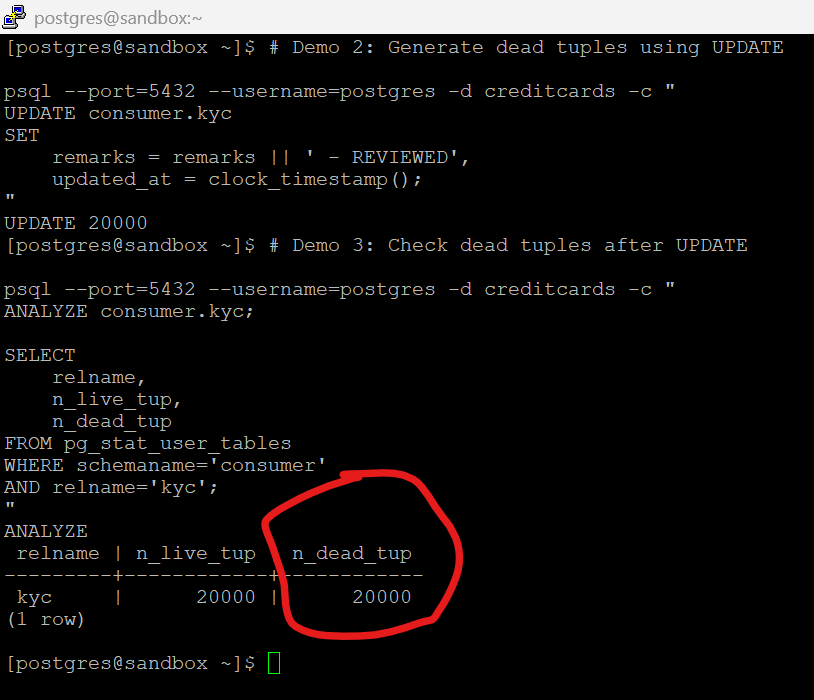
This updates all 20,000 rows.
Because PostgreSQL uses MVCC:
Old row version -> becomes dead tuple
New row version -> becomes live tuple
# Check size after generating dead tuples
psql --port=5432 --username=postgres -d creditcards -c "
WITH rel AS (
SELECT 'consumer.kyc'::regclass AS relid
)
SELECT
pg_size_pretty(pg_relation_size(relid)) AS heap_size,
pg_size_pretty(
pg_total_relation_size(
(SELECT reltoastrelid
FROM pg_class
WHERE oid = relid)
)
) AS toast_size,
pg_size_pretty(pg_indexes_size(relid)) AS index_size,
pg_size_pretty(pg_total_relation_size(relid)) AS total_size
FROM rel;
"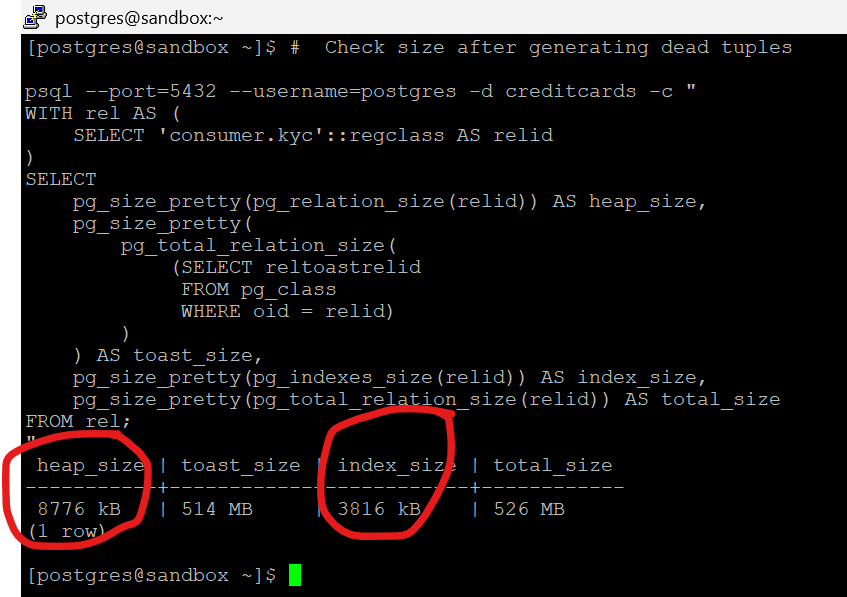
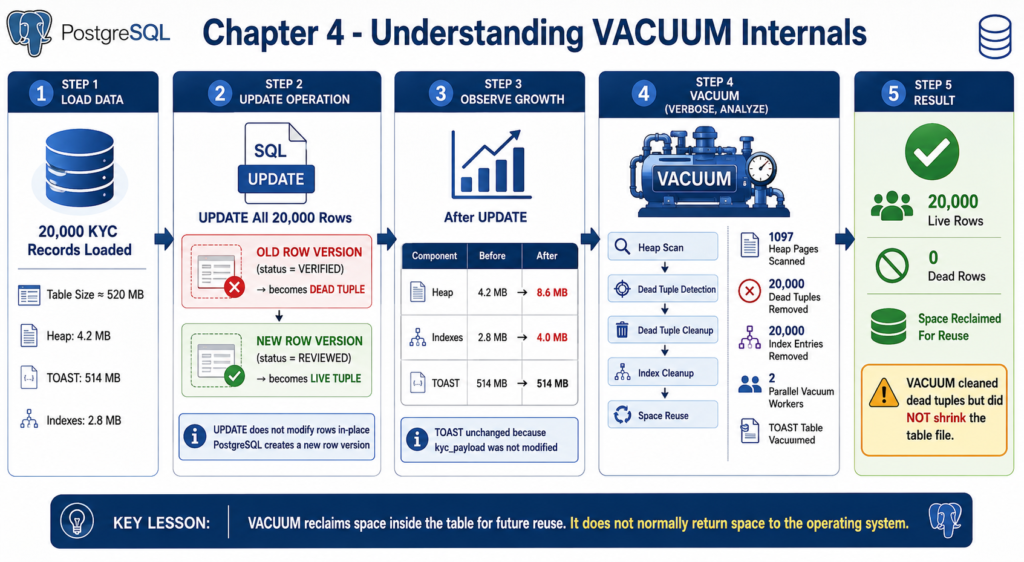
What changed most clearly is the heap:
4.2 MB→8.6 MB
That tells us the UPDATE created new heap row versions. The TOAST area stayed at 514 MB
Updating a row does not necessarily rewrite TOAST data. PostgreSQL only creates new TOAST values when the toasted column itself changes.
# Demo 5: Run VACUUM VERBOSE

psql --port=5432 --username=postgres -d creditcards -c "
VACUUM (VERBOSE, ANALYZE) consumer.kyc;
"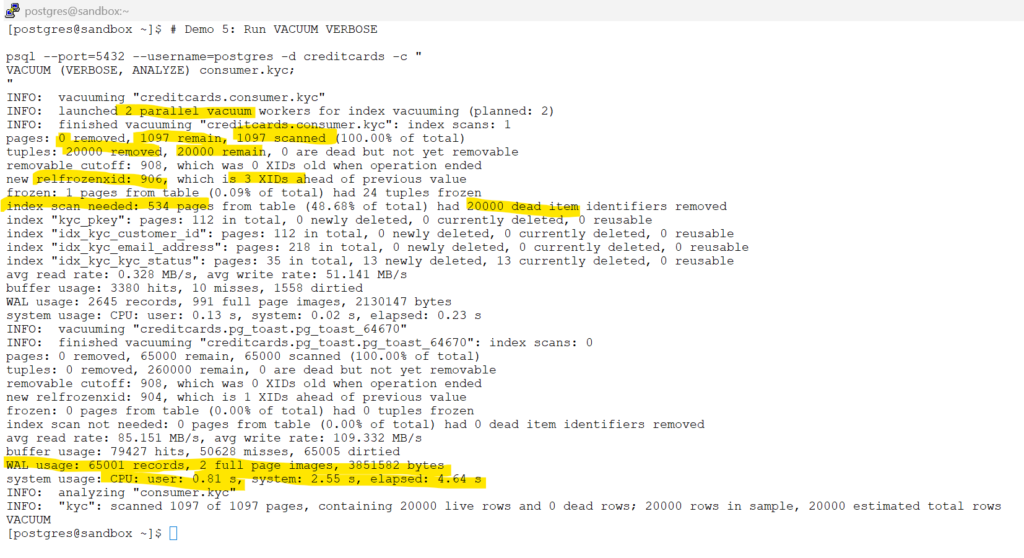
Key Observations
- VACUUM scanned all 1,097 heap pages.
- 20,000 dead tuples were removed.
- No long-running transactions blocked cleanup.
- 20,000 obsolete index entries were removed.
- The TOAST table was vacuumed separately.
- Two parallel workers were used for index cleanup.
Long Running Transactions Preventing VACUUM Cleanup
This is one of the most common production problems, which can stop VACUUM from cleaning dead tuples.
In this demo , we will have 2 sessions opened.
Session A and Session B.
Open Session A:
# Login to database
psql --port=5432 --username=postgres -d creditcards--Leave the transaction open. Do no commit.
BEGIN;
SELECT
txid_current(),
now();
SELECT count(*)
FROM consumer.kyc;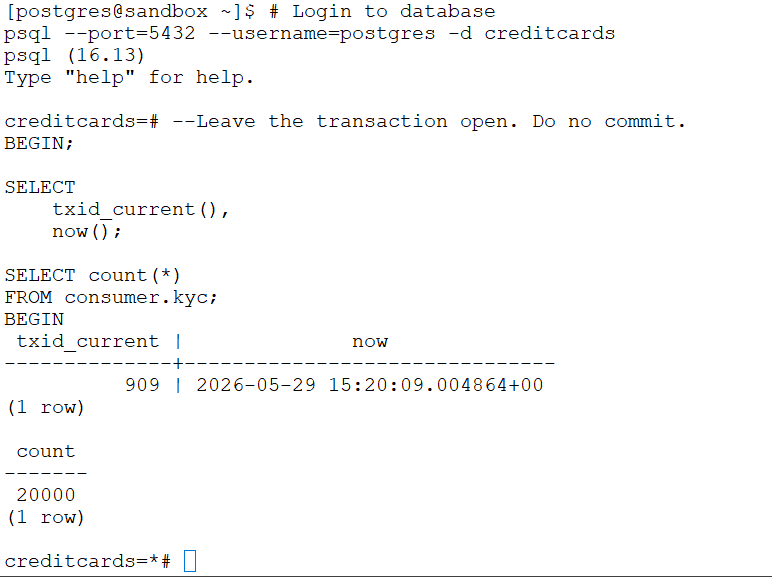
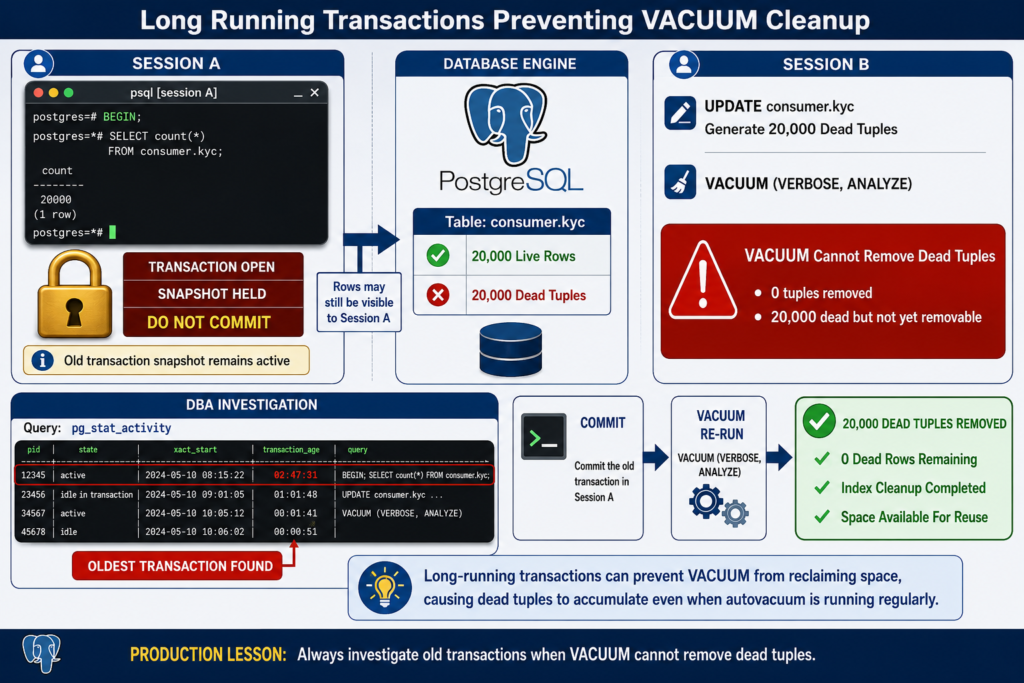
Session A now holds an old transaction snapshot.
PostgreSQL must preserve row versions that may still be visible to this transaction.
Open Session B:
# Demo 9: Generate new dead tuples while Session A remains open
#  Generate new dead tuples while Session A remains open

psql --port=5432 --username=postgres -d creditcards -c "
UPDATE consumer.kyc
SET
    remarks = remarks || ' - LONGTXN',
    updated_at = clock_timestamp();
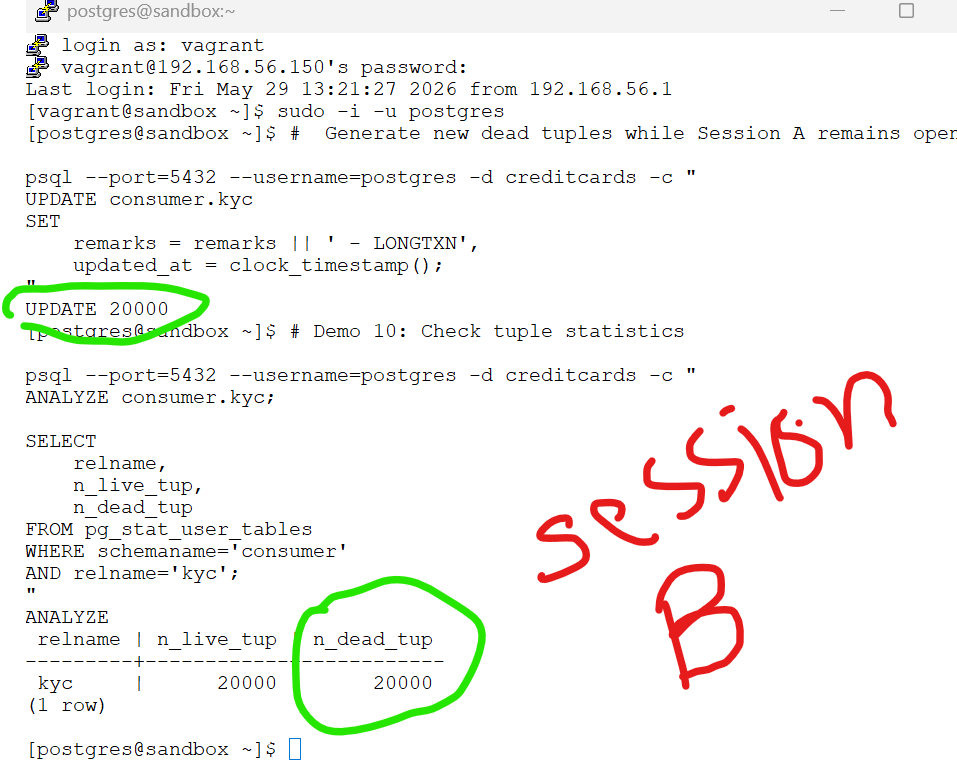
"This creates another: 20,000 dead tuples
#  Check tuple statistics

psql --port=5432 --username=postgres -d creditcards -c "
ANALYZE consumer.kyc;

SELECT
    relname,
    n_live_tup,
    n_dead_tup
FROM pg_stat_user_tables
WHERE schemaname='consumer'
AND relname='kyc';
"
# Run VACUUM while long transaction is active

psql --port=5432 --username=postgres -d creditcards -c "
VACUUM (VERBOSE, ANALYZE) consumer.kyc;
"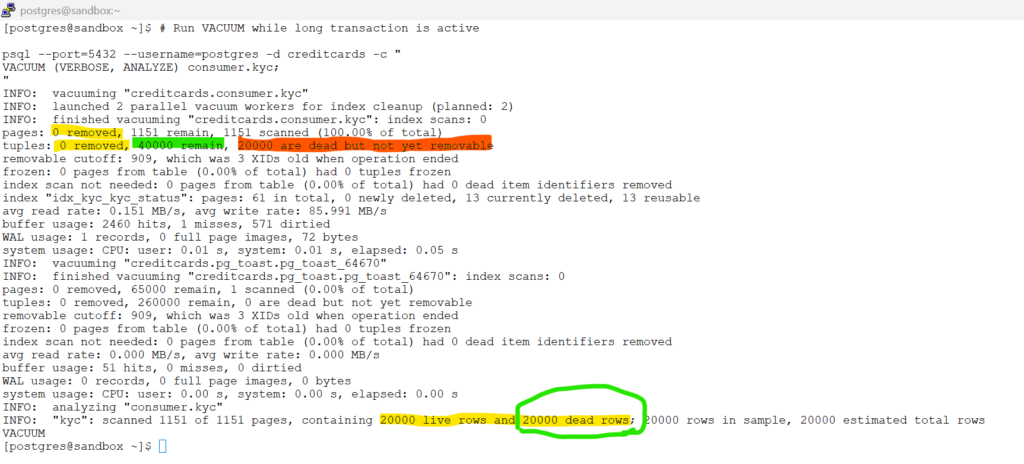
This is a perfect demonstration of how a long-running transaction can prevent VACUUM from reclaiming space. Although VACUUM successfully scanned all 1,151 heap pages, it was unable to remove any dead tuples because an older transaction was still holding a snapshot of the table.
The key evidence is shown in the output below:
tuples: 0 removed, 40000 remain, 20000 are dead but not yet removableEven though 20,000 dead tuples were identified, PostgreSQL could not safely remove them because they might still be visible to the active transaction. As a result, VACUUM completed its scan but deferred the cleanup until the blocking transaction was committed or rolled back.
This behavior highlights one of the most common causes of table bloat in production environments: long-running transactions can prevent VACUUM from reclaiming space, allowing dead tuples to accumulate even when autovacuum is running regularly.
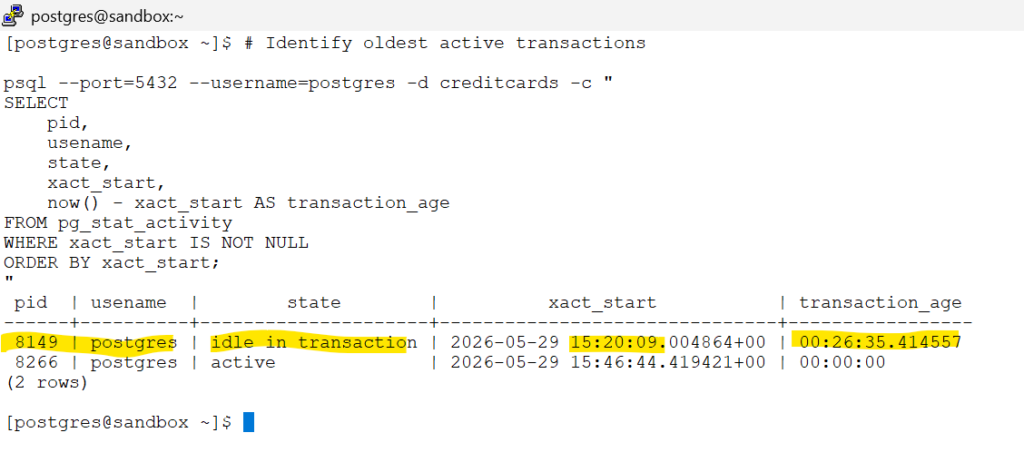
# Identify oldest active transactions

psql --port=5432 --username=postgres -d creditcards -c "
SELECT
    pid,
    usename,
    state,
    xact_start,
    now() - xact_start AS transaction_age
FROM pg_stat_activity
WHERE xact_start IS NOT NULL
ORDER BY xact_start;
"
Back in Session A:
-- back in session where we started the BEIN statement
COMMIT;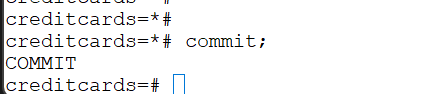
# Run VACUUM after committing the long transaction

psql --port=5432 --username=postgres -d creditcards -c "
VACUUM (VERBOSE, ANALYZE) consumer.kyc;
"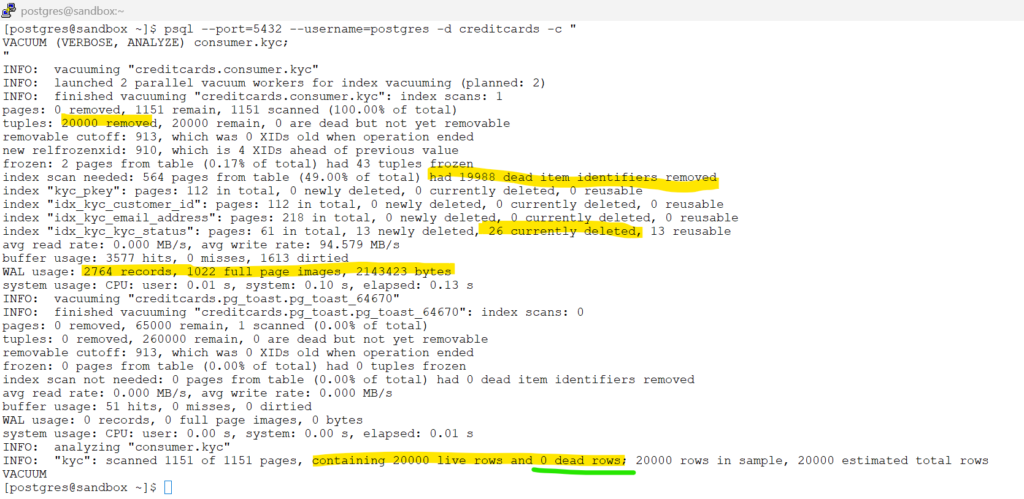
- After committing the long-running transaction, VACUUM was able to successfully remove the previously blocked 20,000 dead tuples, reducing the dead tuple count to zero.
- The output confirms that VACUUM performed both heap cleanup and index cleanup, removing nearly 20,000 obsolete index entries that were still referencing old row versions.
- Although dead tuples were removed, VACUUM did not shrink the physical table files. Instead, PostgreSQL marked the freed space as reusable for future INSERT and UPDATE operations.
- This demonstration highlights one of the most important PostgreSQL maintenance concepts: long-running transactions can prevent VACUUM from reclaiming space, leading to table bloat even when VACUUM or autovacuum is running regularly.
Chapter 5 : Understanding Autovacuum Architecture
5.1 What Autovacuum Does
5.1 What Autovacuum Does
Manually running VACUUM on hundreds or thousands of tables is not practical. PostgreSQL solves this problem through autovacuum, a built-in background maintenance framework that automatically performs VACUUM and ANALYZE operations as tables change over time.
Let us reset the original settings for kyc table – (in our previous chapters we had disabled the autovacuum, now lets enable it back to default).
# Remove the table-level autovacuum override and restore default autovacuum behavior.
psql --port=5432 --username=postgres -d creditcards -c "
ALTER TABLE consumer.kyc RESET (
    autovacuum_enabled
);
"# Verify that no table-level autovacuum override exists.
psql --port=5432 --username=postgres -d creditcards -c "
SELECT
relname,
reloptions
FROM pg_class
WHERE relname = 'kyc';
"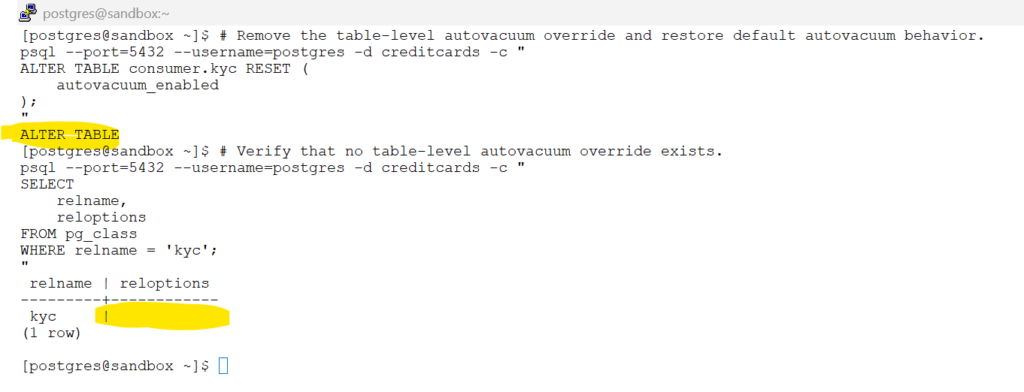
The table no longer has a custom autovacuum setting and will inherit the cluster-wide autovacuum configuration.
# Display all autovacuum-related configuration parameters.
psql --port=5432 --username=postgres -d creditcards -c "
SELECT
    name,
    setting,
    unit,
    source
FROM pg_settings
WHERE name LIKE 'autovacuum%'
ORDER BY name;
"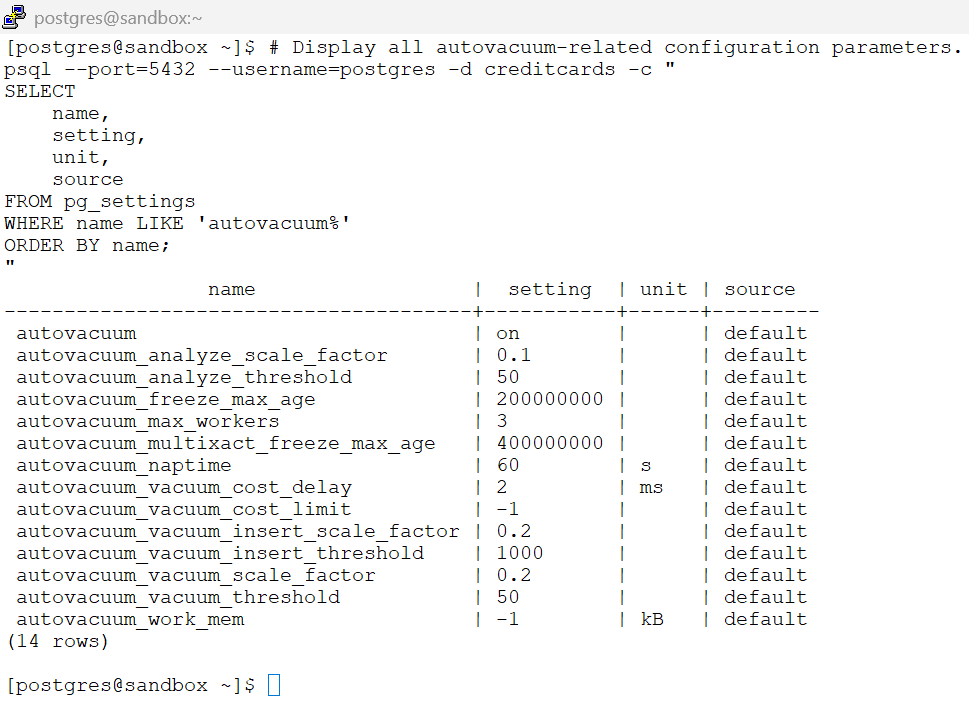
PostgreSQL ships with
autovacuumenabled by default. These parameters determine when maintenance occurs, how frequently workers run, and when VACUUM or ANALYZE operations are triggered. We will explore each of these settings throughout this chapter.
5.2 Architecture Overview
5.2 Architecture Overview
A simple diagram :
                    Autovacuum Launcher
                              │
                              │
                 Wakes up every autovacuum_naptime
                           (Default: 60s)
                              │
                              ▼
            Scans statistics and identifies tables
                   requiring maintenance
                              │
                              ▼
         ┌─────────────────────────────────────┐
         │     Autovacuum Worker Pool          │
         │     (Default: 3 Workers)            │
         └─────────────────────────────────────┘
                 │           │           │
                 ▼           ▼           ▼
             Worker 1    Worker 2    Worker 3
                 │           │           │
                 ▼           ▼           ▼
          VACUUM/ANALYZE VACUUM/ANALYZE VACUUM/ANALYZE
                 │           │           │
└──────► Database Tables ◄──────┘- PostgreSQL uses a launcher process and one or more worker processes.
- The launcher does not vacuum tables itself.
- The launcher identifies tables requiring maintenance.
- Workers perform the
actualVACUUM and ANALYZE operations.
# Display autovacuum-related background processes.
psql --port=5432 --username=postgres -d creditcards -c "
SELECT
    pid,
    backend_type,
    state
FROM pg_stat_activity
WHERE backend_type LIKE 'autovacuum%';
"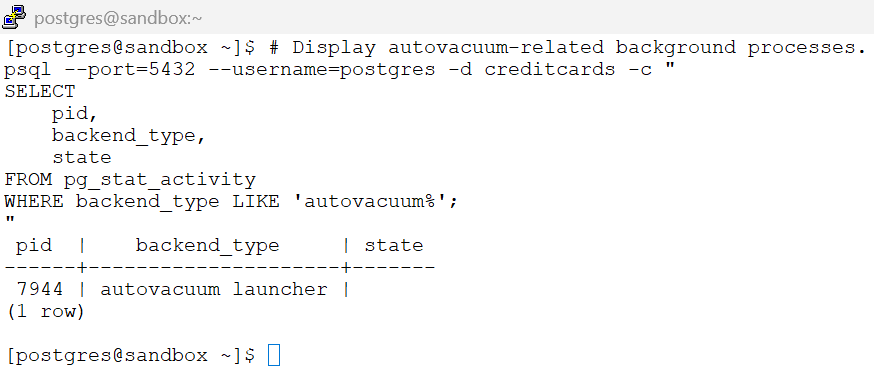
Depending on activity you may also see:
 pid  |      backend_type      | state
------+------------------------+-------
 7944 | autovacuum launcher    |
 5148 | autovacuum worker      | active
Launcher Process
The launcher is a dedicated PostgreSQL background process responsible for:
- waking up periodically
- checking table statistics
- identifying tables requiring maintenance
- assigning work to available workers
The launcher never performs VACUUM itself.
Its job is scheduling.
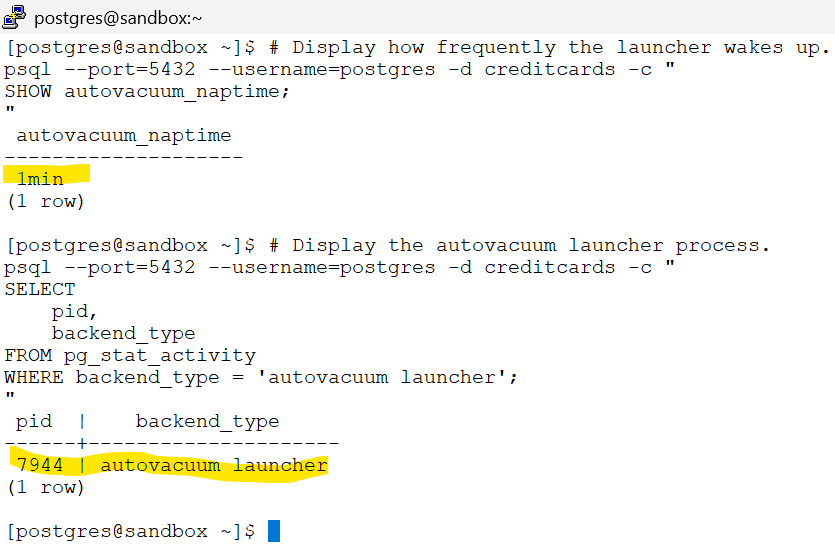
# Display how frequently the launcher wakes up.
psql --port=5432 --username=postgres -d creditcards -c "
SHOW autovacuum_naptime;
"By default, the launcher wakes up every 60 seconds and evaluates whether any tables require maintenance.
# Display the autovacuum launcher process.
psql --port=5432 --username=postgres -d creditcards -c "
SELECT
    pid,
    backend_type
FROM pg_stat_activity
WHERE backend_type = 'autovacuum launcher';
"
Worker Processes
Worker processes perform the actual maintenance work:
- VACUUM
- ANALYZE
- FREEZE operations
Workers are created by the launcher when maintenance is required.
# Display the maximum number of autovacuum workers.
psql --port=5432 --username=postgres -d creditcards -c "
SHOW autovacuum_max_workers;
"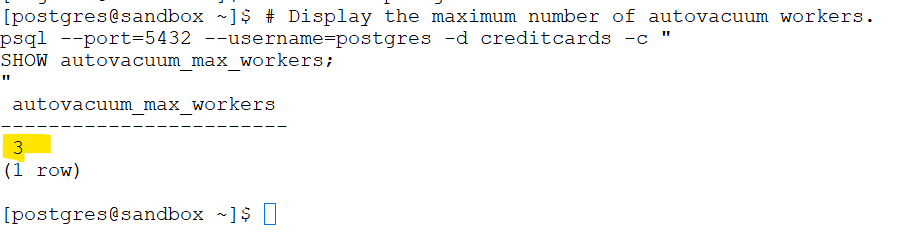
By default, PostgreSQL can run up to three autovacuum workers simultaneously.
Key Takeaways
- Autovacuum consists of a launcher and worker processes.
- The launcher identifies tables requiring maintenance.
- Workers perform VACUUM and ANALYZE operations.
autovacuum_naptimecontrols how often the launcher checks tables.autovacuum_max_workerscontrols how many workers can run simultaneously.
5.3 Maintenance Triggers and Statistics Refresh
5.3 Maintenance Triggers and Statistics Refresh
Autovacuum does not continuously vacuum every table in the database.
Instead, PostgreSQL periodically evaluates whether a table requires maintenance by checking two independent triggers:
| Maintenance Task | Purpose |
|---|---|
| AUTOANALYZE | Refresh optimizer statistics |
| AUTOVACUUM | Remove dead tuples created by UPDATE and DELETE operations |
Understanding these triggers is important because they determine when PostgreSQL decides to perform maintenance automatically.
5.3.1 Verify Current Autovacuum Settings
Before demonstrating the trigger calculations, let’s review the current configuration.
# Verify the current autovaccum settings
psql --port=5432 --username=postgres -d creditcards -x -c "
SELECT
    current_setting('autovacuum') AS autovacuum,
    current_setting('autovacuum_vacuum_threshold') AS vacuum_threshold,
    current_setting('autovacuum_vacuum_scale_factor') AS vacuum_scale_factor,
    current_setting('autovacuum_analyze_threshold') AS analyze_threshold,
    current_setting('autovacuum_analyze_scale_factor') AS analyze_scale_factor,
    current_setting('autovacuum_naptime') AS autovacuum_naptime;
"-[ RECORD 1 ]--------+-----
autovacuum | on
vacuum_threshold | 50
vacuum_scale_factor | 0.2
analyze_threshold | 50
analyze_scale_factor | 0.1
autovacuum_naptime | 1min
5.3.2 Understanding the Trigger Formulas
PostgreSQL uses separate formulas for AUTOANALYZE and AUTOVACUUM.
AUTOANALYZE Trigger
Analyze Trigger =
autovacuum_analyze_threshold + (autovacuum_analyze_scale_factor × Number of Rows)
Default values:
autovacuum_analyze_threshold = 50
autovacuum_analyze_scale_factor = 0.10
AUTOVACUUM Trigger
Vacuum Trigger =
autovacuum_vacuum_threshold + (autovacuum_vacuum_scale_factor × Number of Rows)
Default values:
autovacuum_vacuum_threshold = 50
autovacuum_vacuum_scale_factor = 0.20
Notice that the default ANALYZE scale factor is 10%, while the default VACUUM scale factor is 20%.
This means AUTOANALYZE typically becomes eligible before AUTOVACUUM.
5.3.3 Example Trigger Calculations
The following table shows how PostgreSQL calculates maintenance thresholds as table size increases.
| Table Size (Rows) | Analyze Trigger (10%) | Vacuum Trigger (20%) |
|---|---|---|
| 1,000 | 50 + 100 = 150 | 50 + 200 = 250 |
| 10,000 | 50 + 1,000 = 1,050 | 50 + 2,000 = 2,050 |
| 100,000 | 50 + 10,000 = 10,050 | 50 + 20,000 = 20,050 |
| 1,000,000 | 50 + 100,000 = 100,050 | 50 + 200,000 = 200,050 |
As tables become larger, PostgreSQL allows more changes before maintenance is triggered.
5.3.4 Capture Baseline
# Capture the baseline:
psql --port=5432 --username=postgres -d creditcards -x -c "
SELECT
    schemaname,
    relname,
    n_live_tup AS total_rows,
    n_dead_tup AS dead_rows,
    last_vacuum,
    last_autovacuum,
    last_analyze,
    last_autoanalyze
FROM pg_stat_user_tables
WHERE relname='kyc'
AND schemaname='consumer';
"-[ RECORD 1 ]----+------------------------------
schemaname | consumer
relname | kyc
total_rows | 20000
dead_rows | 0
last_vacuum | <-- Manually run via 'VACUUM;'
last_autovacuum | 2026-05-30 11:57:00.717263+00<-- Last automatic VACUUM
last_analyze | <-- Manually run via 'ANALYZE;'
last_autoanalyze | 2026-05-30 11:57:02.462312+00<-- Last automatic ANALYZE
Note down the last_autovacuum and last_autoanalyze timings.
5.3.5 Calculate Maintenance Thresholds for consumer.kyc
Using the formulas above:
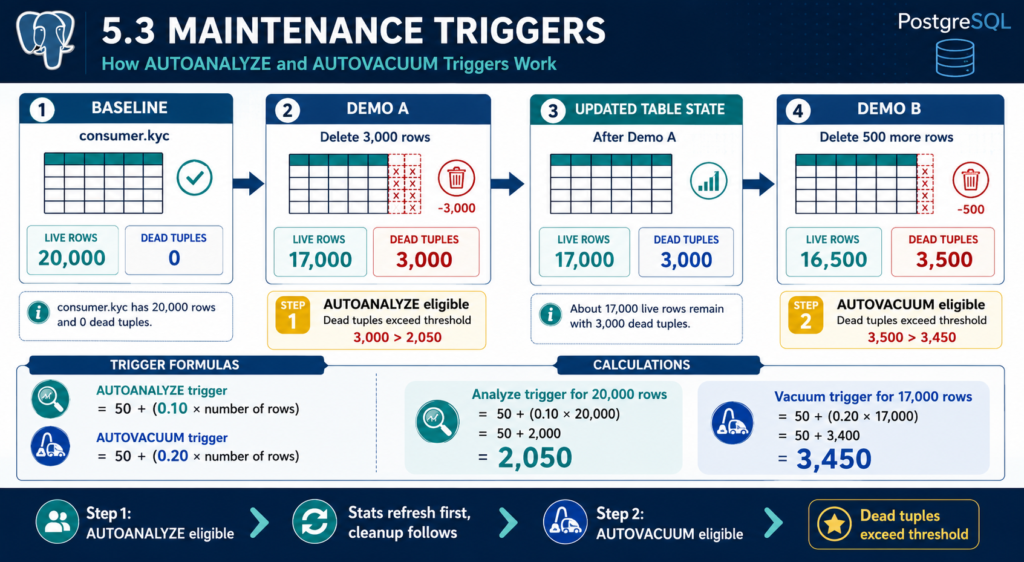
AUTOANALYZE
autovacuum_analyze_threshold + (autovacuum_analyze_scale_factor × Number of Rows)
= 50 + (0.10 × 20,000)
= 50 + 2,000
= 2,050AUTOANALYZE becomes eligible after approximately 2,050 changed rows.
AUTOVACUUM
autovacuum_vacuum_threshold + (autovacuum_vacuum_scale_factor × Number of Rows)
= 50 + (0.20 × 20,000)
= 50 + 4,000
= 4,050AUTOVACUUM becomes eligible after approximately 4,050 dead tuples.
At this point we know:
| Maintenance Task | Trigger Point |
|---|---|
| AUTOANALYZE | 2,050 rows |
| AUTOVACUUM | 4,050 rows |
5.3.6 Demo — Trigger AUTOANALYZE
To demonstrate AUTOANALYZE, delete approximately 15% of the table.
# Delete 3k records - 15% of the table entries.
psql --port=5432 --username=postgres -d creditcards -c "
DELETE FROM consumer.kyc
WHERE kyc_id IN (
SELECT kyc_id
FROM consumer.kyc
ORDER BY kyc_id
LIMIT 3000
);
"DELETE 3000
Compare against the trigger values:
AUTOANALYZE Trigger = 2,050
Dead Tuples = 3,0003,000 > 2,050AUTOANALYZE becomes eligible.
After 1 min of time, please check the baseline : to see autoanalyze has been triggered.
# Capture the baseline:
psql --port=5432 --username=postgres -d creditcards -x -c "
SELECT
    schemaname,
    relname,
    n_live_tup AS total_rows,
    n_dead_tup AS dead_rows,
    last_vacuum,
    last_autovacuum,
    last_analyze,
    last_autoanalyze
FROM pg_stat_user_tables
WHERE relname='kyc'
AND schemaname='consumer';
"
-[ RECORD 1 ]----+------------------------------
schemaname | consumer
relname | kyc
total_rows | 17000
dead_rows | 3000
last_vacuum |
last_autovacuum | 2026-05-30 11:57:00.717263+00
last_analyze |
last_autoanalyze | 2026-05-30 16:47:27.203331+00 <-- Last automatic ANALYZE
However: autovaccum is not trigerred because , the trigger has still not met the condition.
AUTOVACUUM Trigger = 4,050
Dead Tuples = 3,000Result:
3,000 < 4,050AUTOVACUUM has not yet reached its trigger point.
What This Demonstrates
The table has changed enough to require refreshed statistics, but not enough dead tuples to require vacuum cleanup.
This explains why AUTOANALYZE typically runs more frequently than AUTOVACUUM.
AUTOANALYZE outcome: Updates planner statistics (pg_statistic) so PostgreSQL can choose more accurate execution plans.
5.3.6 Demo — Trigger AUTOVACUUM
After the first delete, approximately 17,000 live rows remain.
The vacuum threshold is recalculated using the current table size.
Recalculate the Vacuum Trigger
Rows Remaining = 17,000autovacuum_vacuum_threshold + (autovacuum_vacuum_scale_factor × Number of Rows)
= 50 + (0.20 × 17,000)
= 50 + 3,400
= 3,450The new AUTOVACUUM trigger becomes:
3,450 dead tuplesAt this stage the table already contains:
3,000 dead tuplesDelete an additional 500 rows.
# Delete 500 records
psql --port=5432 --username=postgres -d creditcards -c "
DELETE FROM consumer.kyc
WHERE kyc_id IN (
SELECT kyc_id
FROM consumer.kyc
ORDER BY kyc_id
LIMIT 500
);
"Total dead tuples now become approximately:
3,000 + 500
= 3,500 dead tuplesCompare against the recalculated vacuum threshold:
3,500 > 3,450AUTOVACUUM now becomes eligible.
# Capture the baseline:
psql --port=5432 --username=postgres -d creditcards -x -c "
SELECT
    schemaname,
    relname,
    n_live_tup AS total_rows,
    n_dead_tup AS dead_rows,
    last_vacuum,
    last_autovacuum,
    last_analyze,
    last_autoanalyze
FROM pg_stat_user_tables
WHERE relname='kyc'
AND schemaname='consumer';
"-[ RECORD 1 ]----+------------------------------
schemaname | consumer
relname | kyc
total_rows | 14057
dead_rows | 0
last_vacuum |
last_autovacuum | 2026-05-30 17:52:28.392799+00<-- Last automatic VACUUM
last_analyze |
last_autoanalyze | 2026-05-30 16:47:27.203331+00
Key Takeaways
✅ PostgreSQL maintains separate triggers for AUTOANALYZE and AUTOVACUUM.
✅ AUTOANALYZE uses a default scale factor of 10%.
✅ AUTOVACUUM uses a default scale factor of 20%.
✅ On a 20,000-row table, AUTOANALYZE becomes eligible at approximately 2,050 row changes.
✅ After deleting 3,000 rows, AUTOANALYZE becomes eligible.
✅ After the table shrinks to 17,000 rows, the vacuum trigger drops to approximately 3,450 dead tuples.
✅ Deleting an additional 500 rows increases dead tuples to approximately 3,450, causing AUTOVACUUM to become eligible.
This demonstrates why PostgreSQL often refreshes statistics before performing dead tuple cleanup and how maintenance thresholds dynamically adjust as table size changes.
5.4 Monitoring Autovacuum Health
5.4 Monitoring Autovacuum Health
Autovacuum is not something you should just assume is working in the background.
That evidence comes from PostgreSQL’s statistics views and logs. These tell you whether dead tuples are being cleaned, whether autovacuum is running on time, whether planner statistics are fresh, and whether anything is silently going wrong.
Key Takeaways
✅ pg_stat_user_tables shows whether tables are accumulating dead tuples.
✅ pg_stat_progress_vacuum shows vacuum activity while it is happening.
✅ last_autovacuum and last_autoanalyze help you spot stale maintenance.
✅ Logs can confirm whether autovacuum is running, how long it took, and what it cleaned.
⚠️ Rising dead tuples with old timestamps usually mean something is off.
❌ If autovacuum is blocked or delayed too long, bloat starts building up.
5.4.1 Monitoring Autovacuum Activity
# Connect to the database you want to monitor.
psql --port=5432 --username=postgres --dbname=<database_name>replace the port 5432 and replace the <database_name> – accordingly and use below sql commands in respective database in psql prompt
-- Show autovacuum and autoanalyze status for all user tables in the current database.
SELECT
    schemaname,
    relname AS table_name,
    n_live_tup AS live_tuples,
    n_dead_tup AS dead_tuples,
    last_autovacuum,
    last_autoanalyze
FROM pg_stat_user_tables
WHERE schemaname NOT IN ('pg_catalog', 'information_schema')
ORDER BY n_dead_tup DESC;-- Show all currently running vacuum workers in the current database.
SELECT
pid,
relid::regclass AS table_name,
phase,
heap_blks_scanned,
heap_blks_total
FROM pg_stat_progress_vacuum;-- Show the most recently autoanalyzed tables in the current database.
SELECT
schemaname,
relname AS table_name,
last_autoanalyze
FROM pg_stat_user_tables
WHERE schemaname NOT IN ('pg_catalog', 'information_schema')
ORDER BY last_autoanalyze DESC NULLS LAST;-- Show the tables with the highest dead tuple counts in the current database.
SELECT
schemaname,
relname AS table_name,
n_live_tup AS live_tuples,
n_dead_tup AS dead_tuples,
last_autovacuum,
last_autoanalyze
FROM pg_stat_user_tables
WHERE schemaname NOT IN ('pg_catalog', 'information_schema')
ORDER BY n_dead_tup DESC
LIMIT 20;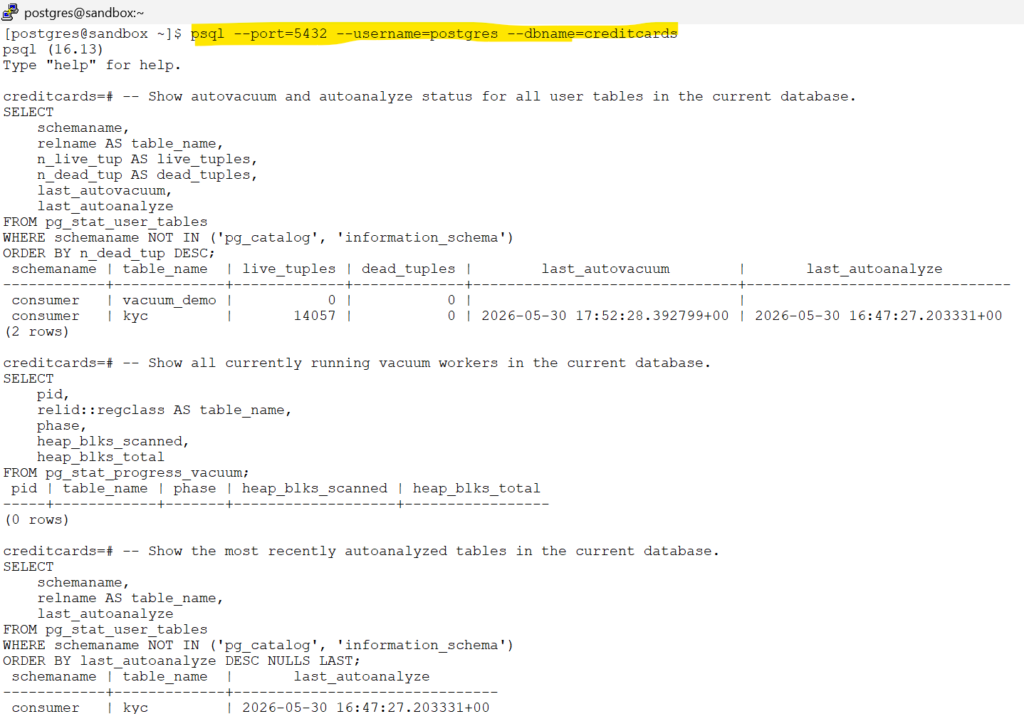
5.4.2 Monitoring Current Vacuum Workers
5.4.2.1 Why Monitor Vacuum Workers?
pg_stat_user_tablesshows historical statistics.- Sometimes you need real-time visibility.
- PostgreSQL provides
pg_stat_progress_vacuumfor active vacuum operations.
✅ Use this view when you want to know whether VACUUM or AUTOVACUUM is currently running.
5.4.2.2 View Active Vacuum Operations
-- Show all currently running vacuum workers in the current database.
SELECT
    pid,
    relid::regclass AS table_name,
    phase,
    heap_blks_scanned,
    heap_blks_total
FROM pg_stat_progress_vacuum;5.4.2.3 Understanding the Output
The information returned by pg_stat_progress_vacuum helps us understand what PostgreSQL is currently doing during a vacuum operation.
Sample Output
 pid  |     table_name     |      phase       | heap_blks_scanned | heap_blks_total
------+--------------------+------------------+-------------------+----------------
 5432 | consumer.kyc       | scanning heap    | 12000             | 17000
Column Descriptions
| Column | Description |
|---|---|
pid | Backend process running the vacuum |
table_name | Table currently being processed |
phase | Current stage of the vacuum |
heap_blks_scanned | Number of table blocks already scanned |
heap_blks_total | Total table blocks to be scanned |
Example Interpretation
In the example above:
✅ Vacuum worker process 5432 is currently active.
✅ The worker is processing table consumer.kyc.
✅ PostgreSQL is currently in the Scanning Heap phase.
✅ 12,000 of 17,000 table blocks have already been scanned.
This indicates the vacuum operation is actively progressing.
Production Note
⚠️ Large tables may remain visible in this view for several minutes.
⚠️ Small tables may finish so quickly that no rows appear when the query is executed.
5.4.2.4 Understanding Vacuum Phases
Initializing
      ↓
Scanning Heap
      ↓
Vacuuming Indexes
      ↓
Cleaning Up Indexes
      ↓
Truncating Heap
      ↓
Complete
5.5 Configuration and Tuning
5.5 Configuration and Tuning
💡 There is no one-size-fits-all autovacuum configuration.
Effective autovacuum tuning begins with understanding:
- How frequently tables are updated or deleted
- Which tables experience the highest transaction volume
- How quickly dead tuples accumulate
- Query performance requirements
- Maintenance windows and resource constraints
5.5.1 Where Should Autovacuum Configuration Be Applied?
PostgreSQL allows autovacuum settings to be configured at multiple levels.
In practice, most environments use a combination of:
| Configuration Level | Use Case |
|---|---|
| Cluster-wide | Default behavior for all databases and tables |
| Database-level | Rarely used; affects all tables within a database |
| Table-level | Most common tuning approach for production systems |
💡 In large production environments, global settings provide a baseline, while heavily updated tables are typically tuned individually using per-table autovacuum settings.
Recommended Approach
A common operational strategy is:
- Define sensible cluster-wide defaults.
- Observe workload patterns.
- Identify high-churn tables.
- Apply targeted per-table tuning where needed.
This approach avoids unnecessary complexity while allowing critical tables to be maintained more aggressively.
5.5.2 Modular Configuration with 01-autovacuum.conf
PostgreSQL allows configuration settings to be organized across multiple files. In this lab, all autovacuum-related parameters are maintained in a dedicated file named 01-autovacuum.conf.
Using a separate configuration file keeps vacuum settings isolated from other areas such as logging, auditing, replication, and backup configuration. It also makes future tuning, troubleshooting, and change management significantly easier.
For demonstration purposes, the file is initially created as an empty placeholder:
# Create an empty autovacuum configuration file
echo -e "" > /var/lib/pgsql/onboarding/conf.d/01-autovacuum.conf5.5.3 Reviewing Current Autovacuum Settings
Before modifying autovacuum behavior, it is useful to understand the current configuration. PostgreSQL exposes all runtime parameters through the pg_settings view, allowing administrators to verify active values and determine where settings originated.
This is particularly helpful in environments that use multiple configuration files, as it confirms whether a parameter is coming from a custom file or from PostgreSQL defaults.
View All Autovacuum Parameters
# Display all autovacuum-related parameters and their active values
psql --port=5432 --username=postgres -d creditcards -c "
SELECT
    name,
    setting,
    unit,
    source,
    sourcefile,
    sourceline
FROM pg_settings
WHERE name LIKE 'autovacuum%'
ORDER BY name;
"name | setting | unit | source | sourcefile | sourceline
---------------------------------------+-----------+------+---------+------------+------------
autovacuum | on | | default | |
autovacuum_analyze_scale_factor | 0.1 | | default | |
autovacuum_analyze_threshold | 50 | | default | |
autovacuum_freeze_max_age | 200000000 | | default | |
autovacuum_max_workers | 3 | | default | |
autovacuum_multixact_freeze_max_age | 400000000 | | default | |
autovacuum_naptime | 60 | s | default | |
autovacuum_vacuum_cost_delay | 2 | ms | default | |
autovacuum_vacuum_cost_limit | -1 | | default | |
autovacuum_vacuum_insert_scale_factor | 0.2 | | default | |
autovacuum_vacuum_insert_threshold | 1000 | | default | |
autovacuum_vacuum_scale_factor | 0.2 | | default | |
autovacuum_vacuum_threshold | 50 | | default | |
autovacuum_work_mem | -1 | kB | default | |
(14 rows)
Why This Matters
Whenever configuration changes are made, this query should be executed again to verify that PostgreSQL has successfully loaded the new values.
It also helps identify situations where a parameter is still using the built-in default rather than a custom setting defined in a configuration file.
💡 Always verify active settings from PostgreSQL itself rather than assuming a configuration file has been loaded correctly.
5.5.4 Understanding the Most Important Autovacuum Parameters
PostgreSQL exposes many autovacuum-related settings, but only a handful are commonly reviewed and tuned during day-to-day administration.
The following parameters have the greatest impact on autovacuum behavior:
| Parameter | Default | Purpose | When to Consider Tuning |
|---|---|---|---|
autovacuum | on | Enables or disables the autovacuum subsystem. | Rarely changed. Should remain enabled in production. |
autovacuum_naptime | 60s | How often the Autovacuum Launcher wakes up and checks for work. | Large environments with many active tables. |
autovacuum_max_workers | 3 | Maximum number of autovacuum workers that can run simultaneously. | When maintenance cannot keep up with table activity. |
autovacuum_vacuum_threshold | 50 | Fixed number of dead tuples required before vacuum becomes eligible. | Frequently updated small tables. |
autovacuum_vacuum_scale_factor | 0.2 (20%) | Percentage of table rows contributing to the vacuum trigger. | High-write OLTP workloads. |
autovacuum_analyze_threshold | 50 | Fixed number of row modifications required before autoanalyze becomes eligible. | Tables requiring fresh planner statistics. |
autovacuum_analyze_scale_factor | 0.1 (10%) | Percentage of table changes contributing to the analyze trigger. | Frequently changing tables. |
Key Takeaways
✅ Most production tuning focuses on thresholds and scale factors.
✅ Lower scale factors cause maintenance to occur more frequently.
✅ autovacuum_max_workers becomes important as database size and table count grow.
✅ Always tune based on observed workload patterns rather than fixed formulas.
5.5.5 Building a Lab-Friendly Autovacuum Configuration
The default PostgreSQL settings are designed to work across a wide range of environments. For demonstration purposes, however, we want autovacuum activity to occur more frequently so that its behavior can be observed within a reasonable timeframe.
The following settings provide a lab-friendly configuration while remaining easy to understand.
Update 01-autovacuum.conf
# Configure lab-friendly autovacuum settings
echo -e "autovacuum = on
autovacuum_naptime = '30s'
autovacuum_max_workers = 5
autovacuum_vacuum_scale_factor = 0.10
autovacuum_vacuum_threshold = 50
autovacuum_analyze_scale_factor = 0.10
autovacuum_analyze_threshold = 50" >> /var/lib/pgsql/onboarding/conf.d/01-autovacuum.conf# Reload configuration without restarting PostgreSQL
psql --port=5432 --username=postgres -d postgres -c "
SELECT pg_reload_conf();
"Verify Active Settings
# Visualization: show only autovacuum-related parameters, along with the config file and line number they came from
psql --port=5432 --username=postgres -d postgres -c "
SELECT
    name,
    setting,
    unit,
    sourcefile,
    sourceline
FROM pg_settings
WHERE name LIKE 'autovacuum%'
  AND sourcefile IS NOT NULL
ORDER BY sourcefile, sourceline, name;"

# Verify that PostgreSQL loaded the updated values
psql --port=5432 --username=postgres -d creditcards -c "
SELECT
    name,
    setting,
    source
FROM pg_settings
WHERE name LIKE 'autovacuum%'
ORDER BY name;"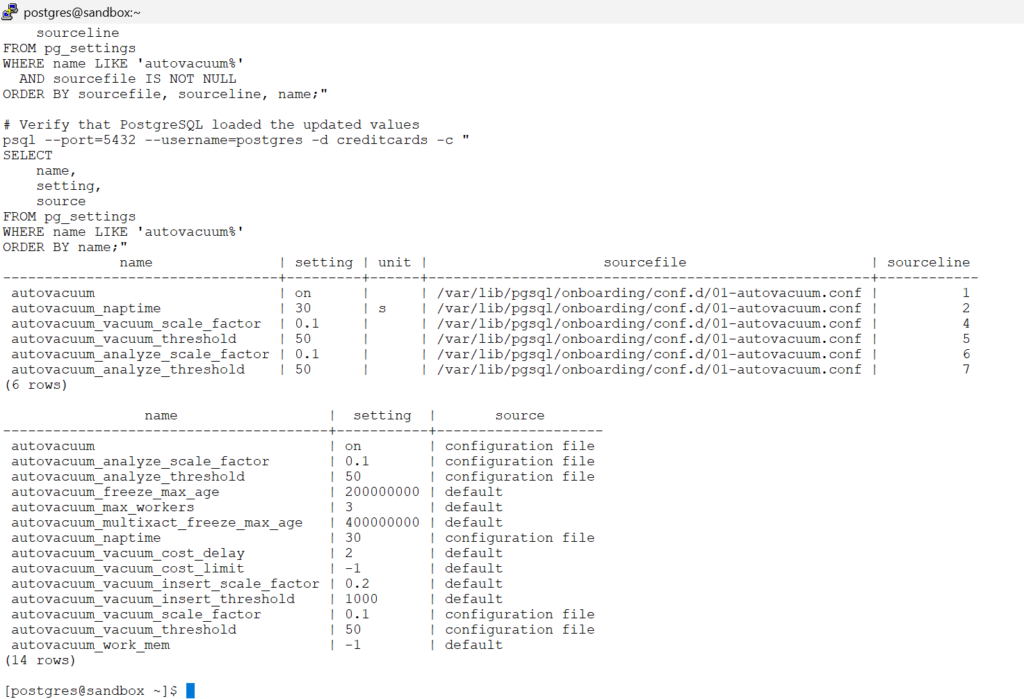
💡 These values are intended for demonstration purposes. Production systems should be tuned according to actual workload characteristics rather than copied directly from a lab environment.
5.5.6 Per-Table Tuning
While cluster-wide settings provide a sensible baseline, production databases often contain tables with very different workload patterns.
For example, consider the consumer.kyc table in our lab.
In a banking environment, a KYC (Know Your Customer) table may experience:
- Frequent customer profile updates
- Address changes
- Contact information updates
- Compliance status modifications
- Periodic risk assessment updates
- Document verification workflows
As a result, rows may be updated many times throughout their lifecycle, generating a steady stream of dead tuples.
Using the same autovacuum settings for both a heavily updated KYC table and a rarely modified reference table may not be optimal. PostgreSQL allows autovacuum behavior to be adjusted at the individual table level, enabling maintenance to occur more aggressively where needed.
View Existing Table-Level Settings
# Check whether any table-specific autovacuum settings exist
psql --port=5432 --username=postgres -d creditcards -c "
SELECT
    relname,
    reloptions
FROM pg_class
WHERE relname = 'kyc';
"relname | reloptions
---------+------------
kyc |
(1 row)
Configure Table-Specific Autovacuum Settings
The following example reduces the vacuum and analyze scale factors for the consumer.kyc table:
# Apply table-specific autovacuum settings
psql --port=5432 --username=postgres -d creditcards -c "
ALTER TABLE consumer.kyc SET (
    autovacuum_vacuum_scale_factor = 0.05,
    autovacuum_vacuum_threshold = 50,
    autovacuum_analyze_scale_factor = 0.05,
    autovacuum_analyze_threshold = 50
);
"💡 Notice that we use 5% rather than an extremely aggressive value such as 2%.
The objective is not to trigger autovacuum as frequently as possible. The objective is to balance timely cleanup against maintenance overhead.
Lower scale factors result in:
✅ Earlier dead tuple cleanup
✅ More frequent statistics updates
❌ More autovacuum activity
❌ Increased CPU and I/O consumption
Verify Table-Level Settings
# Display table-specific autovacuum settings
psql --port=5432 --username=postgres -d creditcards -c "
SELECT
    relname,
    unnest(reloptions) AS individual_setting
FROM pg_class
WHERE relname = 'kyc';
"relname | individual_setting
---------+--------------------------------------
kyc | autovacuum_vacuum_scale_factor=0.05
kyc | autovacuum_vacuum_threshold=50
kyc | autovacuum_analyze_scale_factor=0.05
kyc | autovacuum_analyze_threshold=50
(4 rows)
Production Considerations
⚠️ Per-table tuning should be driven by observed workload patterns, not by applying aggressive settings everywhere.
A common production approach is:
- Start with cluster-wide defaults.
- Monitor dead tuple growth.
- Identify high-churn tables.
- Apply targeted tuning where necessary.
- Re-evaluate based on observed vacuum activity.
This keeps maintenance predictable while avoiding unnecessary overhead on less active tables.
Chapter Summary
At this point we have covered:
- How Autovacuum works
- When VACUUM and ANALYZE are triggered
- How to monitor autovacuum activity
- How to tune autovacuum globally
- How to tune autovacuum at the table level
Chapter 6 : Understanding Transaction IDs and VACUUM FREEZE
Chapter 6 : Understanding Transaction IDs and VACUUM FREEZE
In the previous chapters, we explored how VACUUM removes dead tuples, reduces table bloat, and helps maintain query performance.
Goal
By the end of this chapter, you will understand:
- What Transaction IDs (XIDs) are
- Why PostgreSQL freezes tuples
- What transaction wraparound means
- Why autovacuum performs anti-wraparound maintenance
- How to monitor freeze-related information
What You’ll Learn in This Chapter
Transaction IDs (XIDs)
          ↓
Finite XID Space
          ↓
Transaction Wraparound
          ↓
Wraparound Prevention
          ↓
VACUUM FREEZE
          ↓
Freeze Monitoring
          ↓
Anti-Wraparound Autovacuum
          ↓
Healthy PostgreSQL Cluster
6.1 Why VACUUM Does More Than Remove Dead Tuples
6.1 Why VACUUM Does More Than Remove Dead Tuples
Most PostgreSQL administrators first encounter VACUUM while dealing with table bloat.
As we learned in previous chapters, VACUUM helps PostgreSQL:
- Remove dead tuples created by UPDATE and DELETE operations
- Reclaim space for future reuse
- Maintain healthy table and index performance
- Support query planning through updated statistics
Because of this, many people think VACUUM is simply a cleanup tool.
In reality, VACUUM has another responsibility that is even more important:
Protecting the database from Transaction ID Wraparound.
- If PostgreSQL cannot properly manage transaction IDs, the database may eventually reach a state where it refuses new write operations to protect data integrity.
- This means VACUUM is not just a performance-maintenance tool.
- It is also a critical mechanism that keeps the database operational.
VACUUM Has Two Jobs
Throughout this chapter, think of VACUUM as performing two separate responsibilities:
| Responsibility | Purpose |
|---|---|
| Dead Tuple Cleanup | Removes obsolete row versions created by MVCC |
| Transaction ID Maintenance | Prevents Transaction ID Wraparound |
A Quick Preview
Every transaction in PostgreSQL receives a unique identifier called a Transaction ID (XID).
Let’s look at the current transaction ID:
# Check the current TXN ID
psql --port=5432 --username=postgres -d postgres -c "
SELECT txid_current();
"[postgres@sandbox ~]$ # Check the current TXN ID
psql --port=5432 --username=postgres -d postgres -c "
SELECT txid_current();
"
txid_current
--------------
950
(1 row)
🔍 Key Observation
- Every transaction consumes a Transaction ID (XID).
- Transaction IDs continuously increase over time.
⚠️ Potential Risk
- If old Transaction IDs are not properly managed, PostgreSQL can eventually stop accepting new write operations.
✅ Why VACUUM Matters
- Removes dead tuples created by MVCC.
- Helps prevent Transaction ID Wraparound.
- Keeps the database healthy and operational.
6.2 Understanding Transaction IDs (XIDs)
6.2 Understanding Transaction IDs (XIDs)
What Is a Transaction ID?
Every transaction executed in PostgreSQL receives a unique identifier called a Transaction ID (XID).
Think of an XID as a unique number assigned to a transaction.
For example:
| Transaction | Assigned XID |
|---|---|
| Transaction 1 | 750 |
| Transaction 2 | 751 |
| Transaction 3 | 752 |
Each new transaction consumes the next available XID.
Why PostgreSQL Uses XIDs
PostgreSQL uses Transaction IDs internally for several important purposes.
🔍 Key Uses of XIDs
- Identify individual transactions.
- Track which transaction created or modified a row.
- Determine row visibility for concurrent transactions.
- Support PostgreSQL’s MVCC architecture.
At this stage, the important thing to remember is simple:
Every transaction receives an XID, and PostgreSQL stores and uses these XIDs internally to manage data visibility.
Demo — Exploring the Hidden xmin Column
# Create a table for observing transaction IDs stored in rows
psql --port=5432 --username=postgres -d creditcards -c "
CREATE TABLE xid_demo (
    id      INT,
    remarks TEXT
);
"# Insert the first row
psql --port=5432 --username=postgres -d creditcards -c "
INSERT INTO xid_demo
VALUES (1, 'first row');
"View the Hidden xmin Column
# View the transaction ID that created the row
psql --port=5432 --username=postgres -d creditcards -c "
SELECT xmin, *
FROM xid_demo;
"xmin | id | remarks
------+----+-----------
952 | 1 | first row
(1 row)
Insert Another Row
# Insert a second row using a new transaction
psql --port=5432 --username=postgres -d creditcards -c "
INSERT INTO xid_demo
VALUES (2, 'second row');
"Check xmin Again
# Compare the transaction IDs stored for each row
psql --port=5432 --username=postgres -d creditcards -c "
SELECT xmin, *
FROM xid_demo;
"xmin | id | remarks
------+----+------------
952 | 1 | first row
953 | 2 | second row
(2 rows)
# Remove the demo table
psql --port=5432 --username=postgres -d creditcards -c "
DROP TABLE xid_demo;
"💡 What Did We Learn?
- 🆔 Every row remembers the transaction that created it.
- 👀 The hidden
xmincolumn shows the creator’s XID. - 🔄 New transactions consume new XIDs.
- ⚙️ PostgreSQL relies on XIDs to manage MVCC and data visibility.
6.3 Why PostgreSQL Cannot Count Forever
6.3 Why PostgreSQL Cannot Count Forever
🔍 What Happens to Transaction IDs Over Time?
We learned in the previous section that:
- 🆔 Every transaction receives a unique Transaction ID (XID).
- 🔄 New transactions continuously consume new XIDs.
- 📈 XID values keep increasing as the database processes more work.
This naturally raises an important question:
🤔 Can PostgreSQL keep generating Transaction IDs forever?
The answer is No.
⚙️ Transaction IDs Have a Maximum Value
Transaction IDs are stored using a fixed-size counter.
📊 Maximum Transaction ID value:
4,294,967,295Once PostgreSQL reaches this limit, it cannot continue increasing the number indefinitely.
Instead, the counter wraps around and starts again from the beginning.
🚗 Odometer Analogy
- 🔢 Imagine a car with a 4-digit odometer.
- 📈 The largest value it can display is 9999.
- ❌ It cannot display 10000 because only four digits exist.
- 🔄 After 9999, the next value becomes 0000.
PostgreSQL Transaction IDs follow a similar concept when their maximum value is reached.
⚠️ Why Is Wraparound Dangerous?
PostgreSQL uses Transaction IDs (XIDs) to determine:
- 👀 Which rows are visible
- 🔄 Which row versions are newer
- ⚙️ Which transactions are older or newer
Using our 4-digit odometer analogy:
- 📈 Current value:
9999 - 🔄 Next value:
0000
If the database cannot distinguish between an old XID and a newly reused XID:
- 🚨 Row visibility decisions become unreliable
- 🚨 MVCC consistency can break
- 🚨 Query results may become incorrect
💡 Why VACUUM Matters
- 🧹 Removes dead tuples
- 🛡️ Prevents Transaction ID Wraparound
- ⚙️ Helps PostgreSQL safely manage old XIDs
✅ Key Takeaways
- 🔢 Transaction IDs are not unlimited
- 📊 Maximum XID value is approximately 4.29 billion
- 🚗 Wraparound is similar to a 4-digit odometer resetting after
9999 - 👀 PostgreSQL relies on XIDs for MVCC and row visibility
- 🛡️ VACUUM helps prevent wraparound-related problems
6.4 What Is Transaction Wraparound?
6.4 What Is Transaction Wraparound?
📌 What Is Transaction Wraparound?
Every transaction in PostgreSQL receives a unique Transaction ID (XID).
Example:
Transaction A → XID 100
Transaction B → XID 101
Transaction C → XID 102
As transactions continue, PostgreSQL keeps assigning higher XIDs.
🔢 Why Does Wraparound Happen?
PostgreSQL stores Transaction IDs using a 32-bit counter.
This means the maximum available XID space is:
2^32 = 4,294,967,296Or approximately:
4.29 Billion Transaction IDs📦 Think of It Like a Fixed-Size Counter
- 🔹 The counter cannot grow forever.
- 🔹 Eventually it reaches its maximum value.
- 🔹 PostgreSQL must then reuse XID values.
- 🔹 This reuse process is called Transaction Wraparound.
🔄 How Wraparound Works
XID 1
   ↓
XID 2
   ↓
XID 3
   ↓
...
   ↓
XID 4,294,967,295
   ↓
🔄 Wraparound
   ↓
XID 0
   ↓
XID 1
   ↓
XID 2
🧠 Important
- ➡️ XIDs never move backward.
- ➡️ PostgreSQL always moves forward.
- ➡️ The counter simply starts reusing values after reaching the end.
🎯 Visualizing XIDs as a Cyclic Buffer
1 → 2 → 3 → ... → 4,294,967,295
                     │
                     ▼
                 Wraparound
                     │
                     ▼
                     0 → 1 → 2 → 3 ...4,294,967,295
📌 Key Idea
- 🔄 Transaction IDs behave like a circular ring.
- 🔄 Old XID values eventually get reused.
- 🔄 PostgreSQL must distinguish old transactions from newly assigned ones.
⚠️ Why Is Wraparound Dangerous?
At first glance, reusing XIDs may seem harmless.
Imagine:
- 📅 Year 1 → Row created by XID 100
- 📅 Several billion transactions later…
- 📅 Wraparound occurs
- 📅 New transaction receives XID 100
Now PostgreSQL sees:
Old Row → XID 100
New Row → XID 100
Both transactions have the same XID value.
🚨 What Can Go Wrong?
If PostgreSQL cannot distinguish old XIDs from newly reused XIDs:
- 👀 Old rows may appear newer.
- 👀 New rows may appear older.
- 📖 Visibility calculations become unreliable.
- 🔒 MVCC consistency can break.
- ❌ Query results may become incorrect.
🧠 Why PostgreSQL Cares So Much
PostgreSQL uses Transaction IDs to determine:
- 👀 Which rows are visible
- 🔒 Which transactions are committed
- 🗑️ Which tuples can be removed
- 📖 Which row versions are current
Incorrect XID interpretation can affect all of these decisions.
🛡️ How PostgreSQL Prevents Wraparound Problems
Before transactions become dangerously old:
VACUUM
   ↓
FREEZE old tuples
   ↓
Prevent XID confusion
   ↓
Keep visibility calculations safe
✅ This Is One of VACUUM’s Most Important Jobs
Most administrators associate VACUUM with:
- 🗑️ Dead tuple cleanup
- 📉 Bloat reduction
But VACUUM also protects the database from:
- 🔄 Transaction ID Wraparound
- 🚨 Potential data visibility issues
- 🛡️ Database-wide consistency risks
✅ Key Takeaways
- 🔢 PostgreSQL uses a 32-bit Transaction ID counter.
- 📦 The XID space is limited to approximately 4.29 billion values.
- 🔄 After reaching the maximum value, PostgreSQL begins reusing XIDs.
- ⚠️ Reusing XIDs can create ambiguity between old and new transactions.
- 🧊 VACUUM freezes old tuples before wraparound becomes dangerous.
- 🛡️ Preventing Transaction ID Wraparound is one of VACUUM’s most critical responsibilities.
🔜 Next Section
In the next section, we’ll learn:
🧊 What Frozen XIDs are and how PostgreSQL uses them to safely survive Transaction ID Wraparound.
6.5 How PostgreSQL Prevents Wraparound
6.5 How PostgreSQL Prevents Wraparound
📌 The Problem
In the previous section, we learned that:
- 🔄 Transaction IDs eventually wrap around.
- ⚠️ Old XIDs can become indistinguishable from newly assigned XIDs.
- 🚨 Incorrect XID interpretation can break visibility calculations.
PostgreSQL must therefore ensure that very old XIDs never become ambiguous.
🛡️ PostgreSQL’s Solution: Freezing
Instead of remembering ancient Transaction IDs forever, PostgreSQL replaces very old XIDs with a special value called:
FrozenXID📌 Simplified View
Old XID
    ↓
FrozenXID
🧠 Meaning
When a tuple is frozen, PostgreSQL treats it as:
✅ Permanently visible to all future transactions
The original XID no longer needs to be tracked.
🔄 Why Freezing Works
Consider a row created long ago:
Row Created → XID 100After billions of transactions:
XID 100 may be reusedWithout freezing:
- ⚠️ PostgreSQL could confuse old and new XID 100 values.
- ⚠️ Visibility calculations become harder.
- ⚠️ Wraparound risk increases.
With freezing:
XID 100
   ↓
FrozenXID
PostgreSQL no longer cares about the original XID.
🎯 Think of Freezing as Archiving History
Instead of storing:
Created by XID 100PostgreSQL effectively records:
This row is extremely old.
This row is visible to everyone.
Benefits
- ✅ Eliminates wraparound ambiguity
- ✅ Simplifies visibility checks
- ✅ Protects MVCC consistency
- ✅ Allows safe XID reuse
⚙️ When Does Freezing Occur?
Freezing is typically performed by:
- 🤖 AUTOVACUUM
- 🧹 VACUUM
- 🧊 VACUUM FREEZE
PostgreSQL automatically freezes tuples before they become dangerous.
🔍 Hands-On: View Current Database XID Age
Why This Matters
The closer a database gets to the wraparound limit, the more important freezing becomes.
Check Database Transaction Age
# Check database transaction age
psql --port=5432 --username=postgres -d postgres -c "
SELECT
    datname,
    age(datfrozenxid) AS xid_age
FROM pg_database
ORDER BY xid_age DESC;
"Example Output
[postgres@sandbox ~]$ # Check database transaction age
psql --port=5432 --username=postgres -d postgres -c "
SELECT
    datname,
    age(datfrozenxid) AS xid_age
FROM pg_database
ORDER BY xid_age DESC;
"
     datname      | xid_age
------------------+---------
 postgres         |     233
 template1        |     233
 template0        |     233
 creditcards      |     233
(4 rows)

[postgres@sandbox ~]$
🧠 What Is datfrozenxid?
Each database maintains a special value:
datfrozenxidThis represents:
- 🧊 The oldest frozen transaction ID in the database
- 📏 The baseline used to calculate transaction age
- 🛡️ A key indicator of wraparound risk
🚨 Why PostgreSQL Monitors This Value
As transaction age increases:
Current XID
      ↓
Age grows
      ↓
Wraparound risk increases
      ↓
More aggressive freezing occurs
PostgreSQL continuously monitors transaction age and triggers freezing before dangerous limits are reached.
🔍 Identifying Relations With the Highest Freeze Age
Earlier, we checked the database transaction age using datfrozenxid.
To understand where that age comes from, we can inspect the transaction age of individual relations.
# Show relations with the highest freeze age
psql --port=5432 --username=postgres -d postgres -c "
SELECT
    current_database() AS database_name,
    n.nspname,
    c.relname,
    age(c.relfrozenxid) AS xid_age
FROM pg_class c
JOIN pg_namespace n
    ON n.oid = c.relnamespace
WHERE c.relkind = 'r'
ORDER BY xid_age DESC
LIMIT 10;
"database_name | nspname | relname | xid_age ---------------+------------+-----------------------+--------- postgres | pg_catalog | pg_type | 233 postgres | pg_catalog | pg_foreign_table | 233 postgres | pg_catalog | pg_authid | 233 postgres | pg_catalog | pg_statistic_ext_data | 233 postgres | pg_catalog | pg_user_mapping | 233 postgres | pg_catalog | pg_subscription | 233 postgres | pg_catalog | pg_attribute | 233 postgres | pg_catalog | pg_proc | 233 postgres | pg_catalog | pg_class | 233 postgres | pg_catalog | pg_statistic | 233 (10 rows)
📌 Key Observations
- 🔹 The highest
xid_agecurrently observed is 233. - 🔹 This matches the database age reported earlier using
datfrozenxid. - 🔹 Several
pg_catalogrelations currently have the oldest freeze age. - 🔹 These relations are the oldest from a freeze perspective inside the database.
- 🔹 PostgreSQL continuously tracks transaction age using
relfrozenxid. - 🔹 Relations with higher transaction ages move closer to future freeze maintenance.
- ⚠️ An
xid_ageof 233 is extremely small and does not represent a wraparound risk. - ⚠️ This query demonstrates how PostgreSQL identifies aging relations long before they become a problem.
📌 The Big Picture
- 🔹 PostgreSQL does not wait for wraparound to occur.
- 🔹 PostgreSQL continuously tracks transaction age at both the database and relation level.
- 🔹 Freeze maintenance is performed proactively long before transaction IDs become dangerous.
- 🔹 This proactive approach is what keeps PostgreSQL safe from transaction ID wraparound.
📌 Key Takeaways
- ✅ PostgreSQL tracks transaction age at both the database and relation level.
✅datfrozenxidprovides database-level age tracking.
✅relfrozenxidprovides relation-level age tracking.
✅ Relations with higher transaction ages move closer to future freeze maintenance.
✅ Proactive freezing is one of PostgreSQL’s defenses against transaction ID wraparound.
6.6 VACUUM FREEZE Explained
6.6 VACUUM FREEZE Explained
📌 Why Run VACUUM FREEZE?
Instead of waiting for future vacuum cycles:
- 🧊
VACUUM FREEZEimmediately freezes eligible tuples. - 🧊 Advances freeze-related metadata.
- 🧊 Reduces future wraparound maintenance work.
- 🧊 Useful after large data loads or maintenance windows.
Check Current Freeze Age
# Check freeze age for all user tables
psql --port=5432 --username=postgres -d creditcards -c "
SELECT
    n.nspname AS schema_name,
    c.relname AS table_name,
    c.relfrozenxid,
    age(c.relfrozenxid) AS xid_age
FROM pg_class c
JOIN pg_namespace n
    ON n.oid = c.relnamespace
WHERE c.relkind = 'r'
  AND n.nspname NOT IN ('pg_catalog', 'information_schema')
  AND n.nspname NOT LIKE 'pg_toast%'
ORDER BY xid_age DESC;
"schema_name | table_name | relfrozenxid | xid_age
-------------+-------------+--------------+---------
consumer | kyc | 941 | 14
(2 rows)
# Refresh statistics for the table
psql --port=5432 --username=postgres -d creditcards -c "
ANALYZE consumer.kyc;
"# Recheck stats after analyze
psql --port=5432 --username=postgres -d creditcards -c "
SELECT
relname,
n_live_tup,
n_dead_tup,
pg_size_pretty(pg_relation_size(relid)) AS table_size
FROM pg_stat_user_tables
WHERE schemaname = 'consumer'
AND relname = 'kyc';
"relname | n_live_tup | n_dead_tup | table_size
---------+------------+------------+------------
kyc | 16500 | 0 | 4272 kB
(1 row)
Run vacuum freeze and show detailed maintenance output
# Run vacuum freeze and show detailed maintenance output
psql --port=5432 --username=postgres -d creditcards -c "
VACUUM (FREEZE, VERBOSE) consumer.kyc;
"INFO: aggressively vacuuming "creditcards.consumer.kyc"
INFO: finished vacuuming "creditcards.consumer.kyc": index scans: 0
pages: 0 removed, 534 remain, 442 scanned (82.77% of total)
tuples: 0 removed, 19343 remain, 0 are dead but not yet removable
removable cutoff: 957, which was 0 XIDs old when operation ended
new relfrozenxid: 957, which is 16 XIDs ahead of previous value
frozen: 442 pages from table (82.77% of total) had 16500 tuples frozen
index scan not needed: 0 pages from table (0.00% of total) had 0 dead item identifiers removed
index "kyc_pkey": pages: 57 in total, 0 newly deleted, 9 currently deleted, 9 reusable
avg read rate: 42.658 MB/s, avg write rate: 45.286 MB/s
buffer usage: 582 hits, 422 misses, 448 dirtied
WAL usage: 886 records, 444 full page images, 3647580 bytes
system usage: CPU: user: 0.00 s, system: 0.02 s, elapsed: 0.07 s
INFO: aggressively vacuuming "creditcards.pg_toast.pg_toast_170207"
INFO: finished vacuuming "creditcards.pg_toast.pg_toast_170207": index scans: 0
pages: 0 removed, 65000 remain, 53625 scanned (82.50% of total)
tuples: 0 removed, 252038 remain, 0 are dead but not yet removable
removable cutoff: 957, which was 0 XIDs old when operation ended
new relfrozenxid: 957, which is 16 XIDs ahead of previous value
frozen: 53625 pages from table (82.50% of total) had 214500 tuples frozen
index scan not needed: 0 pages from table (0.00% of total) had 0 dead item identifiers removed
index "pg_toast_170207_index": pages: 720 in total, 0 newly deleted, 125 currently deleted, 125 reusable
avg read rate: 37.055 MB/s, avg write rate: 36.555 MB/s
buffer usage: 53789 hits, 54365 misses, 53631 dirtied
WAL usage: 107252 records, 53627 full page images, 438623779 bytes
system usage: CPU: user: 0.13 s, system: 6.31 s, elapsed: 11.46 s
VACUUM
🔹 VACUUM (FREEZE, VERBOSE) froze eligible tuples, advanced relfrozenxid, and generated WAL as PostgreSQL recorded the visibility and freeze changes.
📌 DBA Takeaways
- ✅
VACUUM FREEZEperforms cleanup and freezing in a single operation. - ✅
relfrozenxidadvances as tuples are frozen. - ✅
datfrozenxidmay advance over time as more relations are frozen. - ✅ WAL generation is a normal side effect of freezing.
- ✅
VACUUM FREEZEreduces future wraparound risk.
6.7 Freeze-Related Parameters
6.7 Freeze-Related Parameters
| Parameter | Purpose |
|---|---|
vacuum_freeze_min_age | Tuple becomes eligible for freezing |
vacuum_freeze_table_age | Aggressive freeze threshold |
autovacuum_freeze_max_age | Anti-wraparound protection |
🧊 Understanding vacuum_freeze_min_age
Assume:
Current XID = 10000
vacuum_freeze_min_age = 1000| Tuple | xmin | Age Formula | Tuple Age | Eligible For Freeze? |
|---|---|---|---|---|
| Tuple A | 8500 | 10000 − 8500 | 1500 | ✅ Yes |
| Tuple B | 8700 | 10000 − 8700 | 1300 | ✅ Yes |
| Tuple C | 9300 | 10000 − 9300 | 700 | ❌ No |
| Tuple D | 9800 | 10000 − 9800 | 200 | ❌ No |
🧮 Formula
Tuple Age = Current XID - xminWhere:
- 🆔 Current XID = latest transaction ID in the database
- 📌 xmin = transaction ID that created the tuple
🔍 What Happens?
Tuple A → Eligible for Freezing
Tuple B → Eligible for Freezing
Tuple C → Remains unchanged
Tuple D → Remains unchanged💡 Since vacuum_freeze_min_age = 1000, only tuples with an age greater than 1000 become eligible for freezing during future VACUUM or AUTOVACUUM operations.
🔎 Understanding vacuum_freeze_table_age
Assume:
vacuum_freeze_table_age = 5000| Table | age(relfrozenxid) | Aggressive Freeze Scan? |
|---|---|---|
| consumer.kyc | 6200 | ✅ Yes |
| consumer.kyc_history | 3200 | ❌ No |
🚦 What Happens?
For consumer.kyc:
Table age exceeded threshold
↓
🔎 Aggressive freeze scan
↓
📋 Check every tuple
↓
🧊 Freeze eligible tuples🤝 How Both Parameters Work Together
Assume:
vacuum_freeze_min_age = 1000
vacuum_freeze_table_age = 5000Table age:
age(relfrozenxid) = 6200Since the table age exceeds vacuum_freeze_table_age, PostgreSQL performs an aggressive freeze scan.
📋 Tuple Evaluation
| Tuple | Age | Eligible For Freeze? |
|---|---|---|
| Tuple A | 1500 | ✅ Yes |
| Tuple B | 1300 | ✅ Yes |
| Tuple C | 700 | ❌ No |
| Tuple D | 200 | ❌ No |
🎯 Result
🧊 Tuple A → Frozen
🧊 Tuple B → Frozen
⏭️ Tuple C → Remains unchanged
⏭️ Tuple D → Remains unchanged🔄 Freeze Workflow
📈 Table age crossed vacuum_freeze_table_age
↓
🔎 Aggressive freeze scan started
↓
📋 Each tuple evaluated
↓
🧊 Tuples older than vacuum_freeze_min_age frozen⚠️ Important Note
Crossing vacuum_freeze_table_age is not required for freezing to occur.
If a normal VACUUM or AUTOVACUUM runs for other reasons, PostgreSQL may still freeze tuples that have already exceeded vacuum_freeze_min_age.
🗑️ Dead tuples exceed autovacuum threshold
↓
🤖 AUTOVACUUM starts
↓
🔍 Old tuples encountered
↓
🧊 Eligible tuples frozen🚨 Understanding autovacuum_freeze_max_age
Assume:
autovacuum_freeze_max_age = 200 millionPostgreSQL continuously tracks:
age(relfrozenxid)for every table.
As transactions continue to occur, the table age grows.
📊 Example
| Table | age(relfrozenxid) | Status |
|---|---|---|
| consumer.kyc | 50 million | ✅ Safe |
| consumer.kyc_history | 180 million | ⚠️ Warning Zone |
| audit_log | 199 million | 🚨 Critical |
🚦 What Happens?
For audit_log:
age(relfrozenxid)
↓
Approaching autovacuum_freeze_max_age
↓
🚨 Anti-Wraparound AUTOVACUUM
↓
🔎 Aggressive freeze scan
↓
🧊 Freeze eligible tuples
↓
📈 Advance relfrozenxidUnlike the previous parameters, PostgreSQL is no longer asking:
Can this tuple be frozen?Instead, PostgreSQL is saying:
I must prevent transaction ID wraparound.🎯 Why Is This Important?
Recall that Transaction IDs are not infinite.
Maximum XID
4,294,967,295Without freezing, old transaction IDs would eventually become unsafe to track.
Before that can happen, PostgreSQL automatically launches an Anti-Wraparound AUTOVACUUM to protect the table.
💡 Think of autovacuum_freeze_max_age as PostgreSQL’s final safety net against transaction ID wraparound.
🎓 Key Takeaways
- ✅
vacuum_freeze_min_agedetermines which tuples are eligible for freezing. - ✅
vacuum_freeze_table_agedetermines when PostgreSQL aggressively searches for freezable tuples. - ✅ Normal
VACUUMcan freeze tuples. - ✅
AUTOVACUUMcan freeze tuples. - ✅
VACUUM FREEZEaggressively freezes eligible tuples. - ✅ Reaching
vacuum_freeze_table_agedoes not mean the entire table is frozen. - 🚨 PostgreSQL always freezes eligible tuples, not entire tables.
- 🛡️ If freezing is delayed for too long, PostgreSQL automatically launches an Anti-Wraparound AUTOVACUUM before transaction ID wraparound can occur.
🔍 Default Vacuum Freeze Settings
vacuum_freeze_min_age = 50 million
vacuum_freeze_table_age = 150 million
autovacuum_freeze_max_age = 200 million🎯 Practical Guidance
For most databases:
- ✅ Leave these parameters at their default values.
- ✅ Focus on ensuring AUTOVACUUM is running correctly.
6.8 What Happens If Freeze Maintenance Is Ignored?
6.8 What Happens If Freeze Maintenance Is Ignored?
🚨 The Worst-Case Scenario
Old XIDs Continue Aging
↓
Freeze Does Not Occur
↓
XID Age Approaches Limit
↓
⚠️ PostgreSQL Starts Warning
↓
🤖 Anti-Wraparound Autovacuum Starts
↓
🚨 Emergency Protection Mode
↓
⛔ New Writes May Be BlockedStage 1 — Warning Messages
As XID age approaches dangerous levels:
⚠️ PostgreSQL logs warningsTypical warning:
database must be vacuumed within N transactionsStage 2 — Aggressive Autovacuum
PostgreSQL attempts to protect itself:
High XID Age
↓
Anti-Wraparound Autovacuum
↓
Aggressive FreezingThis vacuum may run even when:
Dead Tuples = 0because the goal is freeze protection, not space reclamation.
Stage 3 — Emergency Protection
If maintenance is still ignored:
Critical XID Age
↓
PostgreSQL refuses risky operationsTo avoid visibility corruption:
⛔ INSERT
⛔ UPDATE
⛔ DELETEmay eventually be blocked.
Why PostgreSQL Is So Strict
PostgreSQL would rather:
Stop accepting writesthan
Return incorrect dataThis safeguard protects database consistency.
🎯 Key Takeaway
- ✅ Transaction wraparound is one of PostgreSQL’s most serious maintenance risks.
- ✅ VACUUM FREEZE exists to prevent this scenario.
- ✅ Autovacuum continuously works to keep XID age under control.
- ✅ Ignoring freeze maintenance can eventually lead to a write outage.
Chapter 7 : Reclaiming Space in PostgreSQL
Chapter 7 : Reclaiming Space in PostgreSQL
In previous chapters, we learned that VACUUM removes dead tuples and prevents transaction ID wraparound.
However, many administrators are surprised when they discover that running VACUUM does not necessarily reduce table size.
This chapter explains:
- 🧹 Why VACUUM does not shrink tables
- 🪓 How VACUUM FULL reclaims disk space
- 🔒 Why VACUUM FULL can block applications
- 📦 WAL impact of table rewrites
- 🧱 How REINDEX reclaims index space
- 🛠️ When pg_repack is a better alternative
7.1 Why VACUUM Does Not Shrink Tables
Concepts
A common misconception is:
DELETE rows
↓
Table becomes smallerPostgreSQL does not work this way.
When rows are deleted:
- 🗑️ Rows become dead tuples
- ♻️ Space becomes reusable inside the table
- 📦 Table files usually remain the same size
- ❌ Filesystem space is not returned
Think of VACUUM as cleaning a room.
It removes garbage but does not make the room physically smaller.
Demo — VACUUM Cleans Space But Does Not Shrink the Table
# Create a table and load 100,000 rows
psql --port=5432 --username=postgres -d creditcards -c "
DROP TABLE IF EXISTS reclaim_demo;
CREATE TABLE reclaim_demo (
id BIGSERIAL PRIMARY KEY,
payload TEXT
);
INSERT INTO reclaim_demo(payload)
SELECT repeat('x',200)
FROM generate_series(1,100000);
"# Check table size before deleting rows
psql --port=5432 --username=postgres -d creditcards -c "
SELECT
pg_size_pretty(pg_relation_size('reclaim_demo')) AS table_size;
"# Delete half of the rows
psql --port=5432 --username=postgres -d creditcards -c "
DELETE
FROM reclaim_demo
WHERE id % 2 = 0;
"# Run VACUUM
psql --port=5432 --username=postgres -d creditcards -c "
VACUUM reclaim_demo;
"# Check table size after VACUUM
psql --port=5432 --username=postgres -d creditcards -c "
SELECT
pg_size_pretty(pg_relation_size('reclaim_demo')) AS table_size;
"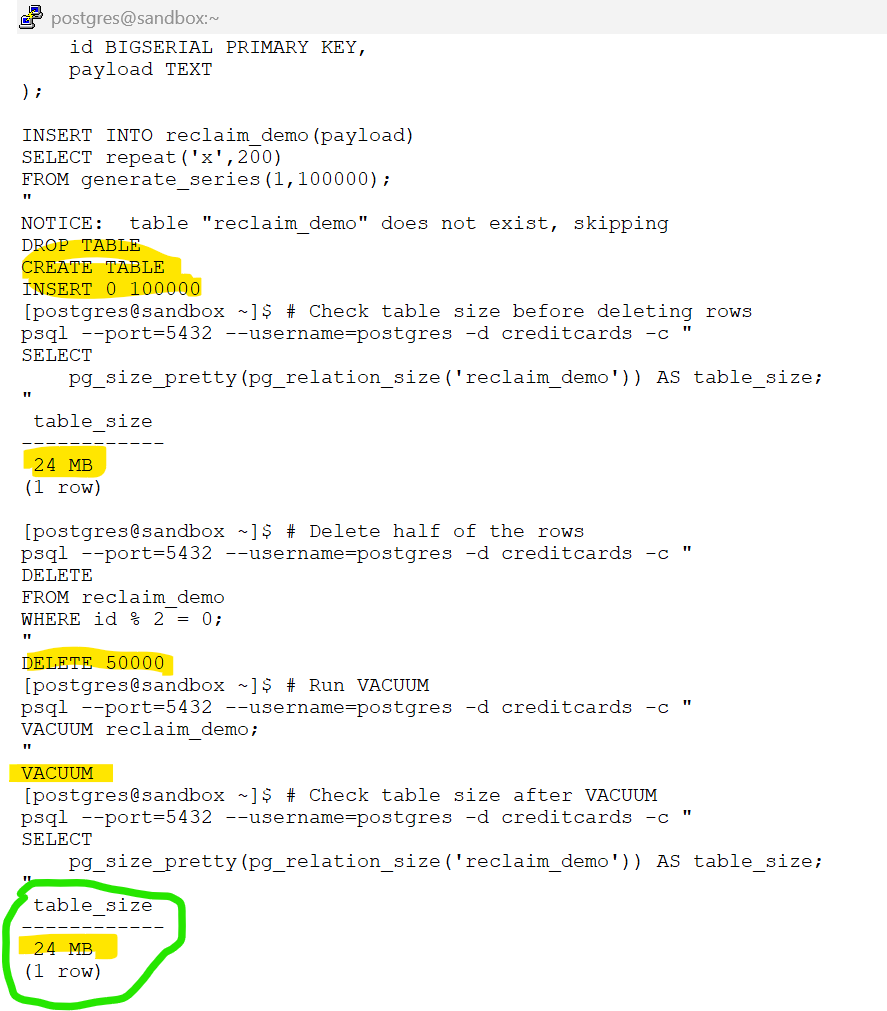
Key Takeaways
- ✅ VACUUM removes dead tuples
- ✅ VACUUM makes space reusable
- ❌ VACUUM does not usually shrink table files
- ❌ VACUUM does not return space to the operating system
7.2 Understanding VACUUM FULL
Concepts
VACUUM FULL solves a different problem.
Instead of simply cleaning dead tuples, PostgreSQL rewrites the entire table.
Conceptually:
Old Table
↓
Create New Table
↓
Copy Live Rows
↓
Replace Old TableBecause a new table is created:
- 🪓 Dead tuples disappear
- 📦 Empty pages disappear
- ♻️ Free space disappears
- 💾 Disk space can be returned to the filesystem
Demo — Reclaiming Space with VACUUM FULL
# Check table size before VACUUM FULL
psql --port=5432 --username=postgres -d creditcards -c "
SELECT
pg_size_pretty(pg_relation_size('reclaim_demo')) AS table_size;
"# Rewrite the table
psql --port=5432 --username=postgres -d creditcards -c "
VACUUM FULL reclaim_demo;
"# Verify storage reclamation
psql --port=5432 --username=postgres -d creditcards -c "
SELECT
pg_size_pretty(pg_relation_size('reclaim_demo')) AS table_size;
"[postgres@sandbox ~]$ # Check table size before VACUUM FULL
psql --port=5432 --username=postgres -d creditcards -c "
SELECT
pg_size_pretty(pg_relation_size('reclaim_demo')) AS table_size;
"
table_size
------------
24 MB
(1 row)
[postgres@sandbox ~]$ # Rewrite the table
psql --port=5432 --username=postgres -d creditcards -c "
VACUUM FULL reclaim_demo;
"
VACUUM
[postgres@sandbox ~]$ # Verify storage reclamation
psql --port=5432 --username=postgres -d creditcards -c "
SELECT
pg_size_pretty(pg_relation_size('reclaim_demo')) AS table_size;
"
table_size
------------
12 MB
(1 row)
[postgres@sandbox ~]$
Key Takeaways
- ✅ VACUUM FULL rewrites the table
- ✅ VACUUM FULL reclaims disk space
- ✅ VACUUM FULL removes dead space
- ✅ VACUUM FULL creates new physical storage files
- ✅ Associated indexes are rebuilt as part of the rewrite
- 🔒 VACUUM FULL requires an
ACCESS EXCLUSIVElock - 📝 VACUUM FULL generates additional WAL records
- ⚠️ VACUUM FULL requires extra temporary disk space during execution
- ⚠️ VACUUM FULL is much more expensive than VACUUM
7.3 Understanding VACUUM FULL Locking
Concepts
To rewrite a table safely, PostgreSQL acquires an:
ACCESS EXCLUSIVE LOCKThis is the strongest table lock.
During the rewrite:
- 🔒 SELECT may wait
- 🔒 INSERT may wait
- 🔒 UPDATE may wait
- 🔒 DELETE may wait
For large tables this can become significant.
Demo — VACUUM FULL Blocking Other Sessions
Session 1:
# Open session 1 and login to the database
psql --port=5432 --username=postgres -d creditcards--Start a transaction and keep it open
BEGIN;
SELECT *
FROM reclaim_demo
LIMIT 1;[postgres@sandbox ~]$ # Open session 1 and login to the database
psql --port=5432 --username=postgres -d creditcards
psql (16.13)
Type "help" for help.
creditcards=# --Start a transaction and keep it open
BEGIN;
SELECT *
FROM reclaim_demo
LIMIT 1;
BEGIN
id | payload
---------------------
1 | xxxx
(1 row)
creditcards=*#
Session 2:
# Attempt VACUUM FULL in another session
psql --port=5432 --username=postgres -d creditcards -c "
VACUUM FULL reclaim_demo;
"Observe that VACUUM FULL waits.
Session 1:
-- check for blocking session
SELECT
pid,
wait_event_type,
wait_event,
query
FROM pg_stat_activity
WHERE datname = 'creditcards';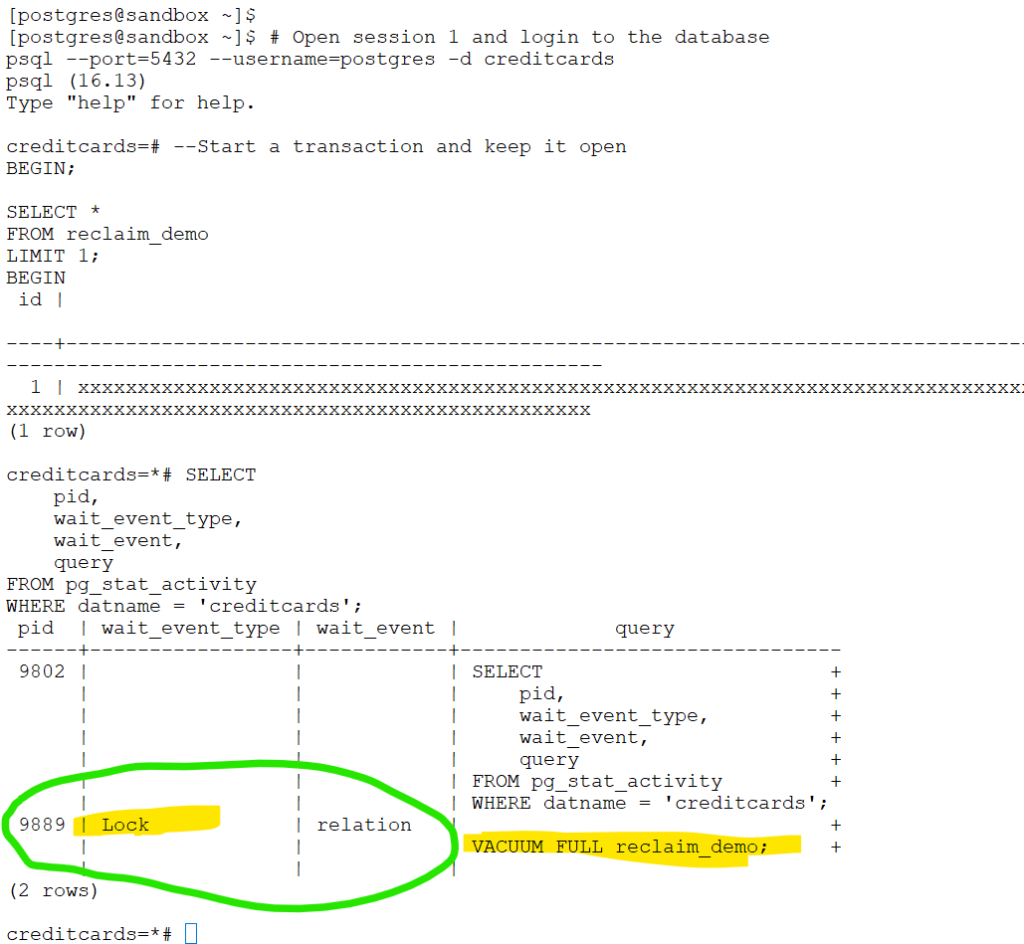
-- issue commit in session1
commit;👀 Notice: Once the blocking transaction ends, VACUUM FULL resumes and completes successfully.
Key Takeaways
- ⚠️ VACUUM FULL is a blocking operation
- ⚠️ Large tables may remain locked for a long time
- ✅ Schedule VACUUM FULL carefully
⚠️ Production Consideration: Although not visible in this lab due to the small table size, VACUUM FULL holds an ACCESS EXCLUSIVE lock while rewriting the table. On large tables, application sessions attempting to access the table may be blocked until the operation completes.
7.4 WAL Impact of VACUUM FULL
Concepts
Because VACUUM FULL rewrites the entire table:
- 📦 New data pages are generated
- 📝 WAL records are generated
- 🔄 Replicas must replay the WAL
- 📁 Archive volume may increase significantly
Large table rewrites can generate substantial WAL.
Demo — Measuring WAL Growth
# View current WAL location
psql --port=5432 --username=postgres -d creditcards -c "
SELECT pg_current_wal_lsn();
"# Rewrite the table
psql --port=5432 --username=postgres -d creditcards -c "
VACUUM FULL reclaim_demo;
"# View WAL location again
psql --port=5432 --username=postgres -d creditcards -c "
SELECT pg_current_wal_lsn();
"👀Observe the WAL position advancing.
Key Takeaways
- ⚠️ VACUUM FULL generates WAL
- ⚠️ Replication traffic increases
- ⚠️ Archive storage usage increases
- ✅ Consider WAL impact before rewriting large tables
7.5 Reclaiming Index Space with REINDEX
Concepts
Tables are not the only objects that become bloated.
Indexes can also accumulate unused pages over time due to:
- UPDATE operations
- DELETE operations
- Frequent row churn
Symptoms of index bloat may include:
- 📈 Larger-than-expected index size
- 📉 Reduced cache efficiency
- 🐢 Slower index scans
- 💾 Increased storage consumption
Unlike VACUUM FULL, which focuses on table storage, REINDEX rebuilds the index structure itself.
Conceptually:
Old Index
↓
Build New Index
↓
Replace Old IndexThe result is a compact and optimized index structure.
Demo — Creating Index Bloat
# Create a table and secondary index
psql --port=5432 --username=postgres -d creditcards -c "
DROP TABLE IF EXISTS reindex_demo;
CREATE TABLE reindex_demo (
id BIGSERIAL PRIMARY KEY,
category INT,
payload TEXT
);
INSERT INTO reindex_demo(category,payload)
SELECT
(random()*10)::int,
repeat('x',200)
FROM generate_series(1,100000);
CREATE INDEX idx_reindex_demo_category
ON reindex_demo(category);
"# Delete rows to generate index churn
psql --port=5432 --username=postgres -d creditcards -c "
DELETE
FROM reindex_demo
WHERE id % 3 = 0;
"Rebuilding the Index Online
# Rebuild the index with minimal application disruption
psql --port=5432 --username=postgres -d creditcards -c "
REINDEX INDEX CONCURRENTLY idx_reindex_demo_category;
"psql --port=5432 --username=postgres -d creditcards -c "
DROP TABLE IF EXISTS reindex_demo;
CREATE TABLE reindex_demo (
id BIGSERIAL PRIMARY KEY,
category INT,
payload TEXT
);
INSERT INTO reindex_demo(category,payload)
SELECT
(random()*10)::int,
repeat('x',200)
FROM generate_series(1,100000);
CREATE INDEX idx_reindex_demo_category
ON reindex_demo(category);
"
NOTICE: table "reindex_demo" does not exist, skipping
DROP TABLE
CREATE TABLE
INSERT 0 100000
CREATE INDEX
[postgres@sandbox ~]$ # Delete rows to generate index churn
psql --port=5432 --username=postgres -d creditcards -c "
DELETE
FROM reindex_demo
WHERE id % 3 = 0;
"
DELETE 33333
[postgres@sandbox ~]$ # Rebuild the index with minimal application disruption
psql --port=5432 --username=postgres -d creditcards -c "
REINDEX INDEX CONCURRENTLY idx_reindex_demo_category;
"
REINDEX
[postgres@sandbox ~]$
Production Note
Modern PostgreSQL environments typically prefer:
REINDEX INDEX CONCURRENTLYinstead of:
REINDEX INDEXBenefits:
- 🟢 Queries can continue using the existing index
- 🟢 Application reads continue normally
- 🟢 Application writes continue normally
- 🟢 Downtime is minimized
PostgreSQL builds a new index in the background and switches to it once the rebuild completes.
Conceptually:
Existing Index
│
├── Continues Serving Queries
│
▼
Build New Index
▼
Swap Indexes
▼
Drop Old IndexKey Takeaways
- ✅ REINDEX rebuilds index structures
- ✅ REINDEX can reclaim index bloat
- ✅ REINDEX does not rewrite table data
- 🟢 REINDEX CONCURRENTLY minimizes application disruption
- 📈 Smaller indexes often improve cache efficiency
- ⚠️ REINDEX addresses index bloat, not table bloat
📌 REINDEX is most useful when index bloat is the primary problem. If both the table and indexes are heavily bloated, a table rewrite operation such as VACUUM FULL or pg_repack may be more appropriate.
7.6 Online Alternative: pg_repack
Concepts
Production systems often cannot tolerate VACUUM FULL downtime.
pg_repack provides:
- 🟢 Online table reorganization
- 🟢 Online index rebuilds
- 🟢 Space reclamation
- 🟢 Reduced blocking
For many production workloads, pg_repack is preferred over VACUUM FULL.
Key Takeaways
- ✅ Reclaims table space
- ✅ Reclaims index space
- ✅ Significantly reduces blocking
- ⚠️ Requires extension installation
Chapter Summary
- 🧹 VACUUM cleans dead tuples
- 📦 VACUUM does not usually shrink tables
- 🪓 VACUUM FULL rewrites tables and reclaims space
- 🔒 VACUUM FULL can block applications
- 📝 VACUUM FULL generates WAL
- 🧱 REINDEX rebuilds bloated indexes
- 🛠️ pg_repack provides an online alternative
- ✅ Choose the maintenance operation based on the type of bloat you are solving
Chapter 8 : Monitoring and Troubleshooting VACUUM
Chapter 8 : Monitoring and Troubleshooting VACUUM
Learning Objectives
| Check | What It Tells You | Query Focus |
|---|---|---|
| 🧹 Last vacuum activity | Whether maintenance is running | last_autovacuum, last_vacuum |
| 📈 Table health | Which tables are accumulating dead tuples | n_live_tup, n_dead_tup |
| ⚙️ Vacuum progress | Whether VACUUM is actively running and in which phase | pg_stat_progress_vacuum |
| ⏳ Wraparound risk | Which databases/tables are getting old | age(datfrozenxid), age(relfrozenxid) |
| 🔒 Blocking sessions | Why cleanup may be delayed | pg_stat_activity |
| 🧠 Statistics freshness | Whether planner stats are current | last_autoanalyze |
| 📦 Bloat risk | Which tables are growing abnormally | size + dead tuples trend |
8.1 Check Table Health
Use pg_stat_user_tables to identify tables accumulating dead tuples and verify that automatic maintenance is occurring.
What This Helps Identify
- 📈 Dead tuple accumulation
- 🤖 AUTOVACUUM activity
- 📊 AUTOANALYZE activity
- 🧹 Tables requiring attention
# View table health statistics
psql --port=5432 --username=postgres -d creditcards -c "
SELECT
relname,
n_live_tup,
n_dead_tup,
to_char(last_autovacuum, 'YYYY-MM-DD HH24:MI') AS last_autovacuum,
to_char(last_autoanalyze, 'YYYY-MM-DD HH24:MI') AS last_autoanalyze
FROM pg_stat_user_tables
ORDER BY relname;
"relname | n_live_tup | n_dead_tup | last_autovacuum | last_autoanalyze
--------------+------------+------------+------------------+------------------
kyc | 14025 | 0 | 2026-06-04 19:39 | 2026-06-04 19:39
reclaim_demo | 50000 | 0 | 2026-06-06 10:45 | 2026-06-06 10:48
reindex_demo | 66667 | 0 | 2026-06-06 16:07 | 2026-06-06 16:07
(3 rows)
What Should Catch Your Attention?
🔴 High n_dead_tup
⚠️ Missing or old last_autovacuum
⚠️ Missing or old last_autoanalyze
📈 Rapid growth in n_live_tup
8.2 Monitor Active VACUUM Operations
Use pg_stat_progress_vacuum to monitor currently running VACUUM workers.
What This Helps Identify
🔍 Active vacuum operations
⚙️ Current VACUUM phase
📊 Scan progress
🧹 Cleanup activity
VACUUM Workflow
| Step | Phase | What VACUUM Is Doing |
|---|---|---|
| 1️⃣ | 🔍 Scanning Heap | Identifies dead tuples |
| 2️⃣ | 🗂️ Vacuuming Indexes | Removes index references |
| 3️⃣ | 🧹 Vacuuming Heap | Marks space reusable |
| 4️⃣ | ✅ Cleanup | Final housekeeping |
# View active vacuum operations with progress percentage
psql --port=5432 --username=postgres -d creditcards -c "
SELECT
pid,
relid::regclass AS table_name,
phase,
heap_blks_scanned,
heap_blks_total,
ROUND(
100.0 * heap_blks_scanned /
NULLIF(heap_blks_total, 0),
2
) AS progress_pct
FROM pg_stat_progress_vacuum;
"🎭 Illustrative Example: The following output is simulated for educational purposes.
pid | table_name | phase | heap_blks_scanned | heap_blks_total | progress_pct
------+----------------+--------------------+-------------------+-----------------+--------------
8421 | reclaim_demo | scanning heap | 1200 | 5000 | 24.00
8425 | reindex_demo | vacuuming indexes | 8000 | 8000 | 100.00
8432 | kyc | vacuuming heap | 6000 | 6000 | 100.00
8440 | customer_audit | cleanup | 12000 | 12000 | 100.00
⚠️ Important: progress_pct reflects progress through the heap scan portion of VACUUM. A value of 100% does not necessarily mean the VACUUM operation has completed; it may still be processing indexes or performing cleanup.
What Should Catch Your Attention?
⚠️ Same phase for a very long time
⚠️ Vacuum operations running unexpectedly long
⚠️ Multiple large tables being vacuumed simultaneously
8.3 Monitor Database Wraparound Risk
Use age(datfrozenxid) to determine how close a database is to transaction ID wraparound.
What This Helps Identify
🧊 Freeze health
⚠️ Databases approaching wraparound limits
📈 Anti-wraparound maintenance requirements
# Check database transaction ID age
psql --port=5432 --username=postgres -d creditcards -c "
SELECT
datname,
age(datfrozenxid) AS xid_age
FROM pg_database
ORDER BY xid_age DESC;
"
datname | xid_age
------------------+---------
postgres | 255
template1 | 255
template0 | 255
business_lending | 255
auditing | 255
consumerloans | 255
creditcards | 255
(7 rows)
🎭 Illustrative Example: The following output is simulated to demonstrate databases with different transaction ages.
datname | xid_age
------------------+-----------
creditcards | 125000000
auditing | 85000000
consumerloans | 42000000
business_lending | 18000000
postgres | 1500
template1 | 255
template0 | 255
How to Interpret the Results
| Database | XID Age | Interpretation |
|---|---|---|
| 🔴 creditcards | 125M | High transaction activity; monitor freeze maintenance |
| 🟡 auditing | 85M | Growing steadily; keep under observation |
| 🟡 consumerloans | 42M | Moderate transaction age |
| 🟢 business_lending | 18M | Healthy |
| 🟢 postgres | 1.5K | Minimal activity |
| 🟢 template0/template1 | 255 | System databases; rarely change |
What Should Catch Your Attention?
- 🟢 Low values → Healthy
- 🟡 Continuously growing values → Monitor
- 🔴 Very large values → Verify freezing activity
- 🧊 Databases with the highest XID age should receive the most attention
8.4 Monitor Table Freeze Age
Sometimes only a few tables are responsible for increasing wraparound risk.
Use relfrozenxid to locate them.
What This Helps Identify
🧊 Tables needing freeze maintenance
⚠️ Tables approaching wraparound danger
🔍 Freeze maintenance hotspots
# Check table freeze age
psql --port=5432 --username=postgres -d creditcards -c "
SELECT
relname,
age(relfrozenxid) AS xid_age
FROM pg_class
WHERE relkind = 'r'
ORDER BY xid_age DESC
LIMIT 20;
"🎭 Illustrative Example: The following output is simulated to demonstrate tables with different transaction ages.
relname | xid_age
----------------------------+-----------
transactions | 185000000
credit_card_payments | 142000000
customer_accounts | 118000000
audit_log | 95000000
loan_applications | 62000000
customer_profile | 18000000
countries | 1500
currencies | 1200How to Interpret the Results
| Table | XID Age | Interpretation |
|---|---|---|
| 🔴 transactions | 185M | Very old table; monitor freeze activity closely |
| 🔴 credit_card_payments | 142M | High transaction age; requires attention |
| 🟡 customer_accounts | 118M | Aging table; monitor regularly |
| 🟡 audit_log | 95M | Moderate freeze age |
| 🟡 loan_applications | 62M | Growing age but not yet concerning |
| 🟢 customer_profile | 18M | Healthy |
| 🟢 countries | 1.5K | Mostly static reference table |
| 🟢 currencies | 1.2K | Recently frozen or rarely modified |
What Should Catch Your Attention?
🔴 Tables with the highest xid_age
🧊 Tables approaching autovacuum_freeze_max_age
📈 Tables whose age continuously increases over time
⚠️ Tables that are heavily updated but rarely vacuumed
8.5 Detect Long-Running Transactions
Long-running transactions are one of the most common causes of delayed cleanup and growing bloat.
What This Helps Identify
🔒 Open transactions
📸 Old snapshots
🧹 VACUUM cleanup blockers
📈 Potential bloat growth
# Find long-running transactions
psql --port=5432 --username=postgres -d creditcards -c "
SELECT
pid,
usename,
state,
xact_start,
now() - xact_start AS transaction_age,
query
FROM pg_stat_activity
WHERE xact_start IS NOT NULL
ORDER BY xact_start;
"🎭 Illustrative Example: The following output represents a forgotten application transaction.
pid | usename | state | xact_start | transaction_age | query
-------+----------+--------+-------------------------------+-----------------+--------------------------------------------
11697 | postgres | active | 2026-06-06 20:51:41.864651+00 | 00:00:00 | +
| | | | | SELECT +
What Should Catch Your Attention?
🚨 Transactions open for hours
🚨 idle in transaction sessions
🚨 Application users holding snapshots
🚨 Transactions older than expected for your workload
Key Takeaways
- ✅ Monitor
pg_stat_user_tablesregularly - ✅ Review
pg_stat_progress_vacuumduring maintenance operations - ✅ Track
datfrozenxidandrelfrozenxidage - ✅ Investigate long-running transactions promptly
- ✅ Detect issues early before bloat or wraparound become production incidents
Chapter 9 : Understanding MultiXact IDs and Row Lock Freezing
Chapter 9 : Understanding MultiXact IDs and Row Lock Freezing
Learning Objectives
By the end of this chapter, you should understand:
✅ What a MultiXact ID is
✅ Why PostgreSQL creates MultiXacts
✅ How MultiXact wraparound is prevented
✅ Why most environments require little manual intervention
9.1 What Is a MultiXact ID?
Concepts
We learned earlier that PostgreSQL assigns a Transaction ID (XID) to every transaction.
However, PostgreSQL must also track row-level locks held by multiple transactions.
For this purpose, PostgreSQL uses MultiXact IDs.
🤝 MultiXact IDs track multiple transactions holding locks on the same row.
9.2 When Are MultiXact IDs Created?
A common example is:
SELECT *
FROM accounts
FOR UPDATE;When multiple sessions acquire locks on the same row:
Session A
↓
Locks Row
Session B
↓
Also References Same Row Lock
Session C
↓
Also References Same Row Lock
PostgreSQL
↓
Creates MultiXact ID🤝 Multiple lockers
🔒 Shared row lock tracking
⚙️ Internal lock management
9.3 Do MultiXact IDs Also Wrap Around?
Yes.
Like Transaction IDs:
- 🔢 MultiXact IDs are finite
- ♻️ Their counter eventually wraps around
- 🧊 Old MultiXacts must be frozen
- 🤖 AUTOVACUUM performs this maintenance automatically
9.4 MultiXact Freeze Parameters
| Parameter | Purpose |
|---|---|
🤖 autovacuum_multixact_freeze_max_age | Triggers anti-wraparound protection |
🧊 vacuum_multixact_freeze_min_age | Controls eligibility for MultiXact freezing |
📅 vacuum_multixact_freeze_table_age | Triggers aggressive MultiXact freezing |
🧊 Stage 1 — MultiXact Is Too Young
Assume:
Current MultiXact Age = 1,000
vacuum_multixact_freeze_min_age = 5,000,000Result:
1,000 < 5,000,000- ✅ PostgreSQL ignores the MultiXact
- ✅ No freezing occurs
- ✅ Normal VACUUM continues
🧊 Stage 2 — MultiXact Becomes Eligible For Freezing
Assume:
Current MultiXact Age = 6,000,000
vacuum_multixact_freeze_min_age = 5,000,000Result:
6,000,000 > 5,000,000- 🔍 MultiXact is now eligible for freezing
- 🧹 Future VACUUM operations may freeze it
- ⚠️ Freezing is allowed, but not yet mandatory
⚠️ Stage 3 — Aggressive Freezing Begins
Assume:
Current MultiXact Age = 140,000,000
vacuum_multixact_freeze_table_age = 150,000,000Initially:
140,000,000 < 150,000,000Normal VACUUM behavior continues.
Later:
Current Age = 160,000,000Now:
160,000,000 > 150,000,000Result:
- 🧊 PostgreSQL performs aggressive freezing
- 🔍 More table pages are scanned
- ⚠️ Preventive maintenance becomes more important
🚨 Stage 4 — Anti-Wraparound Protection
Assume:
Current MultiXact Age = 410,000,000
autovacuum_multixact_freeze_max_age = 400,000,000Result:
410,000,000 > 400,000,000- 🚨 PostgreSQL considers wraparound protection critical
- 🤖 Anti-wraparound AUTOVACUUM is triggered
- ⚠️ Maintenance can no longer be postponed
- 🔒 PostgreSQL prioritizes protecting data consistency
9.5 Practical Guidance
✅ Most PostgreSQL environments never require manual MultiXact tuning.
✅ Default settings are usually sufficient.
✅ Heavy row-locking workloads may generate MultiXacts more frequently.
✅ Monitor MultiXact-related warnings if they appear in PostgreSQL logs.
Key Takeaways
- ✅ Transaction IDs (XIDs) track transactions.
- ✅ MultiXact IDs track row-level locks held by multiple transactions.
- ✅ Both use finite 32-bit counters and can wrap around.
- ✅ PostgreSQL automatically protects against both XID and MultiXact wraparound through AUTOVACUUM.
- ✅ For most environments, understanding XID freezing remains far more important than understanding MultiXact freezing.