
This page is designed for anyone who wants a practical and beginner-friendly path into PostgreSQL auditing — whether you are coming from an Oracle background or starting fresh with PostgreSQL.
You can spin up a PostgreSQL sandbox database cluster in just 10 minutes and follow along with the hands-on labs to learn auditing(pgAudit) step by step.
If you don’t already have an environment ready, please follow the Sandbox preparation steps before starting the labs.
Note: This tutorial series is fully hands-on and focused on learning by doing.
Disclaimer: This guide is provided for educational purposes only and is not intended for production use. These steps were documented and tested in a controlled sandbox environment. Please exercise caution before applying any changes to a production system; the author assumes no responsibility for discrepancies or issues. Use at your own risk.
Designing a Modular PostgreSQL Logging Architecture
Designing a Modular PostgreSQL Logging Architecture
Instead of managing one giant config file or using ALTER SYSTEM, we use a conf.d/ directory for better administration:
- Organized Sections: Separate files for Extensions, Logging, and Auditing make it easy to find and update specific settings.
- Clear Source of Truth: We avoid
ALTER SYSTEMbecause it writes to a file (postgresql.auto.conf) that overrides our manual changes and causes confusion. - Easy Maintenance: You can swap or update individual modules (like an audit policy) without touching the core database configuration.
- Faster Troubleshooting: If a setting is wrong, you only have to check a small, 10-line file rather than a 500-line document.
# check the config file name
psql --port=5432 --username=postgres -c "SHOW config_file;"In the Below section, we backup the original file , create a directory , append the main conf file to include the directory path , and verify the update of the config file.
# Update the config file to include directories
# 1. Copy the postgresql.conf
cp /var/lib/pgsql/onboarding/postgresql.conf /var/lib/pgsql/onboarding/postgresql.conf.bak_$(date +%Y%m%d)

# 2. Create the Configuration Directory
mkdir -p /var/lib/pgsql/onboarding/conf.d

# 3. Append the include_dir Statement
echo "include_dir = '/var/lib/pgsql/onboarding/conf.d'" >> /var/lib/pgsql/onboarding/postgresql.conf

# 4. Verify the Change
tail -n 1 /var/lib/pgsql/onboarding/postgresql.conf

# 5. If you are coming from previous chapter of native auditing then lets reset conf files
touch null -> /var/lib/pgsql/onboarding/conf.d/00-extensions.conf
touch null -> /var/lib/pgsql/onboarding/conf.d/01-logging.conf
touch null -> /var/lib/pgsql/onboarding/conf.d/02-auditing.conf# Add README.txt file for reading / how to use - purpose.
cat >> /var/lib/pgsql/onboarding/conf.d/README.txt <<'EOF'
Add new parameters to the appropriate file based on their purpose.
Avoid using ALTER SYSTEM to keep configuration management clean and centralized.
PostgreSQL Modular Configuration Directory
------------------------------------------
00-extensions.conf : Used for PostgreSQL extension-related parameters.
01-logging.conf : Used for logging settings such as CSV logging, rotation.
02-auditing.conf : Used for audit-related configuration parameters.
EOF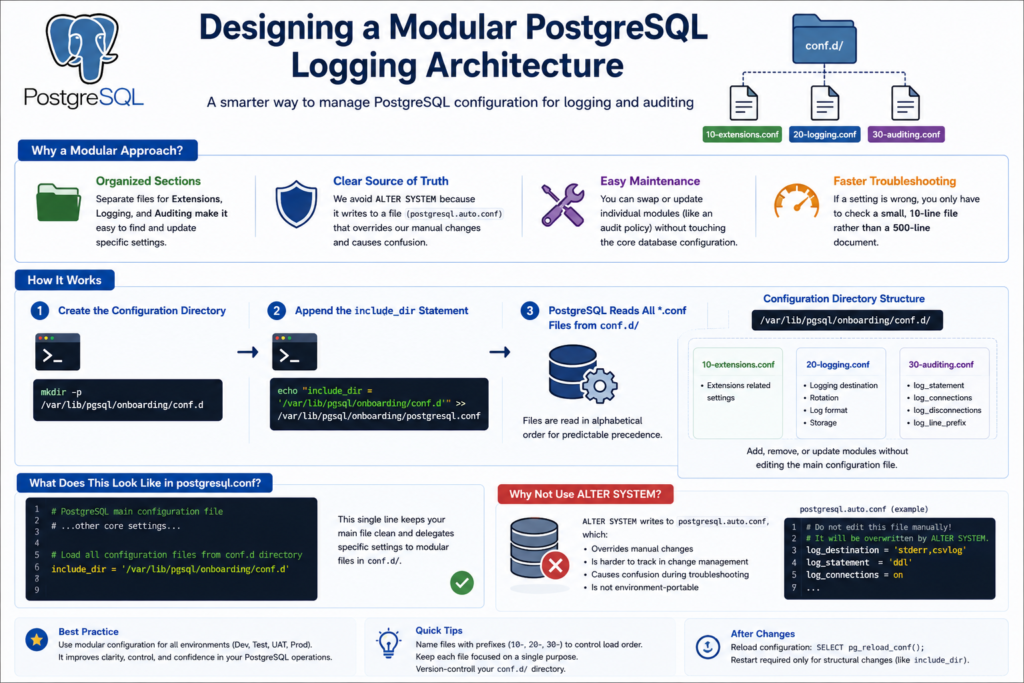
Installing and Enabling pgAudit
Installing and Enabling pgAudit
Download the extension
as vagrant user / root user
# find the available pgAudit package
dnf search -y pgaudit# check for the respository version
rpm -qa | grep postgresql# install pgAudit package for PostgreSQL 16 cluster
sudo dnf install -y pgaudit_16# install pgAudit log-to-file helper package for PostgreSQL 16 cluster
sudo dnf install -y pgauditlogtofile_16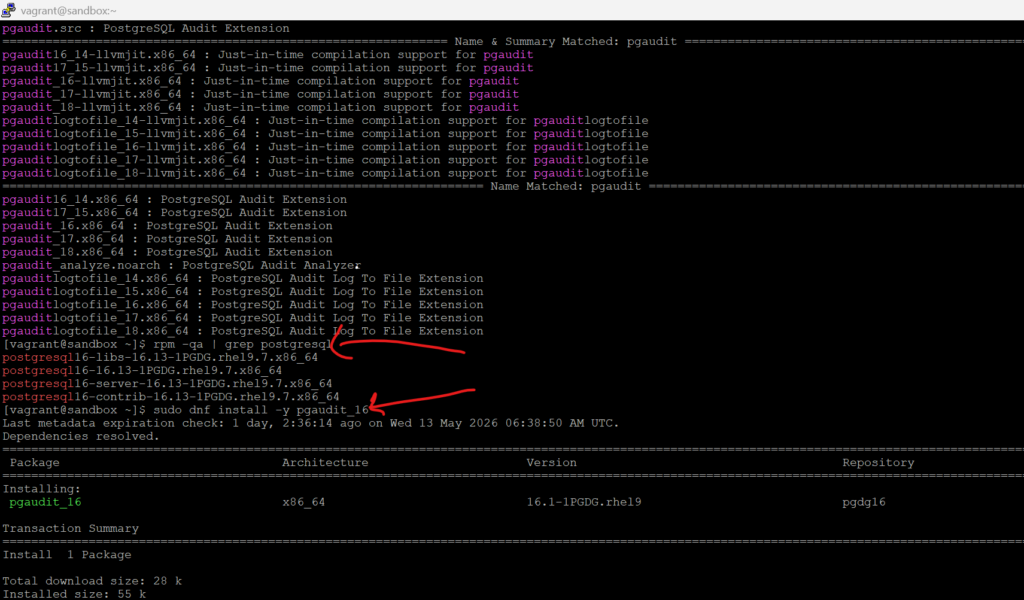
Loading the pgAudit Extension Library
# switch to postgres user
sudo -i -u postgres# Configure pgAudit shared library preload
cat > /var/lib/pgsql/onboarding/conf.d/00-extensions.conf <<EOF
# Shared libraries loaded during PostgreSQL startup
shared_preload_libraries = 'pgaudit,pgauditlogtofile'
EOFshared_preload_libraries = 'pgaudit' requires a PostgreSQL restart, because pgAudit must be loaded at server start.
# after editing 00-extensions.conf
/usr/pgsql-16/bin/pg_ctl restart -D /var/lib/pgsql/onboarding# Create pgAudit extension
psql --port=5432 --username=postgres -c "CREATE EXTENSION pgaudit;"# Verify pgAudit extension
psql --port=5432 --username=postgres -c "SELECT extname, extversion FROM pg_extension WHERE extname='pgaudit';"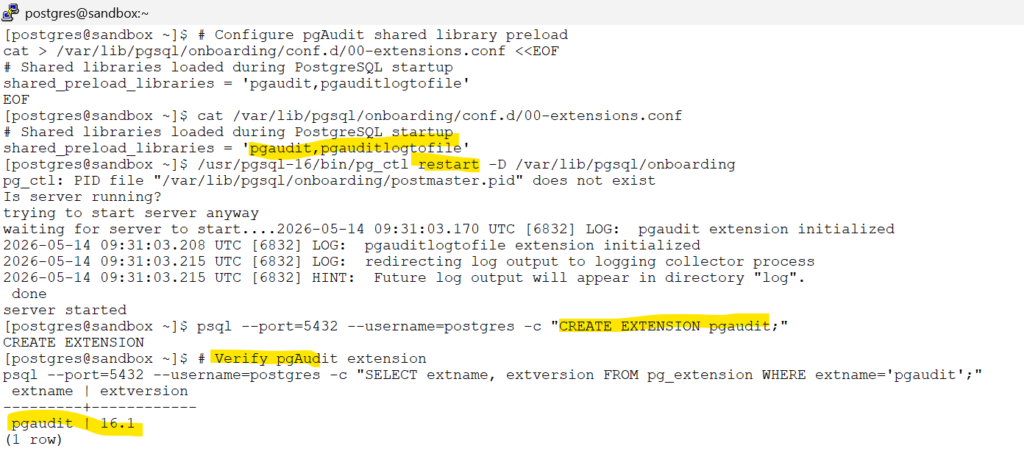
Differences between session and object auditing
| Feature | Session Auditing | Object Auditing |
|---|---|---|
| Purpose | Audits activities executed within a database session/backend | Audits access to specific database objects |
| Configuration Parameter | pgaudit.log | pgaudit.role |
| Scope | Cluster-wide or database-wide statement auditing | Fine-grained auditing on selected tables/views |
| Typical Use Case | Compliance logging, DBA activity tracking, broad monitoring | Auditing sensitive business data only |
| Audit Coverage | DDL, DML, READ, ROLE operations | SELECT, INSERT, UPDATE, DELETE on specific objects |
| Audit Granularity | Broad statement-level auditing | Object-level targeted auditing |
| Noise Level | Can generate high audit volume | Lower noise, focused logging |
| Performance Impact | Higher when many statement classes are enabled | Usually lower due to selective auditing |
| Requires Object Privileges | No | Yes — audit role must be granted privileges on objects |
| Audits Future Tables Automatically | No | Only if default privileges are configured |
| Best For | Enterprise-wide activity visibility | Sensitive schemas and regulated data |
| Common Example | Audit all DDL changes in the database | Audit access to creditcards.customer_ssn |
| Enabled By | Example: pgaudit.log = 'ddl,write,read,role' | Example: pgaudit.role = 'auditor' |
| Logging Behavior | Logs every matching statement executed | Logs only statements touching audited objects |
| Administrative Complexity | Simpler to enable | Requires privilege management and policy design |
| Recommended Practice | Use selectively to avoid excessive log growth | Preferred for production-grade sensitive-data auditing |
Configure dedicated audit logging – (session level)
Configure dedicated audit logging
# pgauditlogtofile – Creates a dedicated configuration file:
PostgreSQL Logs
├── operational database logging
└── regular monitoring logs
Dedicated Audit Logs
└── pgAudit audit trail only (pgauditlogtofile)
# create a dedicated directory to hold the audit logs
mkdir -p /var/lib/pgsql/onboarding/auditCreate a dedicated config file for the audit related settings
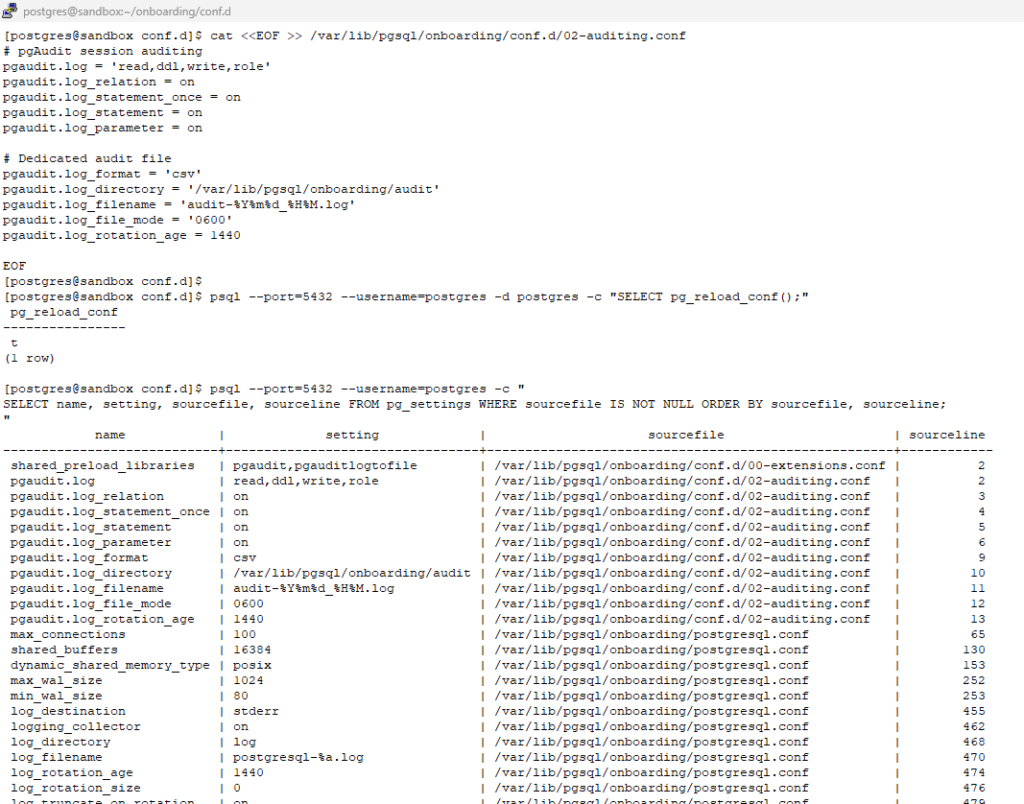
cat <<EOF >> /var/lib/pgsql/onboarding/conf.d/02-auditing.conf
# pgAudit session auditing
pgaudit.log = 'read,ddl,write,role'
pgaudit.log_relation = on
pgaudit.log_statement_once = on
pgaudit.log_statement = on
pgaudit.log_parameter = off

# Dedicated audit file
pgaudit.log_format = 'csv'
pgaudit.log_directory = '/var/lib/pgsql/onboarding/audit'
pgaudit.log_filename = 'audit-%Y%m%d_%H%M.log'
pgaudit.log_file_mode = '0600'
pgaudit.log_rotation_age = 1440

EOF
# reload the config
psql --port=5432 --username=postgres -d postgres -c "SELECT pg_reload_conf();"#Visualization : Shows which configuration parameter is loaded from which config file,
psql --port=5432 --username=postgres -c "
SELECT name, setting, sourcefile, sourceline FROM pg_settings WHERE sourcefile IS NOT NULL ORDER BY sourcefile, sourceline;
"
Hands-On pgAudit: DDL Auditing (ddl) – (session level)
Hands-On pgAudit: DDL
When pgaudit.log is set to ‘ddl’, pgAudit audits structural database operations such as CREATE, ALTER, DROP, INDEX creation, and other database object changes.
In this lab, all CREATE DATABASE, CREATE SCHEMA, CREATE TABLE, ALTER TABLE, CREATE INDEX, and DROP operations were successfully captured in the dedicated pgAudit logfile.
Note:
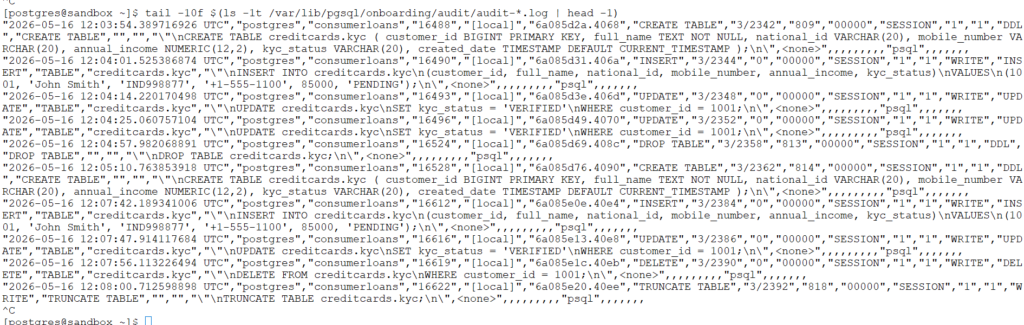
TRUNCATE is not audited as part of the DDL class. To audit TRUNCATE operations, pgaudit.log must include the WRITE class.
# DDL Auditing Demo — Create Database
psql --port=5432 --username=postgres -c "CREATE DATABASE consumerloans;"# enable extension inside the database
psql --port=5432 --username=postgres -d consumerloans -c "
CREATE EXTENSION IF NOT EXISTS pgaudit;
"# DDL Auditing Demo — Create Schema
psql --port=5432 --username=postgres -d consumerloans -c "CREATE SCHEMA creditcards;"# DDL Auditing Demo — Create Table
psql --port=5432 --username=postgres -d consumerloans -c "
CREATE TABLE creditcards.kyc ( customer_id BIGINT PRIMARY KEY, full_name TEXT NOT NULL, national_id VARCHAR(20), mobile_number VARCHAR(20), annual_income NUMERIC(12,2), kyc_status VARCHAR(20), created_date TIMESTAMP DEFAULT CURRENT_TIMESTAMP );
"# Verify the pgaudit log file :
tail -30f $(ls -1t /var/lib/pgsql/onboarding/audit/audit-*.log | head -1)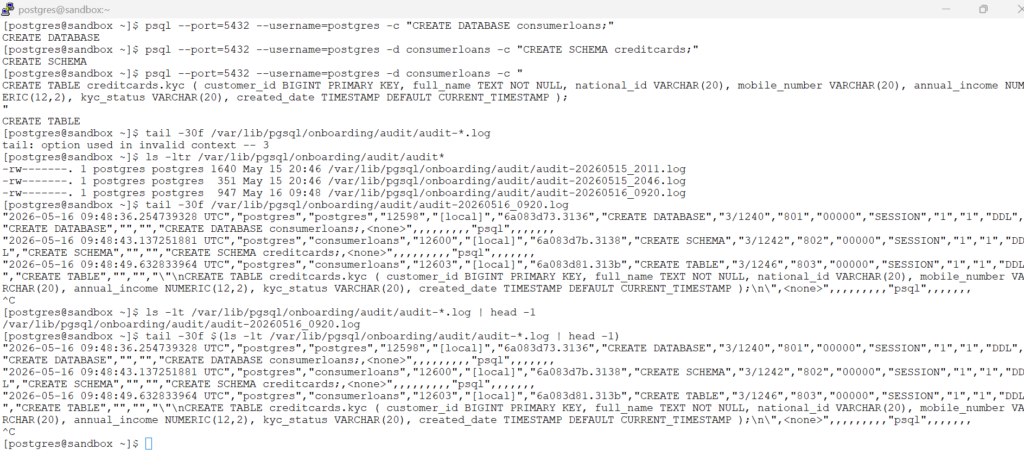
# DDL Auditing Demo — ALTER TABLE
psql --port=5432 --username=postgres -d consumerloans -c "
ALTER TABLE creditcards.kyc
ADD COLUMN email_address TEXT;
"# DDL Auditing Demo — RENAME COLUMN
psql --port=5432 --username=postgres -d consumerloans -c "
ALTER TABLE creditcards.kyc
RENAME COLUMN mobile_number TO phone_number;
"# DDL Auditing Demo — CREATE INDEX
psql --port=5432 --username=postgres -d consumerloans -c "
CREATE INDEX idx_kyc_status
ON creditcards.kyc(kyc_status);
"# DDL Auditing Demo — DROP INDEX
psql --port=5432 --username=postgres -d consumerloans -c "
DROP INDEX creditcards.idx_kyc_status;
"# DDL Auditing Demo — DROP TABLE
psql --port=5432 --username=postgres -d consumerloans -c "
DROP TABLE creditcards.kyc;
"# Re-Create the Table
psql --port=5432 --username=postgres -d consumerloans -c "
CREATE TABLE creditcards.kyc ( customer_id BIGINT PRIMARY KEY, full_name TEXT NOT NULL, national_id VARCHAR(20), mobile_number VARCHAR(20), annual_income NUMERIC(12,2), kyc_status VARCHAR(20), created_date TIMESTAMP DEFAULT CURRENT_TIMESTAMP );
"# Verify the pgaudit log file :
tail -30f $(ls -1t /var/lib/pgsql/onboarding/audit/audit-*.log | head -1)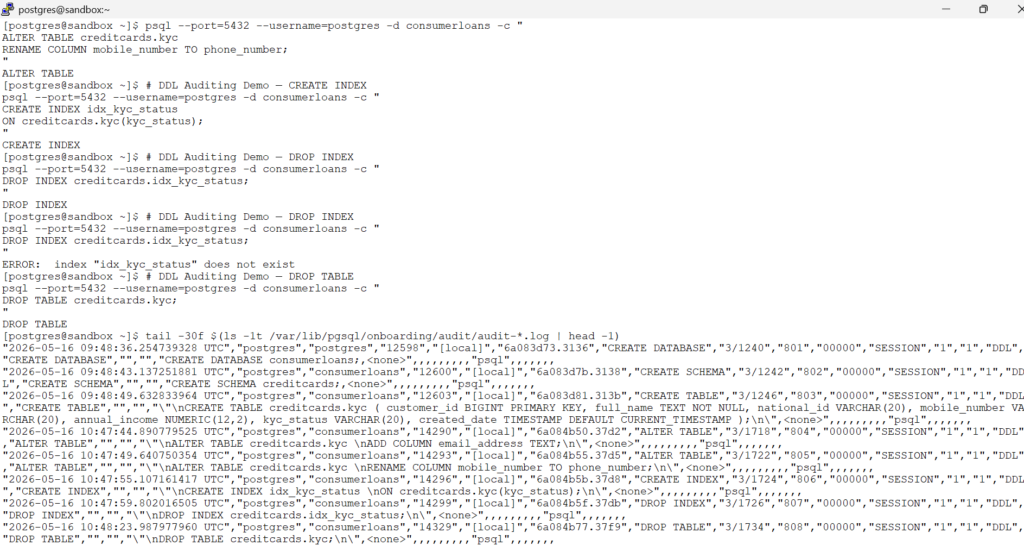
Hands-On pgAudit: DML Auditing (write) – (session level)
Hands-On pgAudit: DML
In pgAudit, the WRITE class covers INSERT, UPDATE, DELETE, TRUNCATE, and COPY when the destination is a relation.
# DML Auditing Demo — TRUNCATE
psql --port=5432 --username=postgres -d consumerloans -c "
TRUNCATE TABLE creditcards.kyc;
"# DML Auditing Demo — INSERT
psql --port=5432 --username=postgres -d consumerloans -c "
INSERT INTO creditcards.kyc
(customer_id, full_name, national_id, mobile_number, annual_income, kyc_status)
VALUES
(1001, 'John Smith', 'IND998877', '+1-555-1100', 85000, 'PENDING');
"# DML Auditing Demo — UPDATE
psql --port=5432 --username=postgres -d consumerloans -c "
UPDATE creditcards.kyc
SET kyc_status = 'VERIFIED'
WHERE customer_id = 1001;
"# DML Auditing Demo — DELETE
psql --port=5432 --username=postgres -d consumerloans -c "
DELETE FROM creditcards.kyc
WHERE customer_id = 1001;
"# DML Auditing Demo — INSERT AGAIN
psql --port=5432 --username=postgres -d consumerloans -c "
INSERT INTO creditcards.kyc
(customer_id, full_name, national_id, mobile_number, annual_income, kyc_status)
VALUES
(1001, 'John Smith', 'IND998877', '+1-555-1100', 85000, 'PENDING');
"# Watch the latest pgAudit log
tail -10 $(ls -1t /var/lib/pgsql/onboarding/audit/audit-*.log | head -1)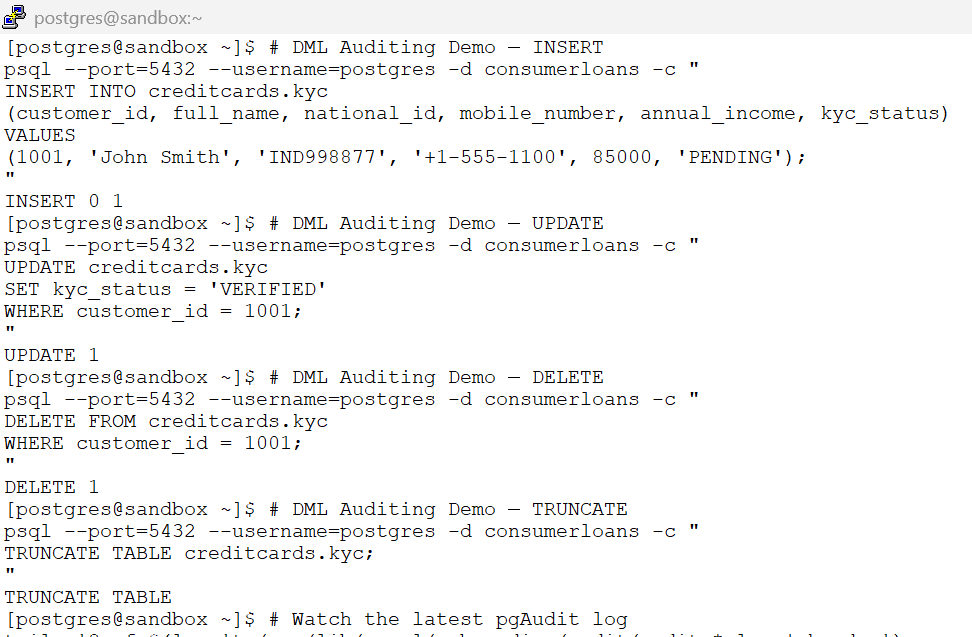
Hands-On pgAudit: READ Auditing (read) – (session level)
Hands-On pgAudit: READ Auditing
When pgaudit.log is set to ‘read’, pgAudit audits data access operations such as SELECT statements and COPY commands where the source is a relation or query.
It is recommended to enable pgaudit.log_relation = on so that pgAudit generates separate audit entries for each referenced table or relation, providing better visibility during JOINS.
# READ Auditing Demo — SELECT all columns
psql --port=5432 --username=postgres -d consumerloans -c "
SELECT * FROM creditcards.kyc;
"# READ Auditing Demo — SELECT specific columns
psql --port=5432 --username=postgres -d consumerloans -c "
SELECT customer_id, full_name, kyc_status
FROM creditcards.kyc;
"# Watch the latest pgAudit log
tail -2 $(ls -1t /var/lib/pgsql/onboarding/audit/audit-*.log | head -1)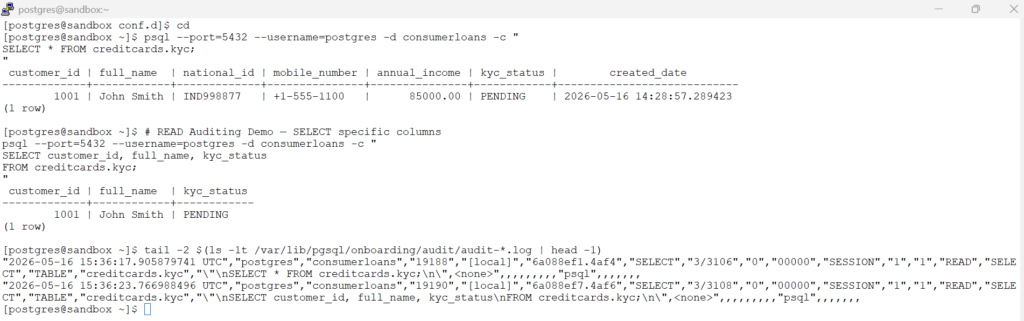
Hands-On pgAudit: ROLE Auditing (role) – (session level)
Hands-On pgAudit: ROLE Auditing
When pgaudit.log is set to role,
pgAudit audits role and privilege-related operations such as:
CREATE ROLE,ALTER ROLE,DROP ROLE,GRANT & REVOKE
This helps track administrative and privilege changes inside the PostgreSQL cluster.
# ROLE Auditing Demo — CREATE ROLE
psql --port=5432 --username=postgres -d consumerloans -c "
CREATE ROLE support_user
LOGIN
PASSWORD 'Support#123';
"# ROLE Auditing Demo — GRANT Privileges
psql --port=5432 --username=postgres -d consumerloans -c "
GRANT SELECT
ON creditcards.kyc
TO support_user;
"# ROLE Auditing Demo — ALTER ROLE
psql --port=5432 --username=postgres -d consumerloans -c "
ALTER ROLE support_user
NOLOGIN;
"# ROLE Auditing Demo — REVOKE Privileges
psql --port=5432 --username=postgres -d consumerloans -c "
REVOKE SELECT
ON creditcards.kyc
FROM support_user;
"# ROLE Auditing Demo — DROP ROLE
psql --port=5432 --username=postgres -d consumerloans -c "
DROP ROLE support_user;
"# View latest ROLE audit entries
tail -5 $(ls -1t /var/lib/pgsql/onboarding/audit/audit*.log | head -1)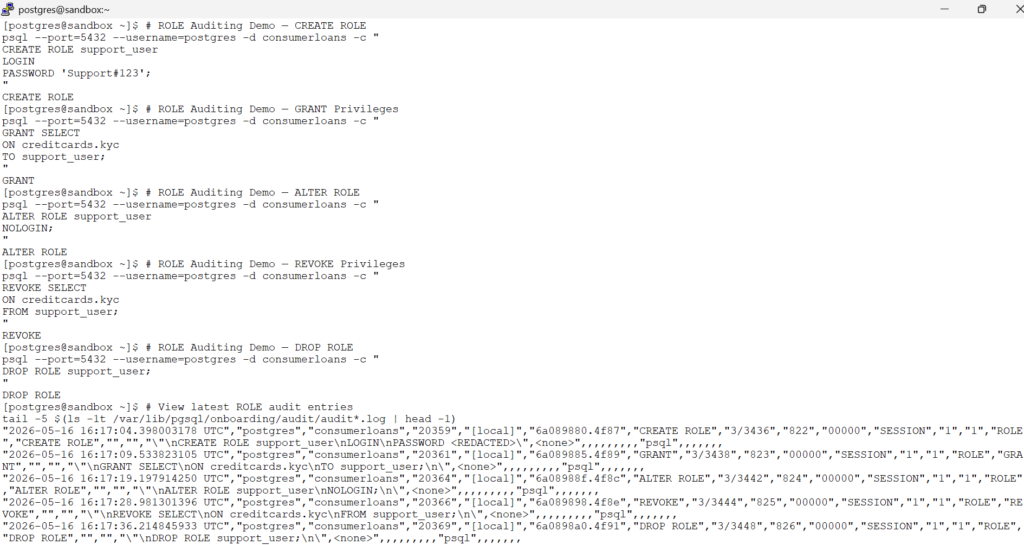
Configure dedicated audit logging – (object level)
Configure dedicated audit logging – (object level)
# Keep READ + DDL at session level
sed -i "s/^pgaudit\.log =.*/pgaudit.log = 'ddl,role'/" \
/var/lib/pgsql/onboarding/conf.d/02-auditing.conf# Enable pgAudit Object Auditing
cat << 'EOF' >> /var/lib/pgsql/onboarding/conf.d/02-auditing.conf
# pgAudit Object level auditing
pgaudit.role = 'auditor'
EOF# Reload PostgreSQL Configuration
psql --port=5432 --username=postgres -c "
SELECT pg_reload_conf();
"# Verify Enterprise Auditing Configuration
psql --port=5432 --username=postgres -c "
SHOW pgaudit.log;
"
psql --port=5432 --username=postgres -c "
SHOW pgaudit.role;
"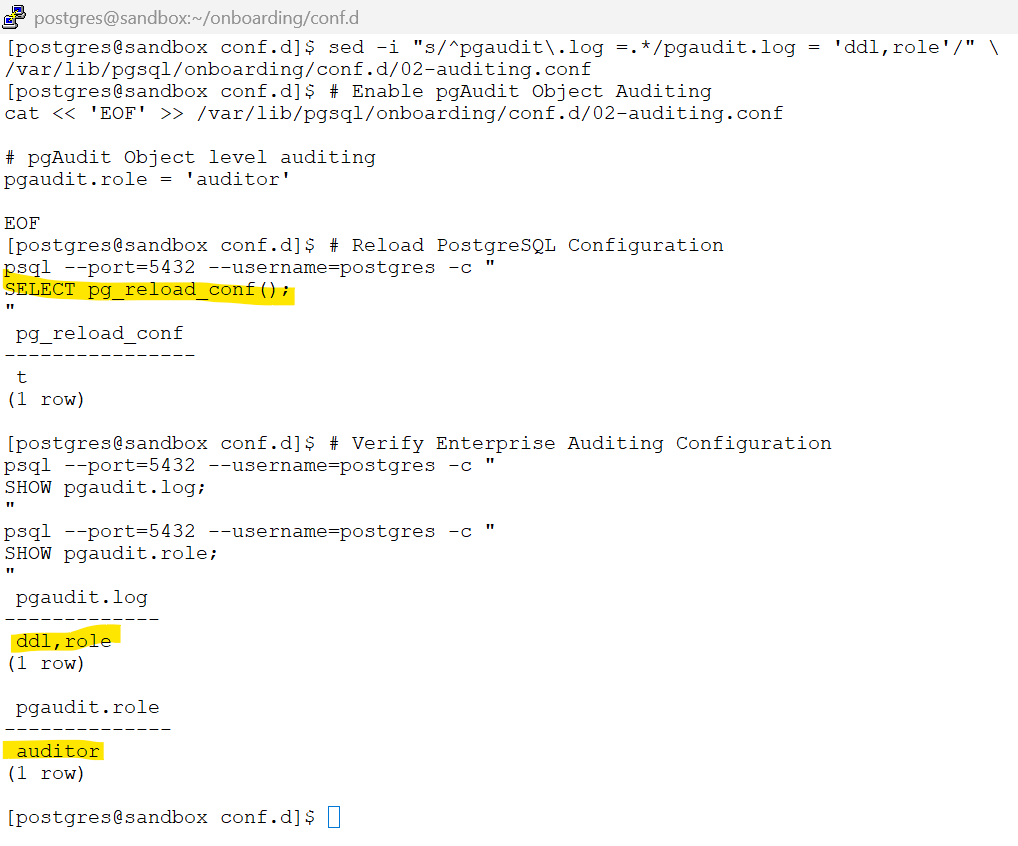
Object auditing selectively audits only sensitive business objects instead of globally auditing all database activity.
Hands-On pgAudit Object Auditing: Auditing Only the Selected Tables
Hands-On pgAudit Object Auditing: Auditing Only the Selected Tables
In this demo, we create two tables: one sensitive table that must be audited and one control table that is not part of the object-audit policy.
We then run the same DDL and DML-style operations on both tables to prove that only the intended table is captured by object-level auditing, while the control table remains outside the object-audit scope.
# Create the sensitive table: customer_ssn
psql --port=5432 --username=postgres -d consumerloans -c "
DROP TABLE IF EXISTS creditcards.customer_ssn;
CREATE TABLE creditcards.customer_ssn
(
    customer_id BIGINT PRIMARY KEY,
    full_name TEXT,
    ssn VARCHAR(20),
    annual_income NUMERIC(12,2)
);
"# CREATE TABLE creditcards.marketing_campaign
psql --port=5432 --username=postgres -d consumerloans -c "
DROP TABLE IF EXISTS creditcards.marketing_campaign;
CREATE TABLE creditcards.marketing_campaign
(
campaign_id BIGINT PRIMARY KEY,
campaign_name TEXT,
campaign_budget NUMERIC(12,2),
campaign_status TEXT
);
"# Create the audit role: Intended for database auditing
psql --port=5432 --username=postgres -d consumerloans -c "
CREATE ROLE auditor NOLOGIN;
"# Grant object-audit coverage only for the sensitive table
psql --port=5432 --username=postgres -d consumerloans -c "
GRANT SELECT, INSERT, UPDATE, DELETE
ON creditcards.customer_ssn
TO auditor;
"Do not grant anything on creditcards.marketing_campaign.
load some sample data
# Insert into sensitive SSN table
psql --port=5432 --username=postgres -d consumerloans -c "
INSERT INTO creditcards.customer_ssn
(customer_id, full_name, ssn, annual_income)
VALUES
(1001, 'John Smith', '123-45-6789', 85000);
"# Insert into control table
psql --port=5432 --username=postgres -d consumerloans -c "
INSERT INTO creditcards.marketing_campaign
(campaign_id, campaign_name, campaign_budget, campaign_status)
VALUES
(2001, 'Summer Offer', 5000, 'ACTIVE');
"run the same DML on both tables
# UPDATE on sensitive SSN table
psql --port=5432 --username=postgres -d consumerloans -c "
UPDATE creditcards.customer_ssn
SET annual_income = 90000
WHERE customer_id = 1001;
"# UPDATE on control table
psql --port=5432 --username=postgres -d consumerloans -c "
UPDATE creditcards.marketing_campaign
SET campaign_status = 'PAUSED'
WHERE campaign_id = 2001;
"# SELECT from sensitive SSN table
psql --port=5432 --username=postgres -d consumerloans -c "
SELECT * FROM creditcards.customer_ssn;
"# SELECT from control table
psql --port=5432 --username=postgres -d consumerloans -c "
SELECT * FROM creditcards.marketing_campaign;
"# Monitor the log file
tail -20 $(ls -1t /var/lib/pgsql/onboarding/audit/audit*.log | head -1)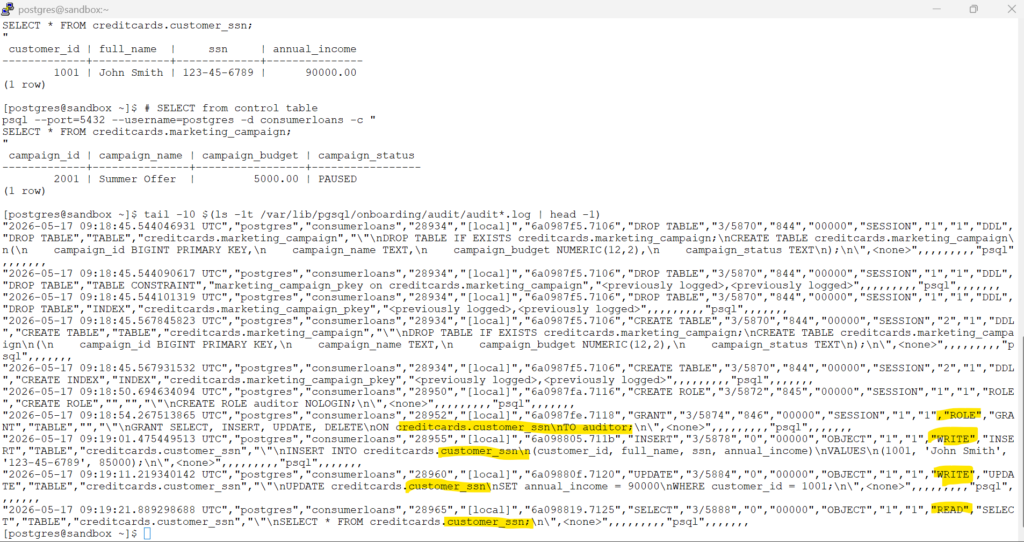
- In this demo, we created two tables: a sensitive
customer_ssntable and a non-sensitivemarketing_campaigntable to demonstrate selective object-level auditing with pgAudit. - The
customer_ssntable was brought under object auditing by granting privileges to the configured audit role defined throughpgaudit.role =‘auditor’, while themarketing_campaigntable was intentionally excluded from the object-audit policy. - Similar SELECT and DML operations were executed on both tables, but pgAudit captured object-level audit records only for the sensitive
customer_ssntable, proving that object auditing selectively audits only the intended business objects instead of globally auditing all database activity.
# Clean up the auditor role - for next labs:
# Revoke the grants
psql --port=5432 --username=postgres -d consumerloans -c "
REVOKE SELECT, INSERT, UPDATE, DELETE
ON creditcards.customer_ssn
FROM auditor;
"# Drop the role
psql --port=5432 --username=postgres -d consumerloans -c "
DROP ROLE auditor;
"Hands-On pgAudit Object Auditing: Auditing complete Schema
Hands-On pgAudit Object Auditing: Auditing complete Schema
# Schema-Wide Object Auditing Setup
# Setup a role for auditing.
psql --port=5432 --username=postgres -d consumerloans -c "
CREATE ROLE auditor NOLOGIN;
"# Allow the audit role to use the schema
psql --port=5432 --username=postgres -d consumerloans -c "
GRANT USAGE ON SCHEMA creditcards TO auditor;
"# Bring all existing tables in the schema under object auditing
psql --port=5432 --username=postgres -d consumerloans -c "
GRANT SELECT, INSERT, UPDATE, DELETE
ON ALL TABLES IN SCHEMA creditcards
TO auditor;
"# Ensure future tables in the schema are also audited
psql --port=5432 --username=postgres -d consumerloans -c "
ALTER DEFAULT PRIVILEGES FOR ROLE postgres
IN SCHEMA creditcards
GRANT SELECT, INSERT, UPDATE, DELETE
ON TABLES
TO auditor;
"The first GRANT covers the tables that already exist, while ALTER DEFAULT PRIVILEGES covers tables that will be created later in that schema. PostgreSQL explicitly documents that ALTER DEFAULT PRIVILEGES IN SCHEMA ... affects objects created after the command, not existing objects.
# Create a new table after enabling schema-wide object auditing
psql --port=5432 --username=postgres -d consumerloans -c "
CREATE TABLE creditcards.card_fraud
(
    fraud_id BIGINT PRIMARY KEY,
    customer_id BIGINT,
    fraud_score NUMERIC(5,2),
    fraud_status TEXT
);
"# Insert data into the newly created table
psql --port=5432 --username=postgres -d consumerloans -c "
INSERT INTO creditcards.card_fraud
VALUES
(5001,1001,92.50,'HIGH_RISK');
"# Insert sample data into customer_ssn
psql --port=5432 --username=postgres -d consumerloans -c "
INSERT INTO creditcards.customer_ssn
(customer_id, full_name, ssn, annual_income)
VALUES
(2001, 'Alice Johnson', '555-22-7788', 125000);
"# Insert sample data into marketing_campaign
psql --port=5432 --username=postgres -d consumerloans -c "
INSERT INTO creditcards.marketing_campaign
(campaign_id, campaign_name, campaign_budget, campaign_status)
VALUES
(3001, 'Festive Cashback Offer', 25000, 'ACTIVE');
"# Query the sensitive customer_ssn table
psql --port=5432 --username=postgres -d consumerloans -c "
SELECT * FROM creditcards.customer_ssn;
"# Query the marketing_campaign table
psql --port=5432 --username=postgres -d consumerloans -c "
SELECT * FROM creditcards.marketing_campaign;
"# Monitor the log file
tail -20 $(ls -1t /var/lib/pgsql/onboarding/audit/audit*.log | head -1)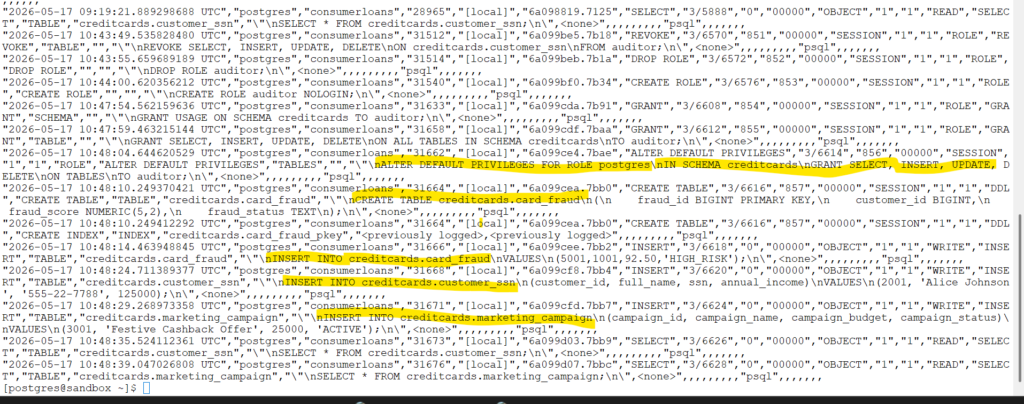
- Existing tables inside the
creditcardsschema were immediately brought under object auditing usingGRANT ... ON ALL TABLES IN SCHEMA. - Future tables created later inside the same schema automatically participated in object auditing through
ALTER DEFAULT PRIVILEGES. - This provides a scalable enterprise auditing model where newly created sensitive business tables can automatically inherit the object-audit policy without requiring manual audit configuration each time.
Best Practices on log_parameter = off
NOTE:
In production environments, it is generally recommended to keep:
pgaudit.log_parameter = off
This helps prevent parameter values from being written separately into audit logs.
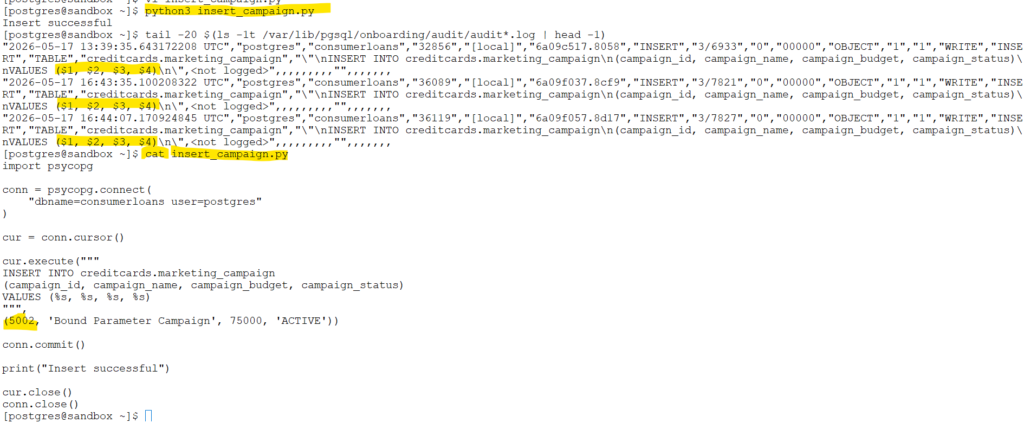
Modern enterprise applications typically use parameterized SQL (bind variables) instead of embedding literal values directly inside SQL statements. In such cases, pgAudit records the SQL structure while avoiding exposure of sensitive data values in the audit logs.
In our lab demonstrations throughout this tutorial, most SQL statements were executed manually using literal values directly in the SQL text for learning simplicity. Because pgAudit logs the statement text itself, those literal values are visible in the audit logs.
pgAudit is an auditing framework, not a data masking engine. Secure logging behavior depends on both:
- proper pgAudit configuration
- application-side use of parameterized SQL
Additional PostgreSQL Logging Best Practices
Additional PostgreSQL Logging Best Practices
Readers should review the earlier native auditing article for foundational logging architecture and operational best practices, including: Database Auditing Using Native PostgreSQL Features
- Designing modular PostgreSQL logging configuration
- Building CSV-based audit pipelines using
csvlog - Managing log rotation and retention
- Capturing failed SQL statements
- Slow query auditing
- Lock and deadlock monitoring
- Building audit reports from PostgreSQL logs
- PostgreSQL operational logging best practices
Oracle Auditing vs pgAudit
Oracle Auditing vs pgAudit
| Auditing Requirement | Oracle Database | pgAudit Equivalent | Notes |
|---|---|---|---|
| Session Auditing | AUDIT SESSION; | pgaudit.log = 'role,ddl,write,read' | pgAudit captures session-level activity through PostgreSQL logging infrastructure. |
| DDL Auditing | AUDIT TABLE; | pgaudit.log = 'ddl' | Captures CREATE, ALTER, DROP, TRUNCATE, GRANT, REVOKE and related DDL operations. |
| DML Auditing | AUDIT INSERT TABLE, UPDATE TABLE, DELETE TABLE; | pgaudit.log = 'write' | Captures INSERT, UPDATE, DELETE, TRUNCATE statements. |
| SELECT Auditing | AUDIT SELECT TABLE; | pgaudit.log = 'read' | Captures SELECT and COPY operations. Can generate high log volume in busy systems. |
| Role and Privilege Auditing | AUDIT ROLE; | pgaudit.log = 'role' | Captures GRANT, REVOKE, CREATE ROLE, ALTER ROLE and related privilege operations. |
| Object-Level Auditing | Fine-Grained Auditing (FGA) | Object Auditing using audit roles | pgAudit can audit selected tables/schemas through PostgreSQL privilege-based auditing. |
| Schema-Wide Auditing | Unified Audit Policies | GRANT ... ON ALL TABLES IN SCHEMA ... TO auditor; | Allows controlled auditing of entire schemas without auditing the whole database. |
| User-Specific Auditing | AUDIT ... BY username; | Role-based auditing using PostgreSQL roles | pgAudit auditing is typically controlled through role inheritance and privileges. |
| Policy-Based Auditing | Unified Auditing Policies | Partial support | pgAudit supports selective object auditing but does not provide Oracle-style declarative audit policies. |
| Failed Statement Auditing | WHENEVER NOT SUCCESSFUL | PostgreSQL error logging + pgAudit | pgAudit logs attempted statements; PostgreSQL server logs indicate actual failures. |
| Structured Audit Records | Unified Audit Trail | CSV logs + pgAudit fields | pgAudit enriches PostgreSQL logs with audit class, object type and command information. |
| Audit Trail Storage | Database tables + OS files | PostgreSQL log files | pgAudit does not store audit records inside database tables by default. |
| SIEM Integration | Oracle Audit Vault, Syslog | Splunk, ELK, QRadar, CloudWatch | pgAudit integrates well with centralized log management platforms. |
| Real-Time Monitoring | V$ views + Unified Audit | pg_stat_activity + logs | PostgreSQL separates runtime monitoring from auditing. |
| Row-Level Auditing | Fine-Grained Auditing (FGA) | Trigger-based auditing | pgAudit audits statements, not row images or before/after values. |
| Audit Architecture | Integrated auditing framework | Extension-based audit enhancement | pgAudit extends PostgreSQL native logging rather than replacing it. |
| Audit Output Destination | SYS schema + OS trail | stderr / csvlog / log collector | PostgreSQL logging configuration remains foundational even with pgAudit enabled. |
| Compliance Readiness | Enterprise-native | Enterprise-capable with proper architecture | pgAudit is widely used for PCI-DSS, SOX and governance auditing in PostgreSQL environments. |
Database Auditing Using Native PostgreSQL Features
Please visit the page to read about Native postgresql auditing features