
Configuring Barman server : step by step.
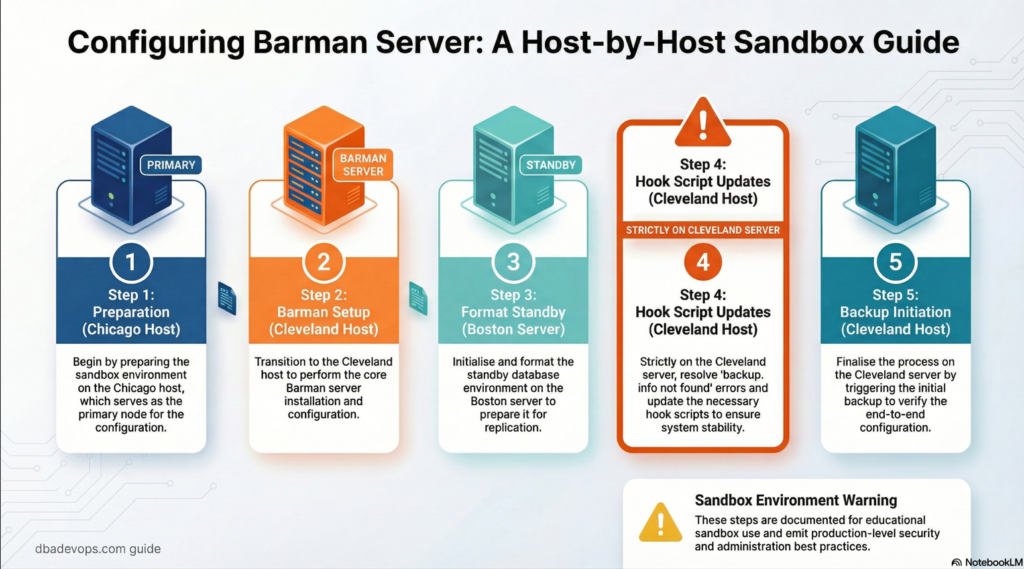
Step 1 : Preparation for barman settings in Chicago host
Step 1.1: Create the barman user
We will follow as per : Rsync setup – barman
on Chicago server as postgresuser
createuser -s -P barmanscreenshot
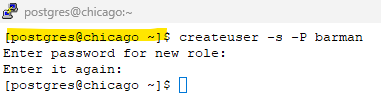
enter password of your choice.
Note: remember this password , we would be updating it in .pgpass file in barman host at step 2.3
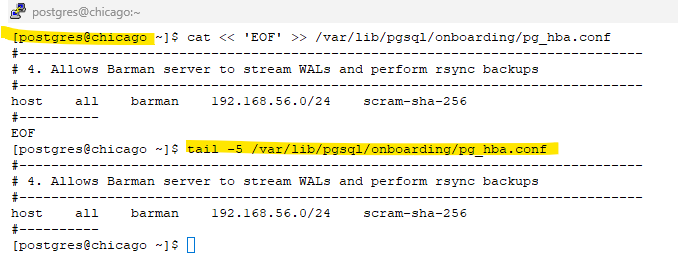
Step 1.2: Update the pg_hba.conf file in chicago to allow connections from barman server.
on both chicago and boston
cat << 'EOF' >> /var/lib/pgsql/onboarding/pg_hba.conf
#------------------------------------------------------------------------------
# 4. Allows Barman server to stream WALs and perform rsync backups
#------------------------------------------------------------------------------
host    all    barman    192.168.56.0/24    scram-sha-256
#----------
EOFscreenshot
Step 1.3: Edit the replication.conf file to include new barman wal archive command
sed -i "s|archive_command = '/bin/true'|archive_command = 'barman-wal-archive cleveland onboarding-chicago-backup %p'|" /var/lib/pgsql/onboarding/conf.d/replication.confOn boston server as postgres user
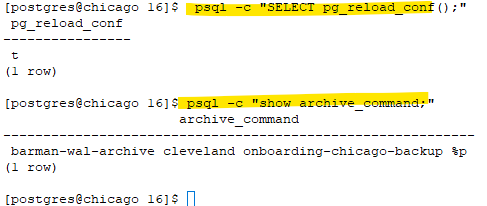
Step 1.4: Reload your Postgres configuration so the new HBA rule takes effect.
on both chicago and boston
psql -c "SELECT pg_reload_conf();"
psql -c "show archive_command;"screenshot
Step 2: Barman setup
Barman setup : we will follow rsync backup method in this tutorial .
From official page : rsync-backup-barman 3.16
on cleveland (barman) host as root user:
We will create the below config files under /etc/barman.d directory
onboarding-chicago-backup.conf :- for the onboarding cluster running in chicago server (backup for the primary db)
onboarding-boston-backup.conf :- for the onboarding cluster running in boston server – (backup for the standby db)
Note : However, due to limited laptop RAM and resource constraints, we are using a single backup server for both databases in this lab setup. In real-world deployments, it is recommended to use separate backup configurations or dedicated backup servers.
Expand for the conf file :
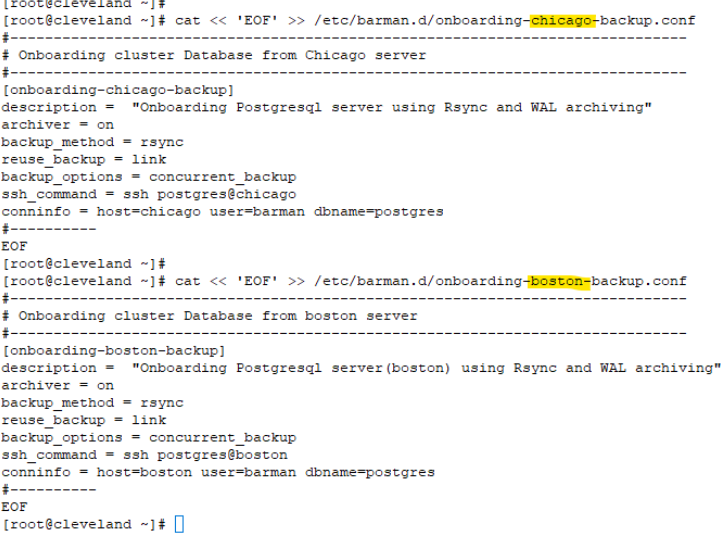
Step 2.1 Update the Config files that needs to be created under /etc/barman.d
cat << 'EOF' >> /etc/barman.d/onboarding-chicago-backup.conf
#------------------------------------------------------------------------------
# Onboarding cluster Database from chicago server
#------------------------------------------------------------------------------
[onboarding-chicago-backup]
description =  "Onboarding Postgresql server(chicago) using Rsync and WAL archiving"
archiver = on
backup_method = rsync
reuse_backup = link
backup_options = concurrent_backup
ssh_command = ssh postgres@chicago
conninfo = host=chicago user=barman dbname=postgres
#----------
EOF


cat << 'EOF' >> /etc/barman.d/onboarding-boston-backup.conf
#------------------------------------------------------------------------------
# Onboarding cluster Database from boston server
#------------------------------------------------------------------------------
[onboarding-boston-backup]
description =  "Onboarding Postgresql server(boston) using Rsync and WAL archiving"
archiver = on
backup_method = rsync
reuse_backup = link
backup_options = concurrent_backup
ssh_command = ssh postgres@boston
conninfo = host=boston user=barman dbname=postgres
#----------
EOFscreenshot
Step 2.2 : Switch to Barman user
su - barmanStep 2.3: create the .pgpass file
# Replace the <Passwd_for_barman_user> created in Step 1 .
vi /var/lib/barman/.pgpass

#hostname:port:database:username:password
chicago:5432:postgres:barman:<Passwd_for_barman_user>
boston:5432:postgres:barman:<Passwd_for_barman_user>screenshot

Step 2.4: Change the permission of the .pgpass file to 600 as barman user.
Note: we are adding boston server details upfront although no barman user created there. This will help us to take backup for the standby db server after it is created.
chmod 0600 /var/lib/barman/.pgpassStep 3: Format the standby boston (since we will re-clone in Step 5)
Step 3.1: Clean up the previously provisioned standby from repmgr
# On Boston as postgres user
# On Boston
sudo systemctl stop postgresql-onboarding# On Boston as postgres user
rm -rf /var/lib/pgsql/onboarding/*Step 3.2: Update the repmgr.conf in boston server – to fetch the wal files from chicago folder in cleveland(barman server)
cat << 'EOF' >> /etc/repmgr/16/onboarding_repmgr.conf
#------------------------------------------------------------------------------
# Barman options
#------------------------------------------------------------------------------
barman_server='onboarding-chicago-backup'  # cluster_name_server_name
barman_host='barman@cleveland' # server where barman is installed
restore_command='/usr/bin/barman-wal-restore cleveland onboarding-chicago-backup %f %p'   #5.1.2. Using Barman as a WAL file source
use_replication_slots=true # 5.2. Cloning and replication slots
#----------
EOFStep 4 : Fix : backup.info not found
Barman introduced a minor change in 3.13.2: relocation of the backup.info file
Follow this link for more info: Link
Here we discuss steps on how to fix in the newer version of Barman
Step 4.1 : Preparation of Hook script
On cleveland(barman) server as barman user:
what below command does:
1) creates a directory for barman hook scripts LINK
2) copy the bakcup.info to the repmgr expected path.
3) change the permission to execute mode.
#1 Create a directory for hook scripts
mkdir -p /var/lib/barman/scripts/
# 2 : create a file fix_metadata.sh- and will be updating the below contents
cat << 'EOF' >> /var/lib/barman/scripts/fix_metadata.sh
#!/bin/bash
# Usage: ./fix_metadata.sh <server_name> <backup_id>
SERVER=$1
BACKUP_ID=$2
META_SOURCE="/var/lib/barman/$SERVER/meta/$BACKUP_ID-backup.info"
TARGET_DIR="/var/lib/barman/$SERVER/base/$BACKUP_ID"
# 1. Check if the metadata file exists
if [ -f "$META_SOURCE" ]; then
# 2. Ensure the target directory exists (it should, as the backup just finished)
if [ -d "$TARGET_DIR" ]; then
## 3. Create the file ../../meta/<timestamp>-backup.info : backup.info
cp /var/lib/barman/${BARMAN_SERVER}/meta/${BARMAN_BACKUP_ID}-backup.info /var/lib/barman/$SERVER/base/$BACKUP_ID/backup.info
echo "[$(date)] SUCCESS: Linked $META_SOURCE to $TARGET_DIR/backup.info" >> /var/log/barman/repmgr_fix.log
fi
else
echo "[$(date)] ERROR: Could not find $META_SOURCE" >> /var/log/barman/repmgr_fix.log
exit 1
fi
EOF
# 3 : Change the permission of the script
chmod +x /var/lib/barman/scripts/fix_metadata.shStep 4.2: Update the post_backup_script in barman.conf
On Cleveland(barman) server as root user :
sed -i 's|^;post_backup_script =.*|post_backup_script = /var/lib/barman/scripts/fix_metadata.sh ${BARMAN_SERVER} ${BARMAN_BACKUP_ID}|' /etc/barman.confStep 5: Barman Backup initiation
Barman checks on Cleveland host as barman user
barman list-serversscreenshot

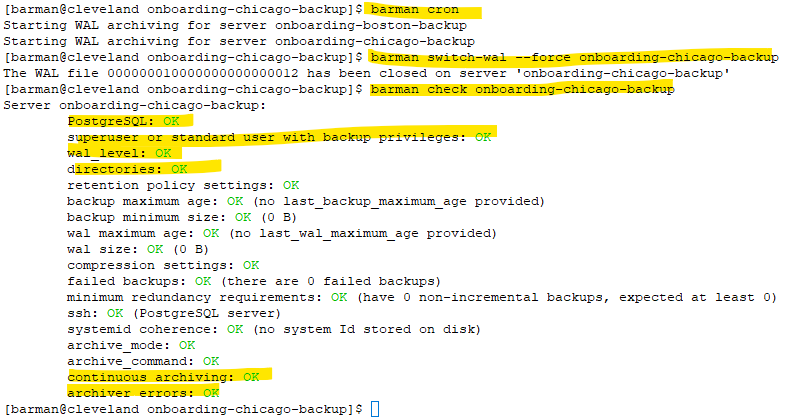
Step 5.2: Force a wal switch in barman host for the onboarding cluster running in chicago host,
barman switch-wal --force onboarding-chicago-backupscreenshot

Step 5.3: Initiate barman cron
barman cronscreenshot

Step 5.4: Check for the wal shipping to barman host .
barman check onboarding-chicago-backupscreenshot
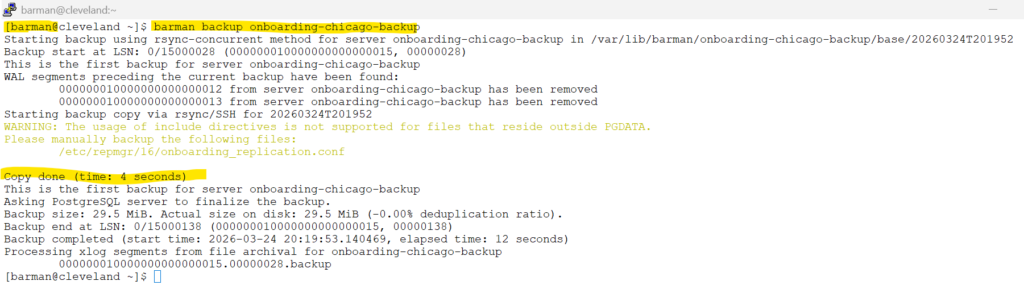
Step 5.5: Initiate backup from the barman server
barman backup onboarding-chicago-backupscreenshot
Tutorials for below sections are combined
Replication slots are used in this tutorial and is completely optional, please ignore if not needed.
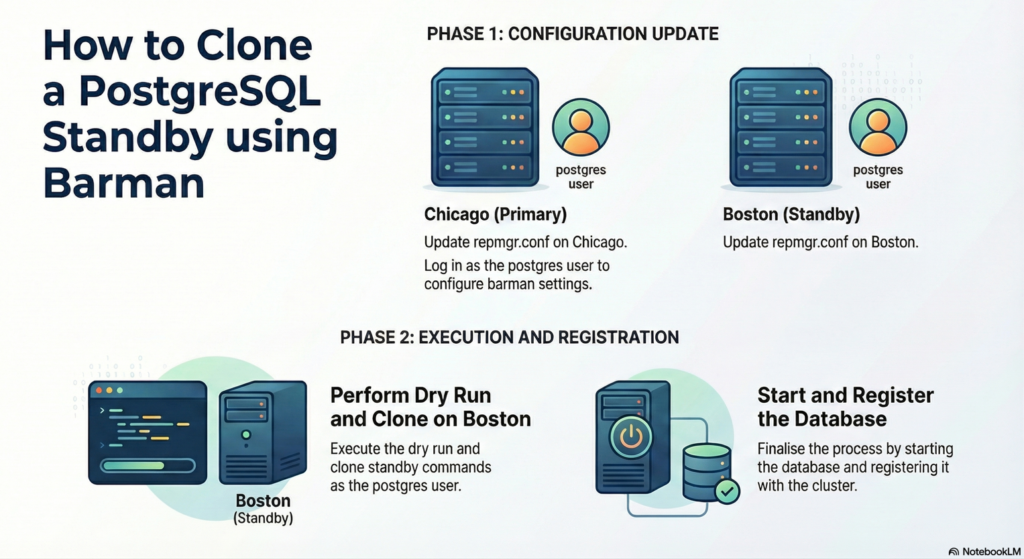
5.1 / 5.2 Cloning a standby from Barman & replication slots
5.1 Cloning a standby from Barman
5.2. Cloning and replication slots
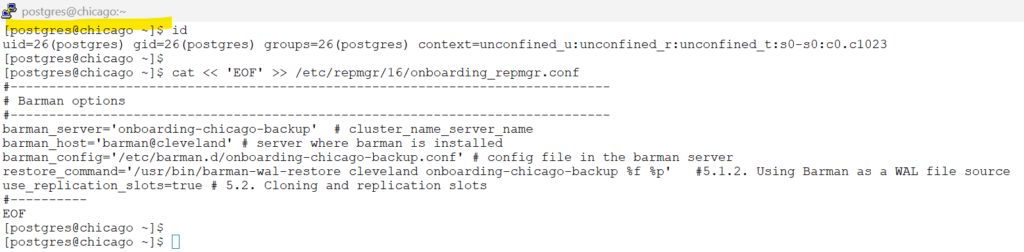
on both chicago and boston host : as postgres user
Update the repmgr.conf for barman configuration settings.
cat << 'EOF' >> /etc/repmgr/16/onboarding_repmgr.conf
#------------------------------------------------------------------------------
# Barman options
#------------------------------------------------------------------------------
barman_server='onboarding-chicago-backup'  # cluster_name_server_name
barman_host='barman@cleveland' # server where barman is installed
restore_command='/usr/bin/barman-wal-restore cleveland onboarding-chicago-backup %f %p'   #5.1.2. Using Barman as a WAL file source
use_replication_slots=true # 5.2. Cloning and replication slots
#----------
EOFscreenshot
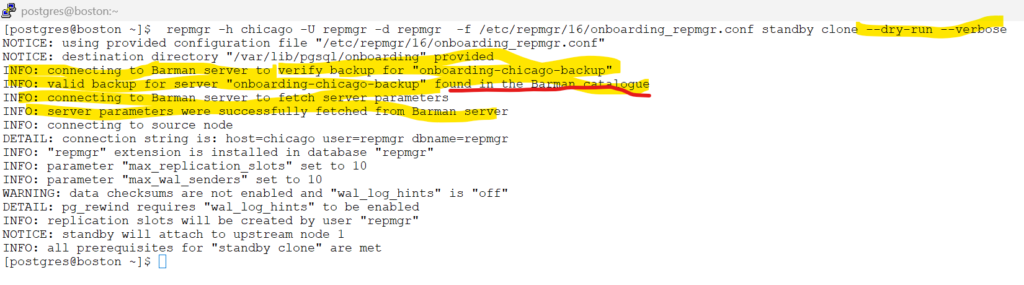
on boston host as postgres user:
execute Dry run commands to check if boston is setup properly to clone chicago .
repmgr -h chicago -U repmgr -d repmgr -f /etc/repmgr/16/onboarding_repmgr.conf standby clone --dry-run --verbosescreenshot
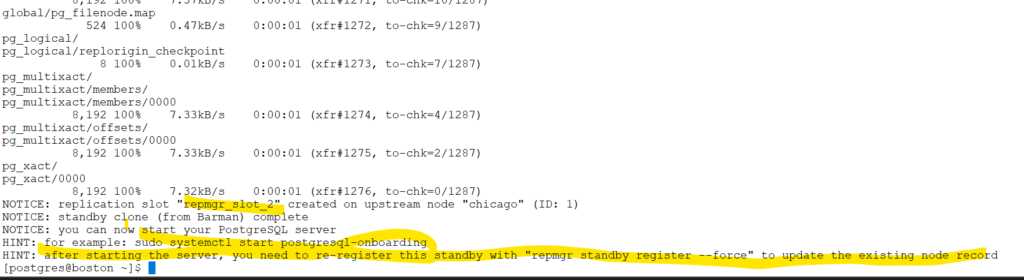
Initiate standby clone
repmgr -h chicago -U repmgr -d repmgr -f /etc/repmgr/16/onboarding_repmgr.conf standby clonescreenshot
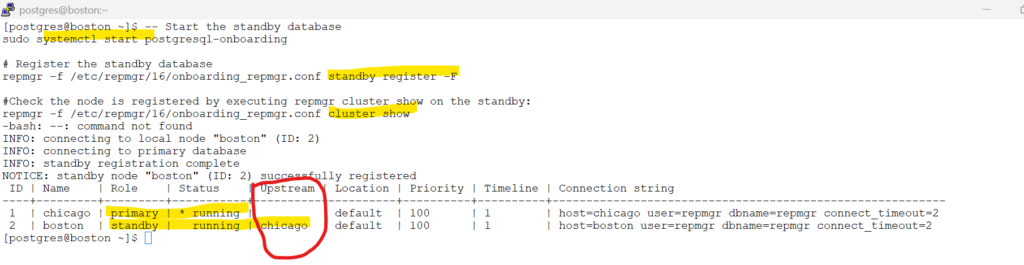
start & register the database
#Start the standby database on boston server as postgres user
sudo systemctl start postgresql-onboarding

# Register the standby database
repmgr -f /etc/repmgr/16/onboarding_repmgr.conf standby register -F

#Check the node is registered by executing repmgr cluster show on the standby:
repmgr -f /etc/repmgr/16/onboarding_repmgr.conf cluster showscreenshot
Check for the replication slots .
# check the replication slots.
psql -U postgres -d repmgr -c "SELECT node_id, upstream_node_id, active, node_name, type, priority, slot_name FROM repmgr.nodes ORDER BY node_id;"Congratulations , you succesfully configured barman setup and cloned to standby using repmgr
Skipped Chapters
From repmgr documentation :
What we will not cover in this tutorials is :
we will ignore this in the lab setup
5.1.3. Using Barman through its API (pg-backup-api)
5.3. Cloning and cascading replication
5.4.3. Separate replication user
5.4.4. Tablespace mapping
Chapter 6. Promoting a standby server with repmgr
Chapter 7. Following a new primary